What Is TLS Fingerprinting? A Complete Guide
TLS fingerprinting identifies your client from its handshake, before any header is read. Here is how JA3, JA4 and JARM work, and why proxies alone will not fix it.
Your scraper sets a perfect Chrome user agent. It sends realistic headers, rotates residential IPs, and respects rate limits. It still gets blocked on the first request. What happened?
The site knew you weren't Chrome before you sent a single header. It figured that out from the TLS handshake, the encrypted greeting your client sends when it opens a connection. That greeting looks different depending on what software is making it, and anti-bot systems read it like a signature. This is TLS fingerprinting, and it's one of the most effective detection methods in use today.
Here's what this guide covers: what a TLS fingerprint actually contains, how JA3, JA4, and JARM work, why Python and Go scrapers get flagged instantly, and the honest reason your proxy budget won't save you from it. If you've ever been blocked without knowing why, this is probably the answer.
The Handshake That Gives You Away
Before any HTTPS request happens, your client and the server negotiate encryption. Your client opens with a message called the ClientHello, which announces what it supports: TLS versions, cipher suites, extensions, elliptic curves, and more.
Here's the catch. Every TLS library builds that message differently. Chrome offers a particular set of cipher suites in a particular order. Firefox does it differently. Python's requests library, Go's net/http, and curl each have their own distinctive pattern. None of it is secret, and none of it is encrypted. It's the first thing you send.
So a server can hash those values into a short string and compare it against known clients. If your handshake matches Chrome's, you're probably Chrome. If it matches Python's, you're definitely not Chrome, no matter what your user agent claims.
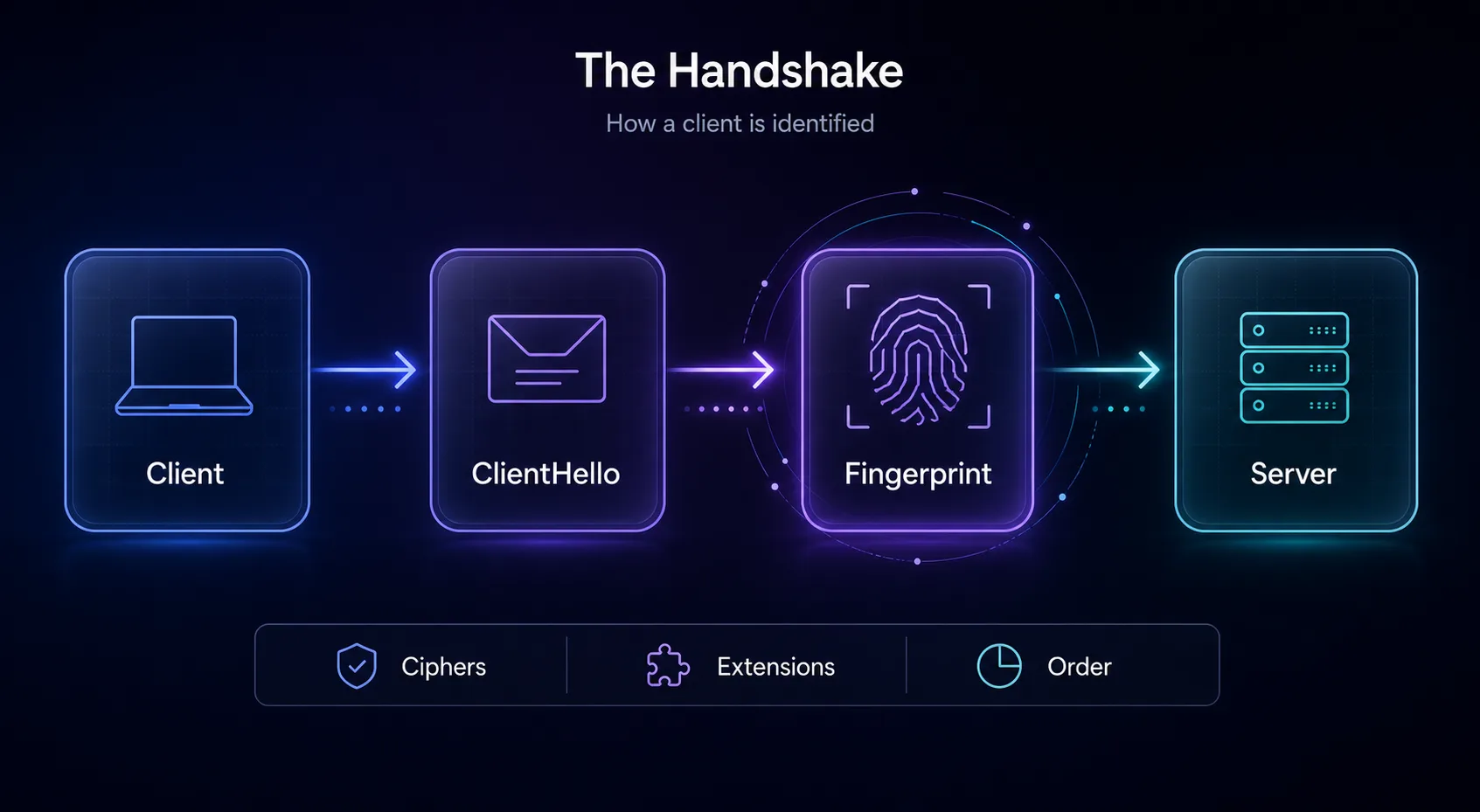
The ClientHello becomes a fingerprint before a single header is read.
What Actually Goes into the Fingerprint
The fields vary by method, but the classic recipe pulls from the ClientHello:
TLS version your client proposes
Cipher suites it supports, and critically, the order they're listed in
Extensions such as ALPN, SNI, and session tickets
Elliptic curves and their point formats
Order matters as much as content. Two clients can support the exact same ciphers and still produce different fingerprints because they list them differently. That ordering is baked into the library, which is why it's such a reliable signal. Developers rarely change it, and most don't know it exists.
JA3, JA4, and JARM
Three methods dominate. JA3, released by Salesforce in 2017, concatenates those ClientHello fields and hashes them with MD5. It became the industry standard almost overnight because it's simple and it works.
JA3 has a weakness though. Chrome and other browsers now shuffle their extension order on purpose (a technique called GREASE), which makes a single JA3 hash unstable across sessions. JA4, developed by FoxIO, fixes that with a longer, human-readable fingerprint that sorts fields and resists shuffling. It's steadily replacing JA3 in modern detection stacks.
JARM works the other direction. Instead of fingerprinting clients, it actively probes servers to identify what's running behind an address, which is useful for spotting malware infrastructure. Different job, same underlying idea.
Method | Fingerprints | Type | Status |
|---|---|---|---|
JA3 | Clients | Passive | Widespread, aging |
JA4 | Clients | Passive | Modern replacement |
JARM | Servers | Active | Security research |
Why Your Python Scraper Gets Caught
Detection systems don't just read your fingerprint. They cross-check it against everything else you claim to be. That's where scrapers fall apart.
Say your headers announce Chrome 120 on Windows, but your TLS handshake matches Python's urllib3. Those two facts can't both be true. No real Chrome user has ever produced that combination. The mismatch itself is the giveaway, and it's a far stronger signal than any single suspicious value.
Cloudflare, Akamai, DataDome, and PerimeterX all run this check. It's cheap, it happens before your request is even processed, and it catches the overwhelming majority of naive scrapers. If you're wondering why your requests die instantly on protected sites, read our guide on bypassing Cloudflare when scraping alongside this one.
The uncomfortable truth: most "undetectable scraper" tutorials focus on user agents and headers. Those are the easy layer. Your TLS stack is the one you can't fake by editing a dictionary of strings.
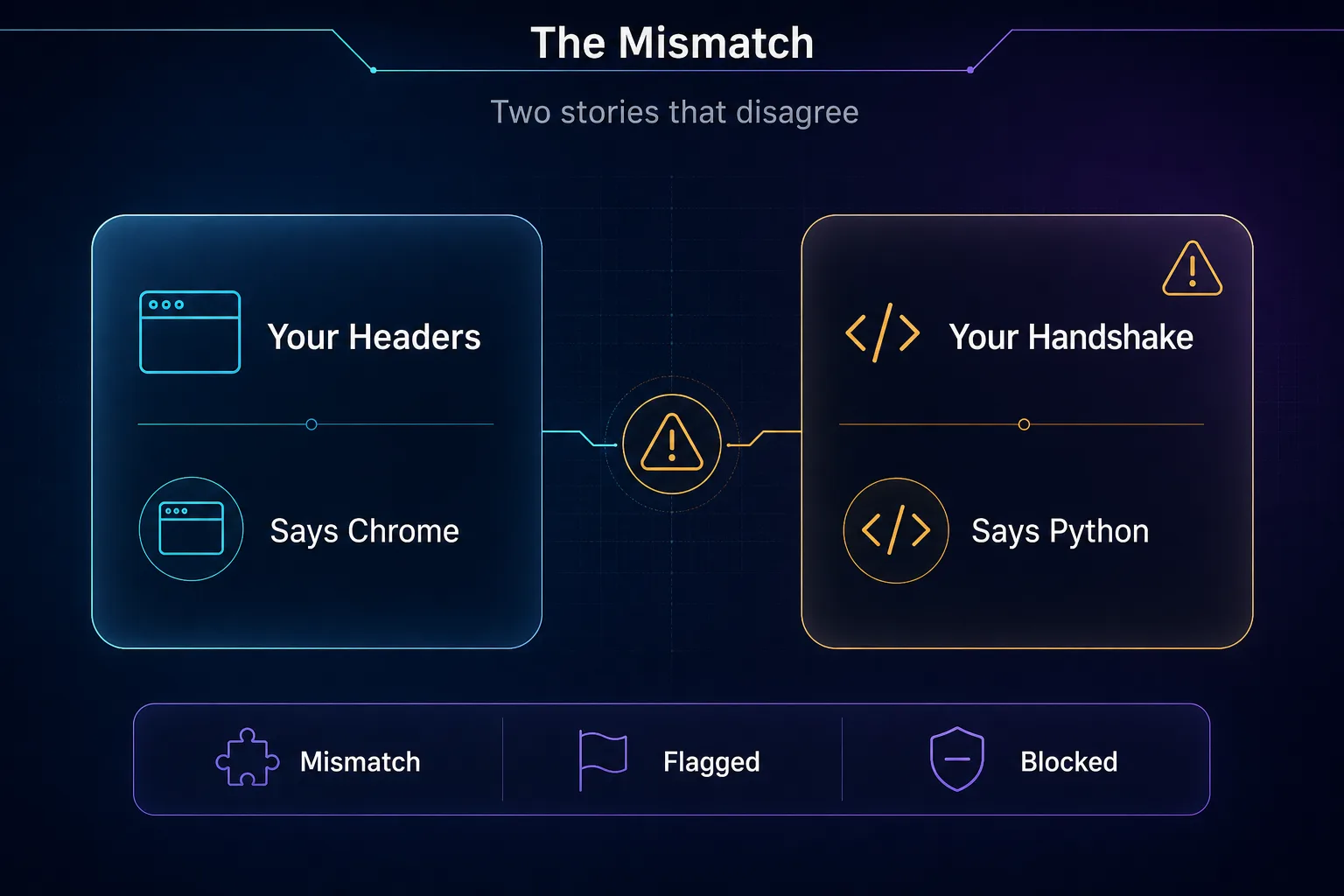
Headers claiming Chrome plus a Python handshake is the contradiction that gets you blocked.
Proxies Won't Fix a Bad TLS Fingerprint
This is the part that costs people the most money, so let's be blunt about it. Proxies operate at the network layer. They change which IP address the request appears to come from. They do not touch your TLS handshake at all.
Buy the cleanest residential IPs on the market, rotate them perfectly, and your Python scraper will still hand over a Python fingerprint on every single connection. You'll burn expensive bandwidth getting blocked with better-looking IPs. We've watched teams triple their proxy spend chasing a problem that lived entirely in their HTTP client.
Both layers matter, and they solve different problems. Proxies fix IP reputation and rate limits. A browser-matched TLS stack fixes client identification. Fix one and ignore the other, and the site still sees a contradiction. For the network side, our explainer on how proxies work covers what they genuinely do.
How to Beat TLS Fingerprinting
You have four realistic options, and they trade off effort against fidelity.
1Impersonation Libraries
Tools like curl-impersonate, curl_cffi in Python, and tls-client in Go rebuild the handshake to match a real browser. You keep the speed of a plain HTTP client and lose the Python-shaped signature. For most scraping work, this is the best value per hour of effort.
2Real Browsers
Playwright, Puppeteer, and Selenium drive an actual browser engine, so the TLS handshake is genuinely Chrome's or Firefox's. Nothing to fake. The cost is resources: browsers are slow and memory-hungry compared to raw HTTP, and headless mode leaks other signals you'll need to handle.
3Antidetect Browsers
These go further, managing TLS, JavaScript, canvas, and hardware signals together so everything tells one consistent story. That consistency is the whole point, and it's why they dominate multi-account work. See how antidetect browsers work or browse our antidetect browser directory.
4Managed Scraping APIs
Services like the scraping APIs from Oxylabs or ZenRows handle fingerprinting, proxies, and retries behind a single endpoint. You pay more per request and give up control, but you stop maintaining an arms race you didn't sign up for.
Approach | Fidelity | Speed | Effort |
|---|---|---|---|
Impersonation library | High | Fast | Low |
Real browser | Perfect | Slow | Medium |
Antidetect browser | Perfect | Slow | Medium |
Scraping API | Handled for you | Varies | Lowest |
Our recommendation: start with curl_cffi or curl-impersonate. It fixes the fingerprint mismatch with a few lines of code and costs nothing. Move to real browsers only when the target needs JavaScript execution.
The IP Layer Still Needs Good Proxies
Fixing your handshake solves identification. It does nothing for rate limits, geo-restrictions, or IP reputation, so you still want a solid proxy pool underneath. Three we rate for scraping work:
1Decodo

Clean residential IPs, straightforward rotation, and pricing that suits smaller projects. It's the easiest starting point when you're pairing proxies with a fixed TLS stack.
2Oxylabs

Enterprise-grade pool plus a Web Scraper API that handles fingerprinting for you if you'd rather not maintain it yourself. Premium pricing, but it scales.
3IPRoyal

Non-expiring traffic makes it forgiving for bursty projects and testing. Good value while you're still tuning your setup. Compare the full field in our proxy directory.
Mistakes That Get Scrapers Flagged
1Spoofing the User Agent and Nothing Else
Changing the user agent string while your TLS stack screams Python creates the exact contradiction detection systems look for. You're not hiding, you're raising your hand. Match the handshake or don't bother changing the string.
2Assuming Residential IPs Are Enough
Clean IPs help with reputation and rate limits. They don't change your fingerprint. Teams routinely spend heavily here while the real problem sits in their HTTP library.
3Forgetting HTTP/2 Fingerprinting
TLS isn't the only protocol-level tell. HTTP/2 settings frames, header order, and priority values also vary by client, and sites fingerprint those too. Impersonation libraries usually handle both. Hand-rolled solutions often don't.
4Ignoring the Browser Layer
Get past TLS and JavaScript checks are waiting: canvas, WebGL, fonts, screen dimensions. Our guides on browser fingerprinting and canvas and WebGL fingerprinting cover what comes next.
5Chasing Perfect Stealth Instead of Consistency
You don't need to be invisible. You need every layer to tell the same story. A consistent, ordinary-looking client beats an exotic one that contradicts itself, every time.
TLS is only one of several layers where automated clients stand out. For the full picture, see how browser automation traffic differs from normal HTTP requests.
Frequently Asked Questions
The Takeaway
TLS fingerprinting works because it reads something you can't easily lie about. Your handshake is built by your networking library, it goes out before any header you carefully crafted, and it rarely matches the browser you're pretending to be.
The fix isn't more proxies. It's making your client tell one coherent story: a browser-matched handshake, headers that agree with it, and a clean IP underneath. Start with curl_cffi or curl-impersonate, because it costs an afternoon and solves the problem for most targets. Reach for a real browser or an antidetect browser when JavaScript checks enter the picture.
Once your fingerprint stops contradicting itself, the proxy layer finally does what you're paying it to do. Compare pools in our proxy directory, or read up on why scraping needs proxies to get the network side right too.
Keep Reading
More articles you might enjoy