How to Handle CAPTCHAs When Web Scraping (2026 Guide)
CAPTCHAs fire when a site’s bot score flags your traffic. Learn why they appear, how to detect them in code, how to reduce them with pacing, IP quality and consistent fingerprints, and when to switch to an API.

Your scraper ran clean for days. Then every response started coming back as a “verify you are human” page, and your parser choked on HTML it had never seen.
CAPTCHAs aren’t random. A site shows one when its scoring system decides your traffic looks automated. If you know which signals tipped the score, you can usually lower it instead of fighting the puzzle.
This guide covers why CAPTCHAs fire, how to detect them in code, how to reduce them with pacing, IP quality and consistent fingerprints, and when the right move is to stop or hand the job to a scraping API.
- CAPTCHAs fire when a site’s bot score flags your IP, speed, fingerprint or behavior.
- Detect challenges in code: the cf-mitigated header, 403 or 429 codes and widget markers.
- Back off first, then fix IP quality, session consistency and your browser fingerprint.
- If careful traffic is still challenged, use an official API, a scraping API or stop.
The Short Answer
The best way to handle CAPTCHAs when web scraping is to trigger fewer of them. Slow down, use IPs that fit the target, keep each session consistent, and detect challenges so your scraper backs off instead of hammering the page.
If a site still challenges careful, low-volume traffic, treat that as a clear signal. Look for an official API or a data feed, or use a managed scraping API, rather than building your own CAPTCHA-beating machine.
What a CAPTCHA Looks Like in 2026
The classic picture puzzle is now the last resort. Most protection runs quietly in the background and only shows a puzzle when the score looks bad. You’ll meet three main kinds.
1Score-Based Checks You Never See
Google’s reCAPTCHA v3 documentation describes a score from 1.0 (very likely a good interaction) to 0.0 (very likely a bot), with 0.5 as the suggested starting threshold. Google even lists “filtering scrapers” as a homepage use case, and notes that its tokens expire after two minutes (checked October 20, 2026).
That means a site can slow you down, hide data or serve a puzzle without you ever seeing a checkbox.
2JavaScript Challenges
Cloudflare’s Turnstile docs say it runs small non-interactive JavaScript challenges, including proof-of-work, proof-of-space and probing for web APIs, to decide whether a visitor needs a visible check at all. Its widgets come in Managed, Non-interactive and Invisible modes.
A plain HTTP client can’t run that JavaScript, so it fails these checks every time. That’s one reason a requests-based scraper hits walls that a real browser walks through.
3Interstitial Challenge Pages
Cloudflare’s Challenge Pages documentation describes a full-page gate that holds the request until the visitor passes. Site owners trigger it from WAF rules, Bot Management or rate limiting, and can pick Non-Interactive, Managed or Interactive challenges. Cloudflare recommends Managed for most rules.
hCaptcha works on similar lines. Its developer docs mention bot scores and passive “No-CAPTCHA” modes for Enterprise customers.
Why CAPTCHAs Fire on Scrapers
Every vendor uses its own model, but the inputs fall into four groups. Cloudflare’s bot score documentation says its machine learning looks at request features such as headers, session characteristics and browser signals, then gives each request a score from 1 to 99. Scores from 2 to 29 count as likely automated.
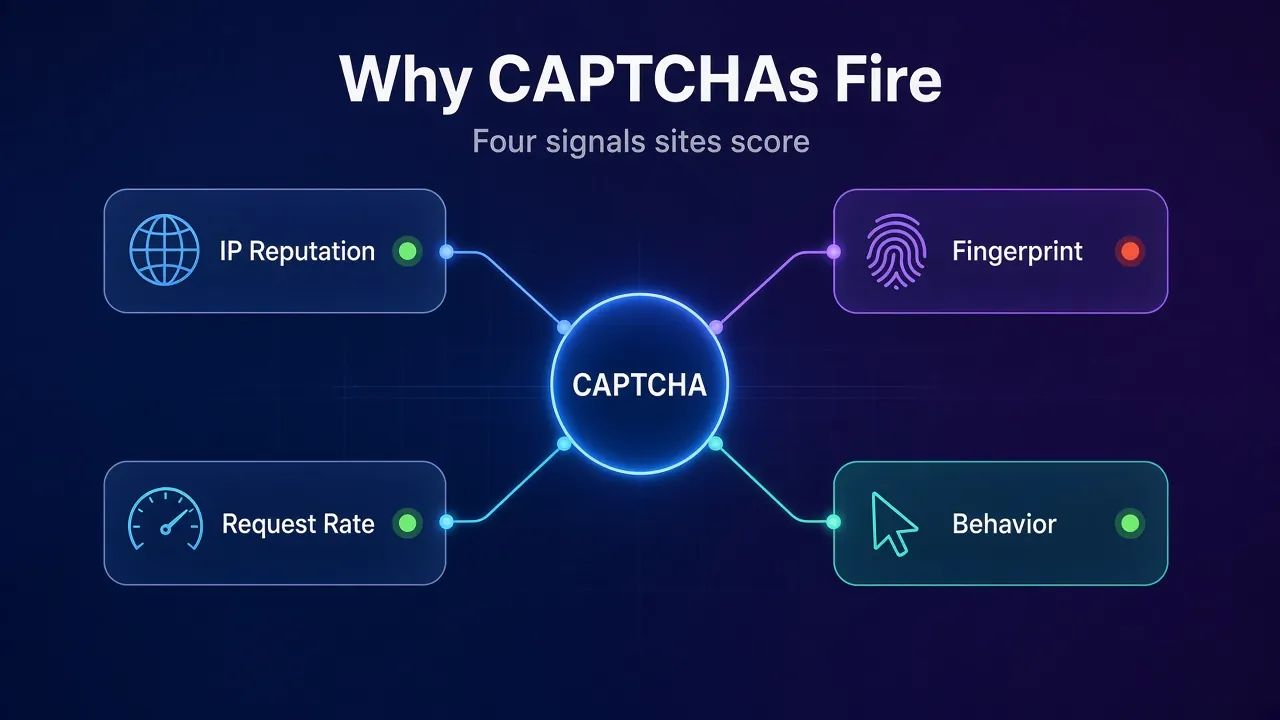
- IP reputation. Hosting and cloud IPs are easy to label, and a busy shared IP may already carry a bad history.
- Request rate. Hundreds of hits a minute from one address, or perfectly even timing, doesn’t look like a person.
- Fingerprint. Headers, TLS handshake and browser properties that don’t match a real browser give you away.
- Behavior. Jumping straight to deep URLs, skipping assets, never keeping cookies and never scrolling all look scripted.
Our guide to how anti-bot systems detect automated browsers breaks each layer down further. The practical point here is simple: a CAPTCHA is a symptom. Fix the signal and the symptom usually fades.
How to Detect a CAPTCHA in Your Scraper
You can’t handle what you don’t notice. Many scrapers save a CAPTCHA page as if it were real data, because the server returned it with a normal-looking response.
Check for these signs on every response:
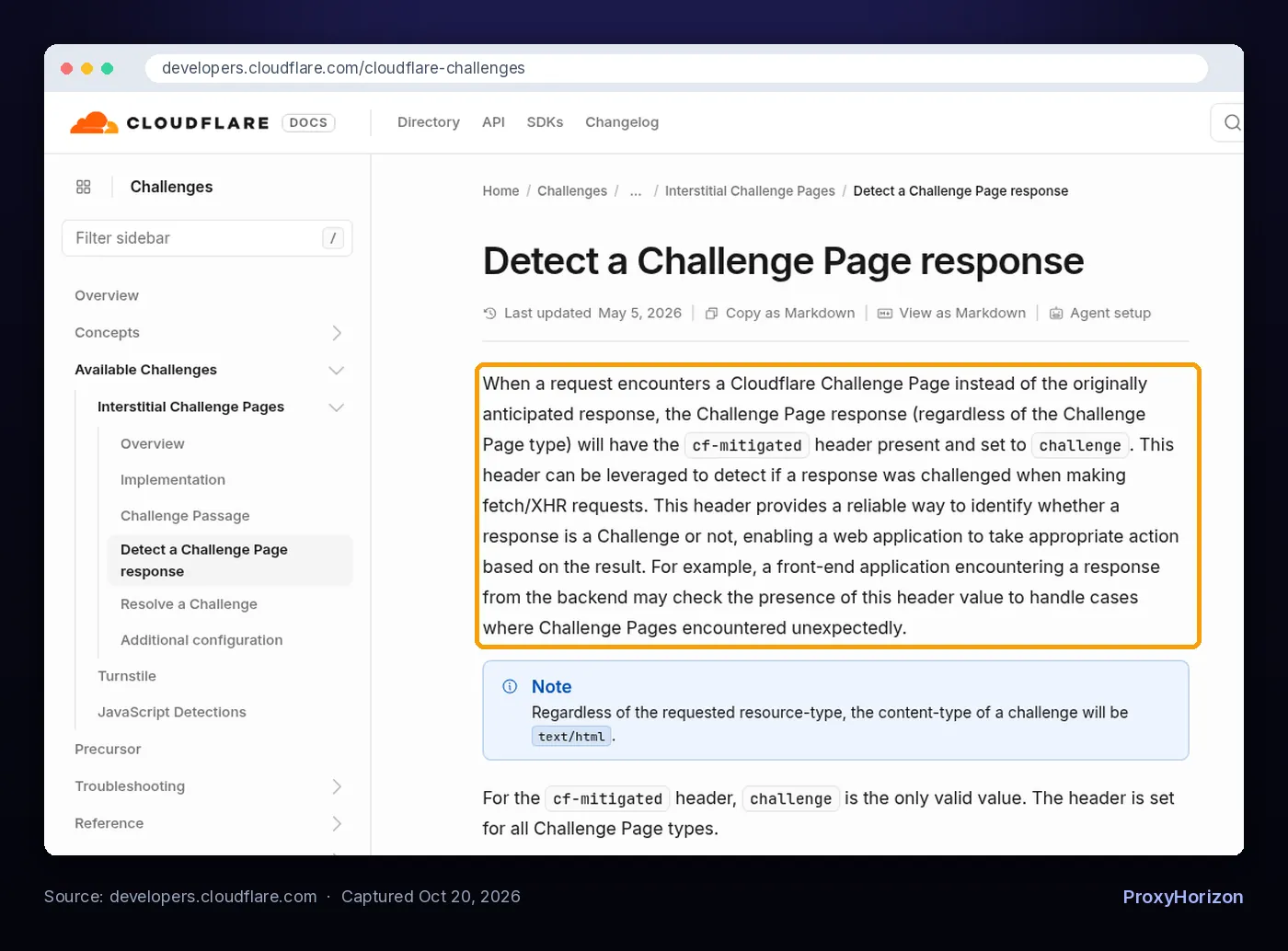
- The cf-mitigated header. Cloudflare documents that every Challenge Page response carries
cf-mitigated: challenge, and that a challenge is alwaystext/htmleven when you requested JSON. - Status codes. A 403 or 429 on a page that normally returns 200 is a strong hint.
- Widget markers in the HTML. The vendors’ own docs use
g-recaptchafor reCAPTCHA,h-captchafor hCaptcha andcf-turnstilefor Turnstile. - Missing content. If the price, title or product grid your parser expects isn’t there, flag the page instead of storing an empty row.
Log every detection with the URL, IP, session and time. After a day you’ll see whether the problem is one bad proxy, one aggressive URL pattern or the whole target.
Step 1: Slow Down and Back Off
Speed is the most common trigger and the cheapest one to fix. MDN’s reference for 429 Too Many Requests describes it as rate limiting, and notes the server may send a Retry-After header saying how long to wait. That header holds either a number of seconds or an HTTP date.
- Honor Retry-After whenever it’s present. It’s the site telling you exactly what it will accept.
- Back off exponentially after a challenge: wait, then double the wait on each repeat, with some random jitter added.
- Cap concurrency per domain, not just overall. Ten workers on ten sites is fine; ten workers on one small site isn’t.
- Randomize gaps between requests so timing doesn’t look machine-perfect.
Never retry a challenged URL instantly on the same IP. That’s the fastest way to turn a soft check into a hard block.
Step 2: Use IPs That Fit the Target
If slowing down doesn’t help, look at where your traffic comes from. Strict sites challenge hosting IPs far more often than home connections.
For lenient targets, datacenter proxies are fine and cheap. For sites with serious bot protection, residential, ISP or mobile IPs pass the first reputation check more often.
Our comparison of residential vs datacenter proxies shows how to test both on your real URLs before you pay for the expensive option. You can compare providers by IP type in our proxy directory.
Session handling matters just as much. A Cloudflare clearance or a login cookie is tied to the visitor that earned it, so changing IP on every request can trigger a fresh challenge each time. Use sticky sessions for multi-page flows and rotate between sessions, not inside them.
Step 3: Make Your Client Look Consistent
A residential IP won’t save a scraper that announces itself in the headers. Consistency is the goal: every signal should describe the same believable browser.
- Send a full, current header set that matches one real browser, including accept-language and the client hints that browser sends.
- Match the TLS handshake to the user agent. A Chrome user agent on a Python TLS fingerprint is an easy catch. See our explainer on TLS fingerprinting.
- Use a real browser engine for sites that run JavaScript challenges, since plain HTTP clients can’t execute them.
- Line up locale details with the proxy: time zone and language should fit the IP’s country. Our guide to browser fingerprinting lists what sites read.
- Keep cookies for the life of a session instead of starting fresh on every request.
Don’t randomize everything on every request. A fingerprint that changes constantly is just as odd as one that never looks human.
Step 4: Behave Like a Reader, Not a Crawler
Behavior signals are the hardest to fake and the easiest to improve by simply asking for less.
- Request only what you need. Skip pages you already have and cache responses so reruns don’t repeat traffic.
- Use sitemaps and listing pages to find URLs instead of guessing or brute-forcing ID ranges.
- Check for a JSON endpoint the page itself calls. It’s often lighter and less guarded than the full HTML.
- Spread work across hours instead of pulling everything in one burst.
- Respect robots.txt and the site’s terms. Our guide to web scraping legal risk explains how those rules affect your exposure.
Should You Use a CAPTCHA Solving Service?
CAPTCHA solving services exist, and some scraping libraries plug into them. We don’t recommend building your workflow around them.
A CAPTCHA is an access control the site owner chose on purpose. Solving it at scale is deliberate circumvention, which raises your risk under most terms of service and, depending on where you are and what you collect, possibly under the law. It also costs money on every page and does nothing about the signals that triggered the challenge.
If careful, low-volume traffic still gets challenged, the site is telling you it doesn’t want automated access to that page. That’s the moment to change approach, not to add a solver.
When to Stop or Switch to a Scraping API
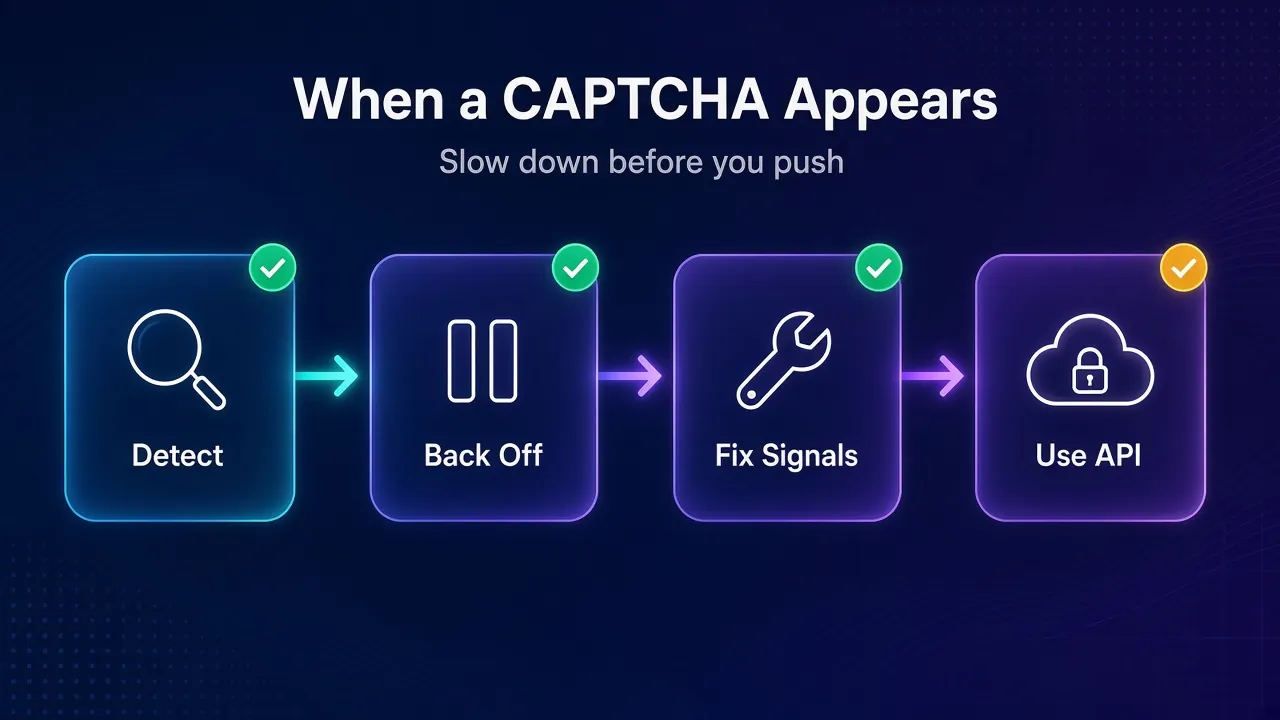
You have three good options once the basic fixes stop working:
- Use an official source. Many sites offer a public API, a data export or a licensing deal. That’s the lowest-risk path to the same data.
- Use a managed scraping API. These services run the proxies, browsers and retries for you. Oxylabs lists CAPTCHA handling, JavaScript rendering and auto-retry for its Web Unblocker, Decodo says its Web Scraping API charges only for successful scrapes, and Zyte advertises automatic ban handling for Zyte API (all checked October 20, 2026).
- Stop. If the data sits behind a login, belongs to users, or the terms clearly ban automated access, walking away is often the right call.
A managed API doesn’t change the rules of the site, but it does remove the engineering burden of chasing every new check. Compare providers in our roundup of the best web scraping APIs. If your main obstacle is one CDN, our guide on getting past Cloudflare when scraping goes deeper on that specific setup.
A Quick CAPTCHA Troubleshooting Table
| What you see | Likely cause | First fix |
|---|---|---|
| CAPTCHAs only after a burst of requests | Rate limiting | Lower per-domain concurrency, honor Retry-After |
| CAPTCHA on the very first request | IP reputation or fingerprint | Try a residential IP and a real browser header set |
| Challenge page you never get past | JavaScript challenge | Switch to a real browser engine |
| New challenge on every page | IP changes mid-session | Use sticky sessions and keep cookies |
| One proxy fails, others are fine | A flagged IP | Retire that IP and log which ones fail |
| Careful traffic still challenged | Site blocks automation on purpose | Use an official API, a scraping API or stop |
Track Your Challenge Rate Over Time
The fixes above only work if you measure them. Treat your challenge rate as a core health metric, right next to success rate and cost per page.
- Count challenges per target, per proxy pool and per hour, so you can see exactly when a change helped or hurt.
- Change one thing at a time. If you swap IPs, headers and pacing together, you won’t know which fix worked.
- Set an alert threshold. A sudden jump usually means the site tightened its rules, and it’s cheaper to pause than to keep paying for blocked requests.
Sites update their defenses without notice. A weekly look at these numbers tells you early when a target needs attention, long before your dataset fills with empty rows.
Frequently Asked Questions
Fewer Triggers Beat Faster Solving
Handling CAPTCHAs when web scraping is mostly about not earning them. Detect challenges in code, back off when you see one, and fix the signal behind it: speed, IP quality, a mismatched fingerprint or scripted behavior.
When a site keeps challenging traffic that’s already slow and consistent, take the hint. An official API, a managed scraping API or a polite exit will cost you less than an arms race.
The bottom line: treat every CAPTCHA as feedback about your scraper, not as a puzzle to beat.
Keep Reading
More articles you might enjoy