How Do Proxies Work? A Complete Guide
A mechanics-first guide to how proxies work — the request lifecycle, how your IP is hidden, protocols, authentication, IP rotation, and how IPs are sourced.
Every time a scraper pulls a million prices, a marketer runs fifty accounts, or a traveler unblocks a website, the same quiet machinery is doing the work: a proxy, standing in the middle, making requests on someone else's behalf. Automated traffic now rivals human traffic on the web (Imperva), and proxies are a huge part of why.
Most explanations stop at "a proxy hides your IP." True — but that one line skips everything interesting. How does it hide your IP? What actually happens to your request between your device and the website? How do millions of rotating IPs get assigned, and why does the same provider sometimes give you a new IP every request and sometimes hold one for an hour?
This is the mechanics guide. We will trace a request through a proxy step by step, show exactly how your IP gets swapped and what headers can still betray you, break down how the protocols and authentication actually work, and explain how IP rotation and sourcing function under the hood. If you already know what a proxy server is and want to understand how it truly works, this is for you.
The Core Idea: A Request Made on Your Behalf
At its simplest, a proxy is an intermediary that makes requests for you. Instead of your device talking directly to a website, it talks to the proxy, and the proxy talks to the website. The site sees the proxy's IP address, not yours. If you are brand new to the concept, our overview of what proxies are covers the basics.
That substitution is the whole trick — but the details of how it happens determine everything about speed, anonymity, and reliability. Let us follow an actual request through the system.
How Proxies Work: The Request Lifecycle
Here is what happens, in order, when you load a page through a proxy.
1Your client is pointed at the proxy
Your browser, scraper, or app is configured with the proxy's address (host and port). Instead of resolving the website and connecting directly, your device opens a connection to the proxy and hands it the request.
2The proxy receives and processes the request
The proxy reads your request, applies any rules it has (authentication checks, filtering, caching lookups), and prepares to forward it. For an encrypted HTTPS site, it sets up a tunnel rather than reading your traffic (more on that below).
3The proxy connects to the destination using its own IP
The proxy makes a fresh outbound connection to the target website from its own IP address. This is the moment your identity is swapped — the website's server only ever sees a connection originating from the proxy.
4The destination responds to the proxy
The website processes the request as though the proxy were the visitor and returns the response — HTML, JSON, an image — to the proxy.
5The proxy relays the response back to you
The proxy passes the response back down the connection to your device. To you it looks like a normal page load; to the website, you were never there. The entire loop typically adds only milliseconds.
The key point: at no stage does the destination server see your real IP. It only ever communicates with the proxy, which acts as a faithful relay in both directions.
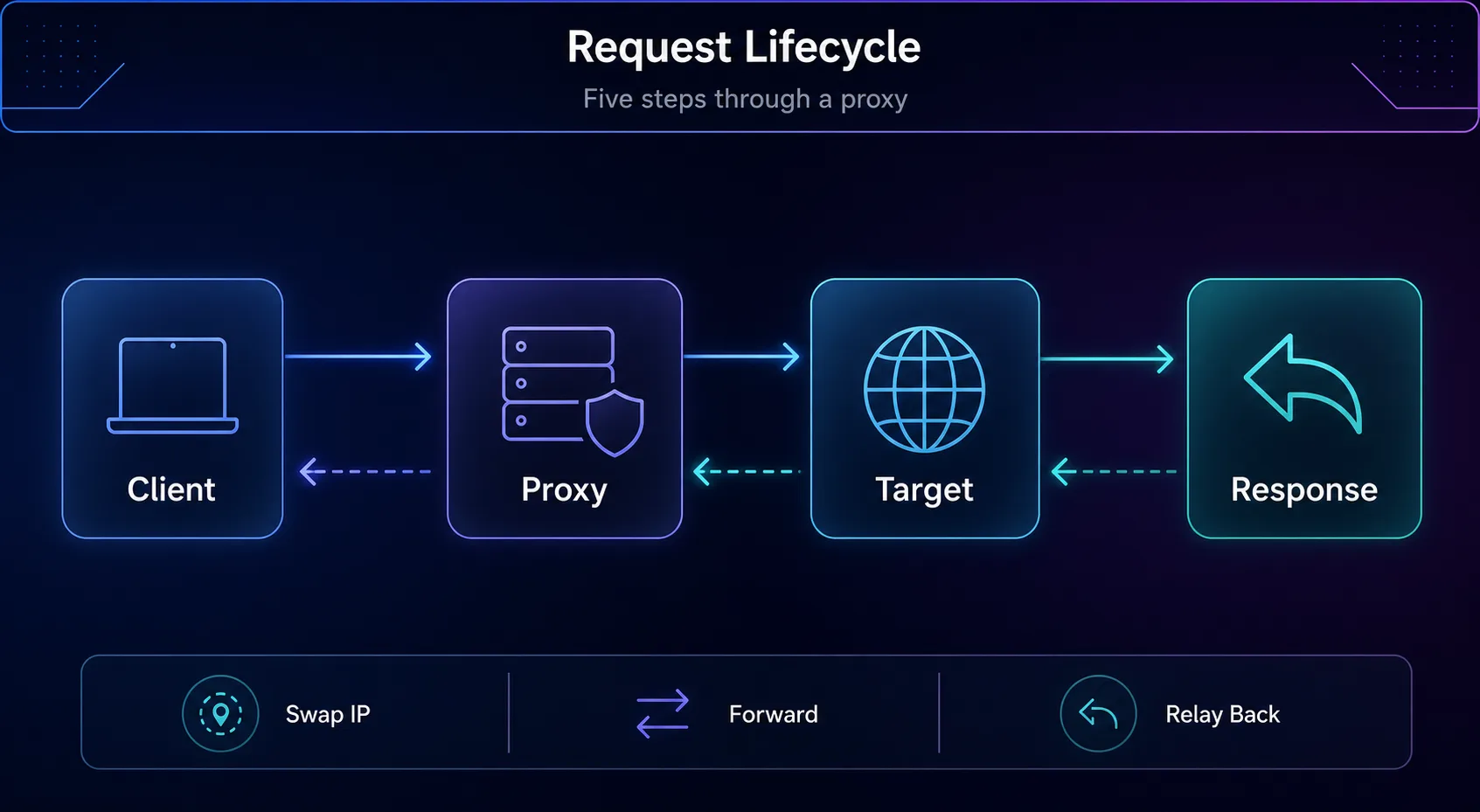
The round trip: client to proxy to target, and the response relayed back.
How a Proxy Actually Hides Your IP
Swapping the source IP is only half the story. Websites can also read HTTP headers, and this is where cheap proxies quietly leak your identity.
Some proxies add headers like X-Forwarded-For or Via that reveal your original IP or announce that a proxy is in use. The three anonymity levels are defined entirely by how these headers are handled:
Transparent proxies forward your real IP in the headers — no anonymity at all (they exist for caching and filtering).
Anonymous proxies strip your real IP but still send headers revealing that a proxy is being used.
Elite (high-anonymity) proxies send no revealing headers, so the destination cannot tell a proxy is involved at all.
In plain English: a proper high-anonymity proxy does two things — it swaps the network-level source IP and cleans the headers so nothing points back to you. Websites still see plenty of other signals, though, which is why the IP is one layer, not a full cloak — see what websites can actually see about you.
How Proxy Protocols Work
The protocol defines how your client and the proxy talk. Two families dominate, and they work quite differently.
1HTTP and HTTPS proxies
An HTTP proxy understands web requests and can read, cache, and modify them. For encrypted HTTPS sites, the client issues an HTTP CONNECT request that tells the proxy to open a blind tunnel — the proxy then passes the encrypted bytes back and forth without being able to read them. This is why an HTTPS site stays private even through an HTTP proxy: the proxy relays the ciphertext but cannot decrypt it.
2SOCKS5 proxies
SOCKS5 works at a lower level and is protocol-agnostic. It does not care whether the traffic is web, email, torrents, or game data — it just relays packets after a short handshake that can include authentication. That flexibility makes it popular for non-web applications. Our guide to HTTP, HTTPS and SOCKS5 proxies compares them in detail.
Feature | HTTP/HTTPS Proxy | SOCKS5 Proxy |
|---|---|---|
Traffic type | Web (HTTP/HTTPS) | Any (protocol-agnostic) |
Can read requests | Yes (HTTP); tunnels HTTPS | No — just relays |
Caching/filtering | Yes | No |
Best for | Web scraping, browsing | Torrents, email, gaming, apps |
How Proxy Authentication Works
Providers need to confirm you are allowed to use the proxy, and there are two standard methods.
Username and password authentication sends credentials with each connection — flexible and portable, so it works from any IP or device. IP whitelisting instead authorizes specific IP addresses to use the proxy with no credentials; convenient for a fixed server, but useless if your own IP changes. Most providers support both, and many rotating endpoints combine a username with parameters that control location and session behavior.
Real-world tip: the username field is often where the magic happens. Providers let you append parameters — country, city, or a session ID — right in the username, so a single endpoint can request a US IP, a sticky session, or a fresh rotation just by changing that string.
How IP Rotation Works
This is the part that most guides gloss over, and it is what makes proxies powerful for scale. Rotating proxies do not give you one IP — they give you access to a pool of thousands or millions, fronted by a single gateway address.
You connect to one endpoint (the gateway), and the provider assigns you an IP from the pool. Depending on your settings, the gateway either hands you a new IP on every request or holds one steady for a set time. The rotation logic lives on the provider's side; you just talk to the gateway.
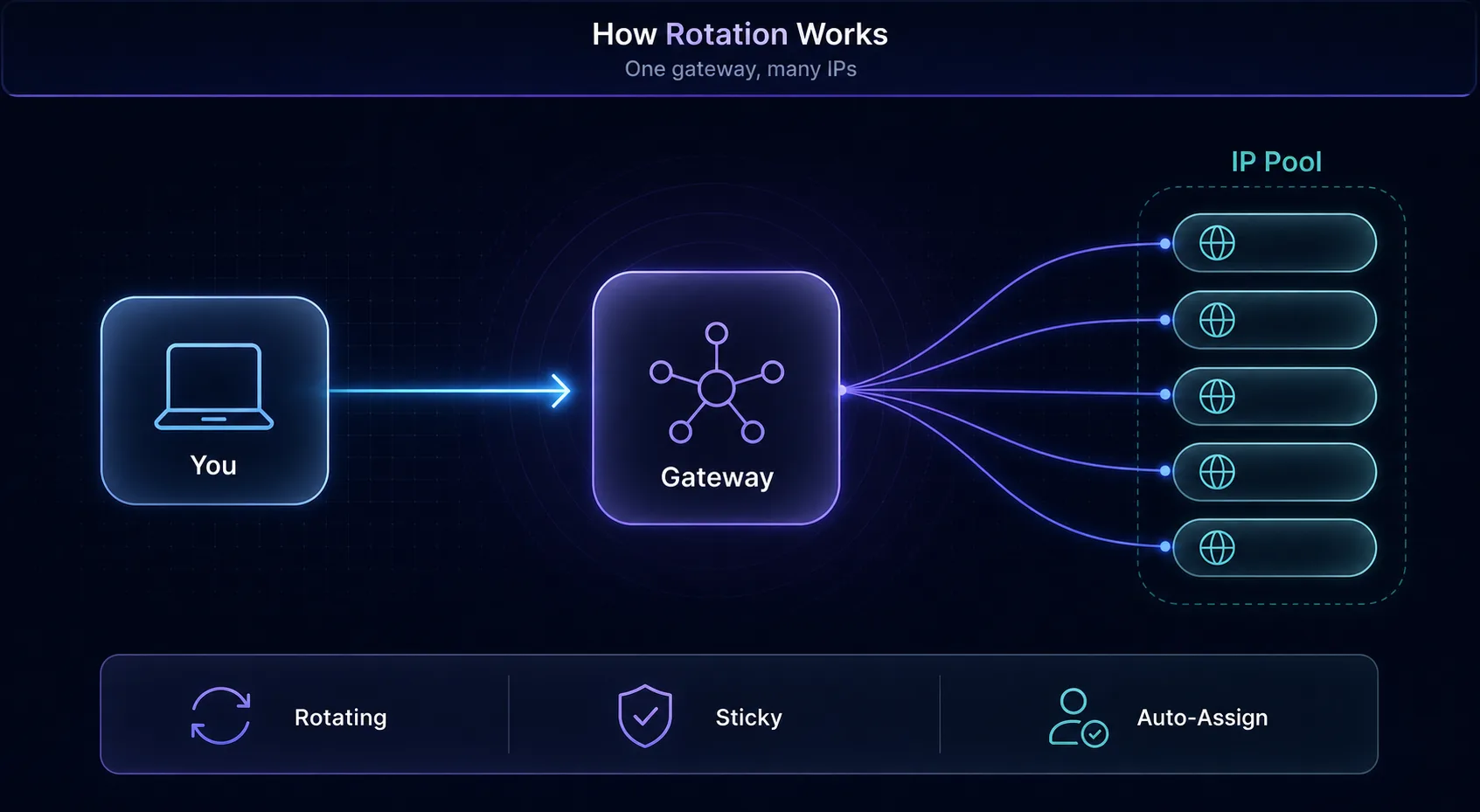
You connect to one gateway; it assigns an IP from the pool behind it.
1Rotating vs sticky sessions
Rotating sessions change your IP frequently — ideal for spreading many requests across many addresses so no single IP gets rate-limited. Sticky sessions hold one IP for minutes or hours — essential for logged-in accounts or multi-step flows that break if the IP changes mid-task.
Mode | IP Behavior | Best For |
|---|---|---|
Rotating | New IP per request (or interval) | Large-scale scraping, avoiding rate limits |
Sticky | Same IP held for minutes/hours | Logins, checkouts, multi-step sessions |
Want to see rotation implemented directly? Our tutorial on building a rotating proxy script in Python shows the mechanics in code. Rotation is also why proxies are so central to web scraping at scale.
How Different Proxy Types Source Their IPs
Where a proxy's IPs come from shapes how it behaves — and it is the reason prices vary so much.
Datacenter proxies use IPs from cloud servers the provider controls. They are fast and cheap, but the IP ranges are registered to hosting companies, so strict sites spot them easily. Residential proxies route through IPs that real ISPs assigned to real homes — often via opt-in peer networks — so they look like ordinary users and rarely get blocked. ISP (static residential) proxies host ISP-registered IPs in data centers, blending residential trust with datacenter speed and stability. Mobile proxies use IPs from 4G/5G carriers, shared by thousands of real subscribers, giving them the highest trust of all.
For the full breakdown, see our guides to residential proxies and datacenter proxies, or the complete map of proxy types.
Proxy Services That Handle Rotation for You
You do not have to build rotation infrastructure yourself. These providers manage the pools, gateways, and sessions so you connect to one endpoint and let them do the work.
1Decodo

Best all-rounder. Decodo (formerly Smartproxy) offers a large residential pool with simple rotating and sticky endpoints, geo-targeting in the username string, and a dashboard that makes session control easy for beginners.
2Oxylabs

Best for enterprise scale. Oxylabs pairs a huge IP pool with an advanced rotation engine and enterprise SLAs — built for large scraping operations that need reliability and fine-grained control at volume.
3IPRoyal

Best pay-as-you-go value. IPRoyal's non-expiring traffic and friendly pricing make it a great place to learn rotation without a big commitment, with residential, mobile, and datacenter options. Compare all providers in our proxy directory.
How to Start Using a Proxy
1Get your credentials
From your provider you will receive an endpoint (host and port) plus either a username and password or an IP-whitelisting option. Rotating providers give you a single gateway host; the rotation happens behind it.
2Configure your client
Enter the host, port, and credentials in your browser's network settings, your scraping library, or an app's proxy config. Choose HTTP or SOCKS5 to match what you bought. Append location or session parameters to the username if your provider supports them.
3Verify it is working
Load an IP-check page through the proxy and confirm it shows the proxy's IP, not yours. Run a DNS-leak test too, to be sure your requests are not resolving outside the tunnel. Then test on your real target before scaling.
Common Misconceptions About How Proxies Work
1"A proxy encrypts my traffic"
Usually not. A standard HTTP proxy hides your IP but does not encrypt your data — that is a VPN's job. HTTPS still protects the content end-to-end, but the proxy layer itself adds no encryption. If you need whole-connection privacy, see proxy vs VPN.
2"Any proxy makes me anonymous"
Only elite proxies clean the headers that reveal proxy use, and even then your browser fingerprint and cookies can identify you. The IP is one signal among many; anonymity takes more than swapping it.
3"Rotating proxies rotate on their own inside my session"
Rotation follows the mode you choose. If you set a sticky session, the IP deliberately stays put; if you set per-request rotation, it changes each call. The provider does exactly what your endpoint settings tell it to — nothing random.
4"More IPs always means better"
Pool size matters, but quality matters more. A smaller pool of clean, well-maintained IPs beats a huge pool of recycled, already-flagged ones. Judge by success rate on your target, not the headline IP count.
Frequently Asked Questions
Conclusion
Now you know how proxies really work — not just that they hide your IP, but how. Your request goes to the proxy, the proxy connects to the destination from its own IP, cleans the headers that could betray you, and relays the response back. Protocols decide how you talk to it, authentication decides who can, and rotation decides which IP from the pool you get.
Those mechanics explain everything downstream: why datacenter IPs are fast but easy to block, why residential and mobile IPs blend in, why sticky sessions exist, and why quality beats raw pool size. Understand the machinery and you can pick and configure a proxy with intent instead of guesswork.
Ready to put it into practice? Explore live options in our proxy directory, compare two providers with our comparison tool, or go deeper on the different types of proxies to find the right fit for your workflow.