Residential vs Datacenter Proxies: Which Should You Use in 2026?
Datacenter proxies are fast and cheap. Residential proxies cost more per GB but get past strict sites. Here’s how they differ on trust, speed and pricing, and how to pick the right one for each target.
Your scraper worked fine for a week. Then the same script started returning CAPTCHAs on every request. Nothing in the code changed. The target just got stricter about where traffic comes from.
That moment is usually when people start asking about residential vs datacenter proxies. One type is cheap and fast. The other costs several times more per gigabyte but gets through doors the first one can’t.
Picking wrong in either direction costs money. Overpay and you burn budget on IPs a lenient site never needed. Underpay and you waste hours on blocks. This guide shows how to tell which side of that line your project sits on, with real pricing checked this month.
- Datacenter IPs are fast and cheap but easy for strict sites to flag as hosting traffic.
- Residential IPs pass as home users, cost several times more per GB, and win on tough targets.
- Residential is usually billed per GB; datacenter per IP or at a much lower per-GB rate.
- Start on datacenter, measure block rates, and move only stubborn targets to residential.
The Short Answer
Use datacenter proxies when the target is lenient and you care about speed and cost. Use residential proxies when the target actively blocks bots, ties activity to accounts, or shows different content to real home users.
Most teams don’t pick one forever. They start on datacenter IPs, measure block rates, and move only the stubborn targets to residential. That habit alone saves a lot of bandwidth money.
If you need a refresher on either type first, our explainers on what a residential proxy is and how datacenter proxies work cover the basics. This post focuses on the choice between them.
What Actually Separates the Two
Both proxies do the same job: your request leaves through someone else’s IP address. The difference is who owns that address.
- A residential proxy exits through an IP that a consumer internet provider assigned to a home connection.
- A datacenter proxy exits through an IP owned by a hosting or cloud company, sitting on a server rack.
Websites can look that ownership up. Every IP belongs to a network with an ASN, and IP intelligence databases label those networks. MaxMind’s GeoIP web service documentation lists user types such as “hosting” and “residential”, plus a separate flag that marks an IP as belonging to a hosting provider (checked October 20, 2026).
So a datacenter IP announces itself before your request even loads. A residential IP looks like an ordinary household, which is exactly why it costs more.
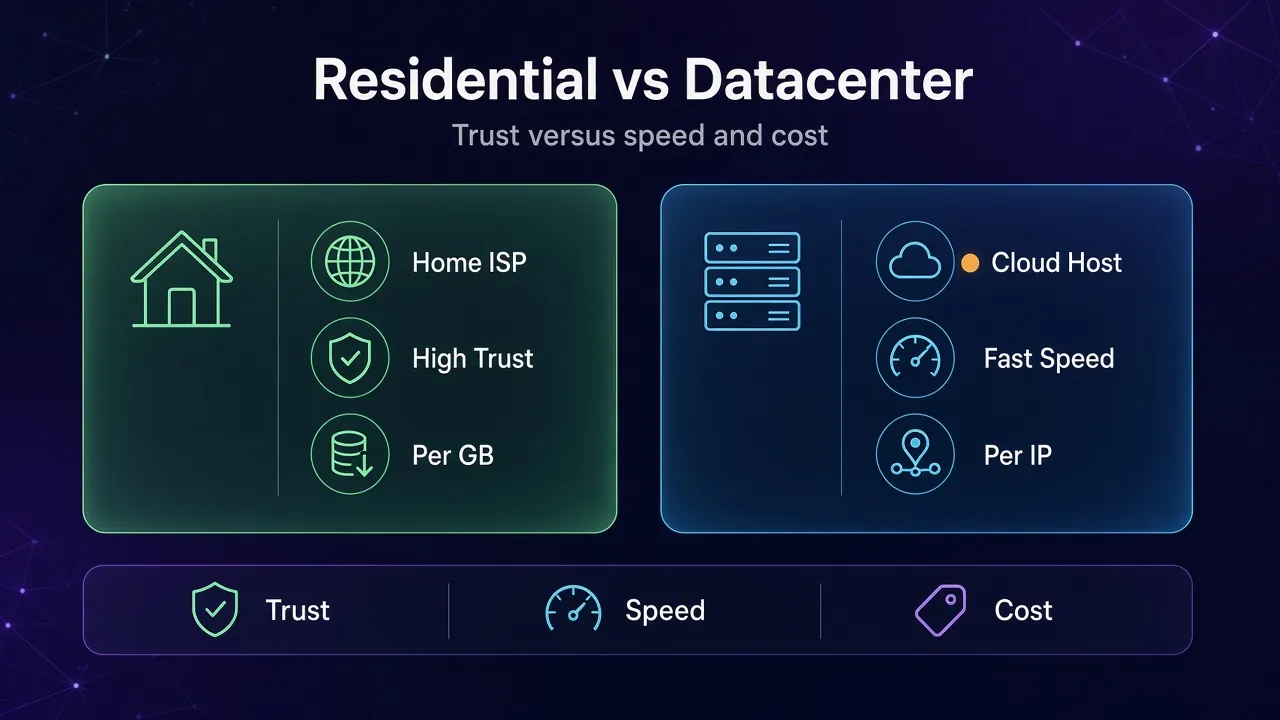
Residential vs Datacenter Proxies at a Glance
| Factor | Residential | Datacenter |
|---|---|---|
| IP owner | Consumer ISP (home connections) | Hosting or cloud company |
| How sites classify it | Residential user type | Hosting user type, easy to flag |
| Typical pricing model | Per GB of traffic | Per IP, or a low per-GB rate |
| Speed and stability | Slower, peers can drop offline | Fast, stable server links |
| Pool size | Very large, rotating | Smaller, fixed blocks of IPs |
| Geo-targeting | Often down to city level | Usually country level |
| Best fit | Strict anti-bot targets, accounts, local results | Lenient sites, bulk jobs, internal tools |
The table looks one-sided until you add price. Then the trade-off becomes very real.
How Pricing Works: Per GB vs Per IP
This is the part most comparisons skip, and it decides your bill more than anything else. Residential proxies are usually sold by bandwidth. Datacenter proxies are usually sold by the IP, or by bandwidth at a much lower rate.
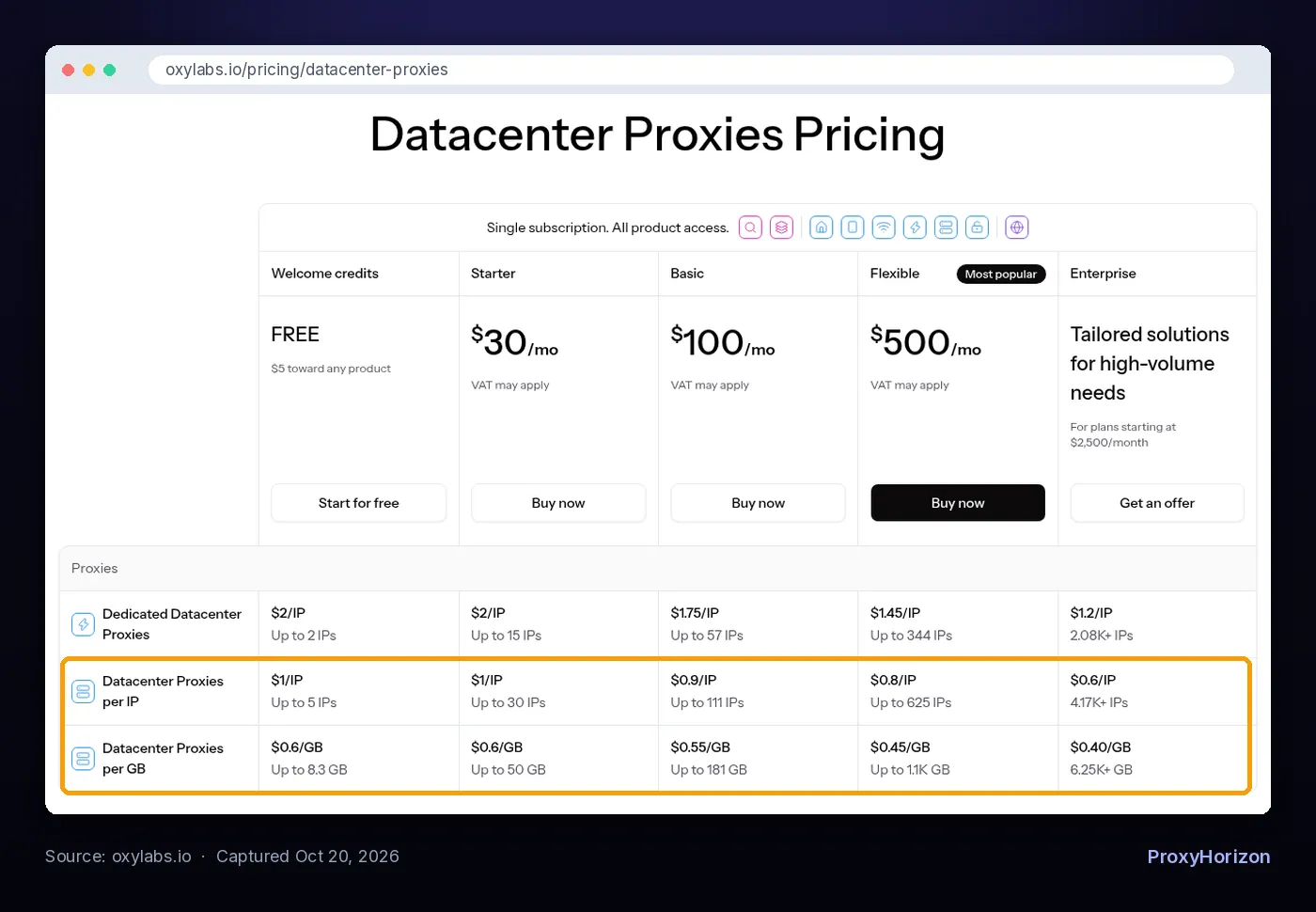
Here’s what three providers list on their official pricing pages, checked October 20, 2026:
| Provider | Residential | Datacenter |
|---|---|---|
| Decodo | $4/GB pay as you go; subscriptions $3.75/GB (3 GB) to $2.75/GB (100 GB) | From $0.60/GB shared, from $0.10/IP shared, from $2.50/IP dedicated |
| Oxylabs | $6/GB on entry tiers, down to $2.50/GB at 1K+ GB | $1/IP down to $0.60/IP, or $0.60/GB down to $0.40/GB |
| Webshare | $3.50/GB (1 GB) down to $1.40/GB at 3,000 GB | 10 free proxies; 100 proxies for $2.99 a month |
Even at the cheapest listed rates, residential bandwidth costs several times more per gigabyte than datacenter bandwidth. On Decodo, pay-as-you-go residential is $4/GB against $0.60/GB for shared datacenter traffic.
1A Quick Cost Example
Say you scrape 10,000 pages a day and each page, with its assets, weighs about 1 MB. That’s roughly 10 GB a day. These are example numbers; your real page weight depends on the site and on whether you block images and scripts.
- On Decodo shared datacenter traffic at $0.60/GB, 10 GB costs about $6.
- On Decodo pay-as-you-go residential at $4/GB, the same 10 GB costs about $40.
Run that every day for a month and the gap is hundreds of dollars. That’s why sending lenient targets through residential IPs is the most common way teams overspend.
2When Per IP Pricing Wins
Per-IP plans flip the math for heavy, steady traffic.
Webshare’s datacenter plans and Decodo’s per-IP option charge mainly for the number of addresses, so a job that downloads a lot through a small, fixed set of IPs can be far cheaper than paying per gigabyte. Check the bandwidth limit on each plan, since per-IP offers usually include a traffic allowance rather than unlimited use.
Trust and Detection: Where Residential Earns Its Price
Strict sites don’t block datacenter traffic because they dislike servers. They block it because very few real shoppers browse from a cloud provider’s network. A request from a hosting ASN is a strong hint that a script, not a person, is on the other end.
Residential IPs pass that first check because they belong to the same networks real customers use. That buys you room on targets with serious bot protection: large marketplaces, search engines, social platforms, ticketing and sneaker sites.
Residential isn’t invisible, though. The same MaxMind documentation describes a flag for IPs that sit on a suspected anonymizing network and belong to a residential ISP. Busy residential pools get spotted too, and IP history matters, so a cheap residential pool with a bad track record can perform worse than you expect.
The IP is also only one signal. Headers, TLS fingerprints and behavior count as well. Our guide to how websites detect proxy traffic walks through the full stack, so you don’t pay for residential IPs and then give yourself away with a default bot user agent.
Speed, Stability and Pool Size
Datacenter proxies win on raw performance. Traffic runs over server-grade links, the IPs don’t disappear, and you can push many parallel connections through them.
Residential traffic routes through real consumer connections. Those connections are slower on average, and individual peers come and go. Providers smooth this over with large pools and automatic rotation, but a single residential session can still drop when the device behind it goes offline.
Pool size works the other way round. Decodo advertises a 115M+ residential IP pool on its pricing page, while Oxylabs lists datacenter pools of up to 36K IPs for its per-IP plan and up to 56K for per-GB traffic. A huge residential pool is what makes high-volume rotation on strict sites possible.
If your workflow needs the same IP for a long time, read our comparison of sticky vs rotating proxy sessions before you buy. Session behavior matters as much as proxy type for logged-in work.
Which One Fits Your Use Case?
Use this as a starting point, then confirm with a small test on your real targets.
| Use case | Start with | Why |
|---|---|---|
| Scraping small or mid-size sites without bot protection | Datacenter | Cheap, fast and nothing blocks it |
| Price monitoring on large marketplaces | Residential | These sites filter hosting IPs aggressively |
| Local search results and ad verification | Residential | You need city-level IPs that see what locals see |
| Social media and multi-account work | Residential, ISP or mobile | Accounts are judged on IP trust and consistency |
| Load testing, QA and internal tools | Datacenter | Speed and stability matter, trust doesn’t |
| Bulk downloads of public files or APIs | Datacenter (per IP) | Heavy traffic makes per-GB pricing expensive |
| Sneaker and ticket releases | Residential or ISP | Some of the strictest bot defenses online |
Two other proxy types sit between these. ISP proxies give you residential-registered IPs hosted in data centers, so you get datacenter speed with a home-ISP label, usually priced per IP. Mobile proxies use carrier IPs and sit at the top of the trust scale for platforms that expect phone traffic.
A Simple Way to Decide
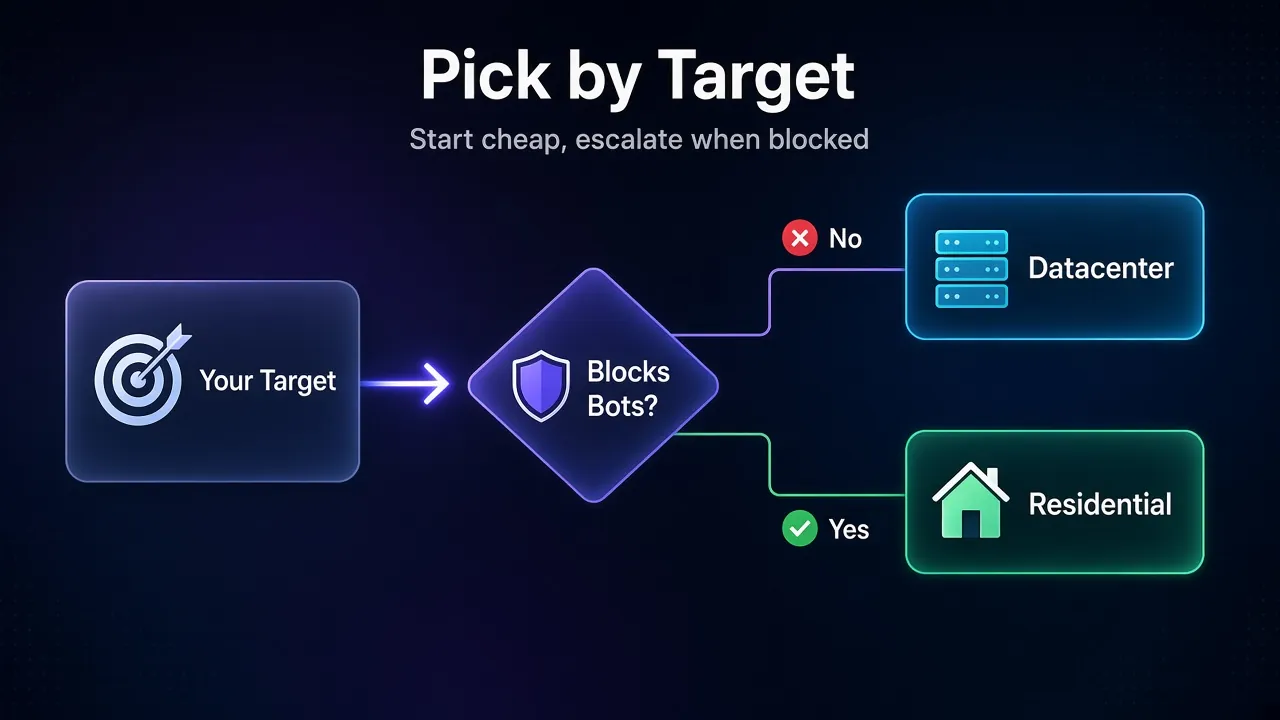
Work through these four questions in order:
- Does the target block datacenter IPs? Send a small batch of requests through a datacenter proxy. If you get clean pages, stop there.
- Are you logging into accounts? If yes, skip datacenter for those accounts. Use residential with sticky sessions, or static ISP IPs.
- Do results change by city? If you need what a shopper in a specific city sees, you need residential geo-targeting.
- How much traffic will you move? Heavy, steady traffic favors per-IP datacenter plans. Light but strict work favors pay-as-you-go residential.
Measure success rate, not just price. A residential request that returns real data on the first try can be cheaper than five datacenter requests that hit CAPTCHAs.
How to Test Before You Commit
Pricing tables can’t tell you how a specific site treats each proxy type. A short test can, and it costs very little.
- Pick 50 to 100 real URLs from the site you plan to collect from, not a generic test page.
- Run the same list through both types with the same script, headers and request rate.
- Count clean responses. A 200 status with a CAPTCHA or an empty product page is a block, not a success.
- Divide cost by clean responses to get your real price per useful page for each type.
Most providers offer a small entry plan or trial credit for this. Webshare lists 10 free datacenter proxies, and Oxylabs lists $5 of welcome credit on its pricing page, both checked October 20, 2026. Repeat the test every few months, because sites tighten their defenses over time.
The Hybrid Setup Most Teams End Up With
Many scraping teams run both types side by side. The pattern is simple: route every target through datacenter IPs by default, and route only the targets that block you through residential.
Keep that split per target, not per request. Don’t fall back from residential to datacenter halfway through a session on a strict site, because mixing network types on one job makes the traffic look less consistent.
Providers make this easier when one account covers both. Decodo and Oxylabs both sell residential and datacenter products, and Oxylabs runs them under one subscription with shared credit. That lets you move a target between types without opening a new vendor account. Compare more options in our best datacenter proxy providers roundup and the proxy directory.
Common Mistakes When Choosing
- Buying residential for everything. Lenient sites never needed it, and per-GB billing adds up fast.
- Judging by price per GB alone. Count successful requests per dollar, including retries.
- Using shared datacenter IPs for accounts. Other customers’ behavior can already have flagged the address.
- Loading full pages on a per-GB plan. Blocking images, fonts and trackers cuts bandwidth on residential traffic.
- Ignoring the rules of the site. A better IP doesn’t change a site’s terms or the law. Our guide to web scraping legal risk covers robots.txt and ToS.
Frequently Asked Questions
Pick the Cheapest Proxy That Still Gets Through
Residential vs datacenter proxies isn’t a contest with one winner. Datacenter IPs are the right default for lenient targets, bulk traffic and internal jobs. Residential IPs earn their higher price on strict sites, account work and local results.
Start small on datacenter, measure your success rate on each target, and move only the targets that block you. Check current prices on the provider’s own page before you commit, since bandwidth rates change often.
The bottom line: pay for trust only where a site demands it, and let cheap datacenter IPs handle everything else.
Keep Reading
More articles you might enjoy