How Much Proxy Bandwidth Do You Need? GB Calculator Guide (2026)
Work out how many GB of proxy bandwidth you need with one simple formula, real page-weight numbers, worked examples, ways to cut usage, and when per-IP plans beat per-GB.
You’re about to buy a residential proxy plan, and the checkout page wants you to pick 5 GB, 25 GB or 100 GB. Pick too little and your scraper stalls mid-month. Pick too much and you pay for gigabytes that quietly expire.
The good news is that proxy bandwidth is easy to estimate once you know what you’re actually downloading. It comes down to one multiplication and a few honest assumptions.
This guide walks you through the formula, real page-weight numbers to plug into it, worked examples, the tricks that cut usage in half, and how to choose between per-GB and per-IP plans.
- Proxy bandwidth is the data you download through the proxy, not the number of requests.
- Monthly GB is pages per month times KB per page, plus a 20% margin.
- HTML-only requests can use about 50 times less data than full browser loads.
- Blocking images and fonts trims roughly 30% off a typical browser page load.
- Per-GB suits light, spread-out jobs; per-IP suits heavy traffic through a few IPs.
What Counts as Proxy Bandwidth?
Proxy bandwidth is the total amount of data that passes through your proxy provider’s network, measured in gigabytes (GB). Most residential and mobile proxies are sold this way, and many datacenter plans offer it as an option.
It isn’t the number of requests you send. A request for a tiny JSON file and a request for a video-heavy homepage both count as one request, but one might weigh 5 KB and the other 10 MB.
What the meter counts depends on the provider, so treat its dashboard as the final word. Oxylabs’ self-service agreement says exactly that: if your own numbers and its dashboard disagree, the dashboard figures prevail.
In practice, downloads drive the total. The requests you send are a few hundred bytes of headers, while the pages and files that come back are often thousands of times larger. That’s why the rest of this guide focuses on what you download.
The Proxy Bandwidth Formula
Here’s the whole calculation in one line:
Monthly GB = pages per month × average KB per page × (1 + retry and overhead margin) ÷ 1,000,000
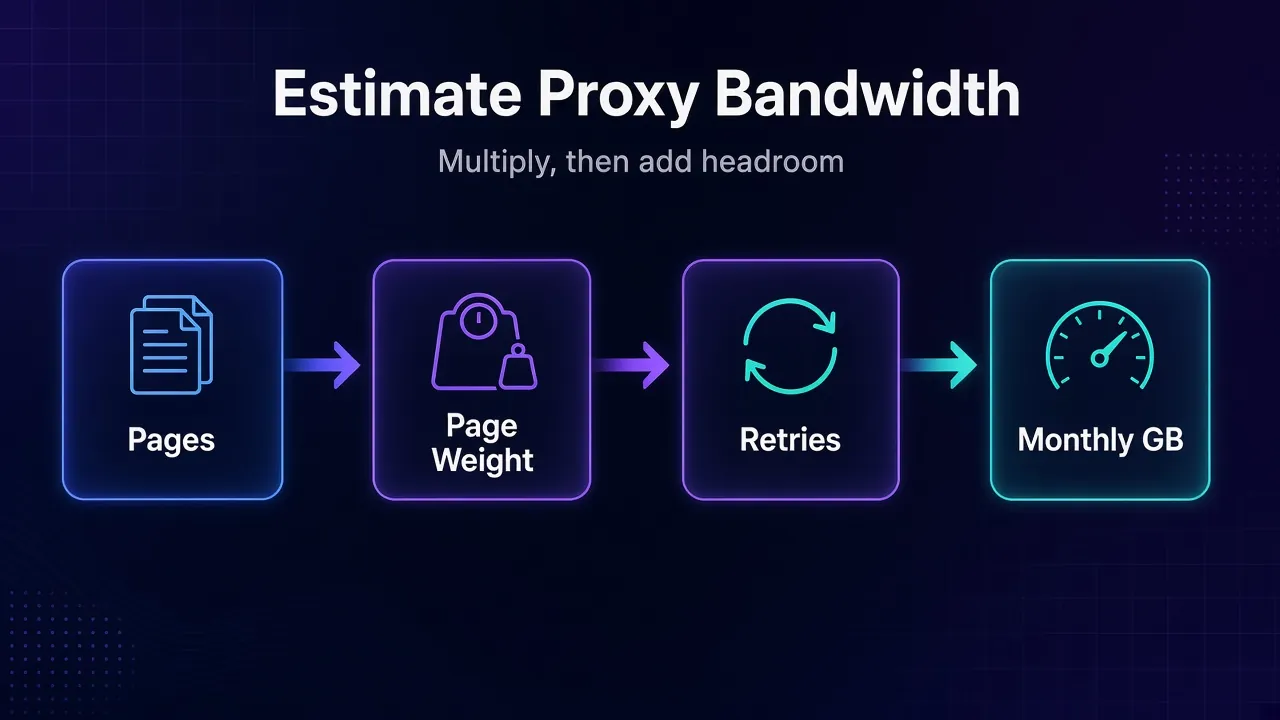
- Pages per month: URLs per run × runs per month. Tracking 5,000 products four times a day is 5,000 × 4 × 30 = 600,000 page loads.
- Average KB per page: what each load actually downloads through the proxy. This depends far more on how you fetch the page than on the site itself.
- Margin: failed requests, redirects, CAPTCHA pages and retries all burn data. A 20% margin is a sensible starting point; raise it for heavily protected sites.
Dividing by 1,000,000 treats 1 GB as a million KB. Some tools count 1,024 × 1,024 instead, which is about 5% different, so round up rather than down.
How Much Does a Web Page Weigh?
The biggest variable in the formula is page weight, and it swings wildly depending on whether you download only the HTML or load the full page in a browser.
The best public benchmark is the HTTP Archive’s Web Almanac 2025 Page Weight chapter, published in January 2026 and based on a July 2025 crawl of millions of sites. Its medians are a useful starting point:
Median Page Weight by What You Download
Desktop, July 2025 crawl
View data
| Median KB | |
|---|---|
| HTML document only | 35 KB |
| Inner page, full load | 1,963 KB |
| Home page, full load | 2,862 KB |
- The median HTML document was about 35 KB on desktop and 33 KB on mobile.
- The median inner page (product pages, articles, listings) loaded 1,963 KB on desktop and 1,769 KB on mobile.
- The median home page was heavier at 2,862 KB on desktop.
- The heaviest 10% of pages weighed more than 9,179 KB on desktop.
That gap is the key insight. A plain HTTP request that grabs only the HTML can use roughly 50 times less data than a full browser load of the same page.
On a median desktop inner page, the Almanac breaks the weight down to about 719 KB of JavaScript, 442 KB of images, 138 KB of fonts, 85 KB of CSS and 21 KB of HTML. Every one of those resources passes through your proxy when a browser loads the page.
Worked Examples: From Pages to GB
Let’s run the formula on one job three different ways: scraping 100,000 product pages a month, with a 20% margin.
| Method | KB per page | Raw GB | With 20% margin |
|---|---|---|---|
| HTTP client, HTML only | About 35 | 3.5 | About 4.2 GB |
| Headless browser, full page | About 1,963 | 196 | About 236 GB |
| Headless browser, images and fonts blocked | About 1,383 | 138 | About 166 GB |
The page weights come from the Almanac’s desktop medians above. Blocking images (442 KB) and fonts (138 KB) removes about 580 KB from a median inner page.
Now put a price on it. At Decodo’s pay-as-you-go residential rate of $4/GB (checked October 2026), that’s roughly $17 for the HTTP route, $944 for full browser loads, and $664 with assets blocked. Same pages, same data, wildly different bills.
Two more quick estimates:
- Price monitoring: 5,000 products checked four times a day is 600,000 HTML requests a month. At 35 KB each plus 20%, that’s about 25 GB.
- SERP or API-style scraping: if the data comes back as JSON, responses are often a few KB each, so even a million requests can stay in single-digit GB. Measure a sample first, because some APIs return huge payloads.
How to Measure Your Own Page Weight
Medians are a starting point, but your targets are what you’ll pay for. A 15-minute test beats any rule of thumb.
- Pick 50 to 100 real URLs from the sites you’ll scrape, mixing page types (listings, product pages, search results).
- Check them in a browser. Open Chrome DevTools, go to the Network tab, reload the page, and read the transferred total in the status bar at the bottom. That’s roughly what a headless browser will pull through your proxy.
- Check them with your actual scraper. Log the size of each response. In Python, summing
len(response.content)gives decompressed sizes, so it slightly overestimates compressed text, which is a safe direction to be wrong in. - Run a small paid test through the provider and compare its dashboard to your estimate. Oxylabs’ residential Public API, for example, reports traffic per sub-user and per target domain.
If you’re working in Python, our Python Requests proxy tutorial shows how to route those test requests through a proxy.
1Common Estimation Mistakes
- Counting URLs instead of page loads. Pagination, retries and repeat checks multiply the number you started with.
- Testing on the home page. Home pages were about 46% heavier than inner pages in the Almanac data, so they skew the average up.
- Forgetting logins and warm-up traffic. Browser sessions that log in, accept cookies or scroll for lazy-loaded content download far more than a single page view.
- Ignoring growth. If you plan to add sites or check more often next quarter, size for that, not for today.
How to Cut Proxy Bandwidth Usage
Most proxy bills are inflated by data you never use. These changes usually save the most.
1Skip the Browser When You Can
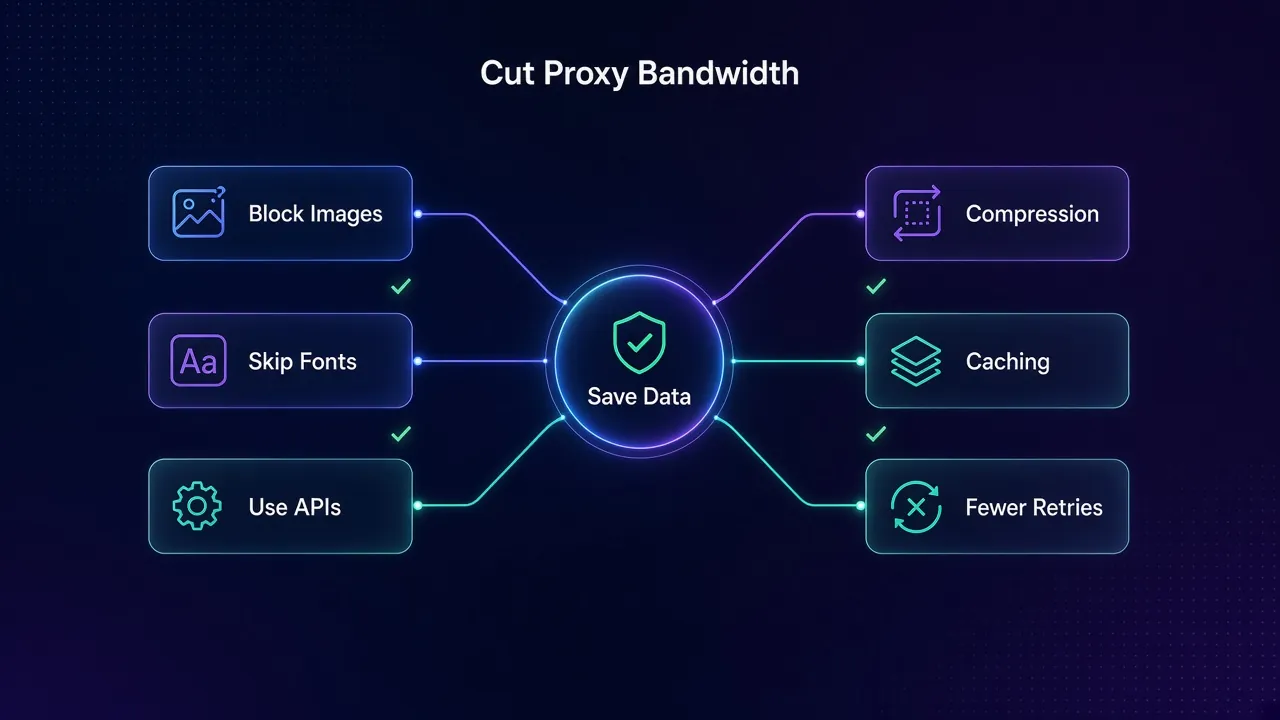
If the data is in the HTML or in a JSON endpoint the page calls, fetch that directly with an HTTP client. It’s the single biggest saving, as the table above shows. Save headless browsers for pages that genuinely need JavaScript to render.
2Block Images, Fonts and Media in Headless Browsers
When you do need a browser, stop it from downloading what you won’t parse. Playwright’s network documentation shows how to abort requests by resource type:
await page.route('**/*', route => {
  const type = route.request().resourceType();
  return ['image', 'font', 'media'].includes(type)
    ? route.abort()
    : route.continue();
});
Test the page after blocking. Some sites break or behave suspiciously without their CSS or scripts, so don’t block those blindly. Our Playwright web scraping guide covers the full setup.
3Accept Compressed Responses
Text like HTML and JSON compresses well with gzip or Brotli. Most HTTP clients ask for compression by default, but check that you haven’t overridden the Accept-Encoding header. The Web Almanac found that about 28-29% of home pages still fail Lighthouse’s text-compression audit, so you can’t control the server side, only your request.
4Don’t Re-Download Unchanged Pages
Cache results and skip URLs that haven’t changed. Where a site supports it, conditional requests with If-None-Match or If-Modified-Since can return a bodiless 304 Not Modified instead of the full page.
5Cut Retries and Blocks
Every blocked request still costs bandwidth, and CAPTCHA pages can be heavy. Better pacing, cleaner IPs and the right session type reduce waste. Our guides on handling CAPTCHAs when scraping and sticky vs rotating sessions explain how.
Per-GB vs Per-IP Proxy Plans: Which Fits Your Usage?
Once you know your monthly GB, the pricing model matters as much as the rate. Providers sell the same proxy type both ways.
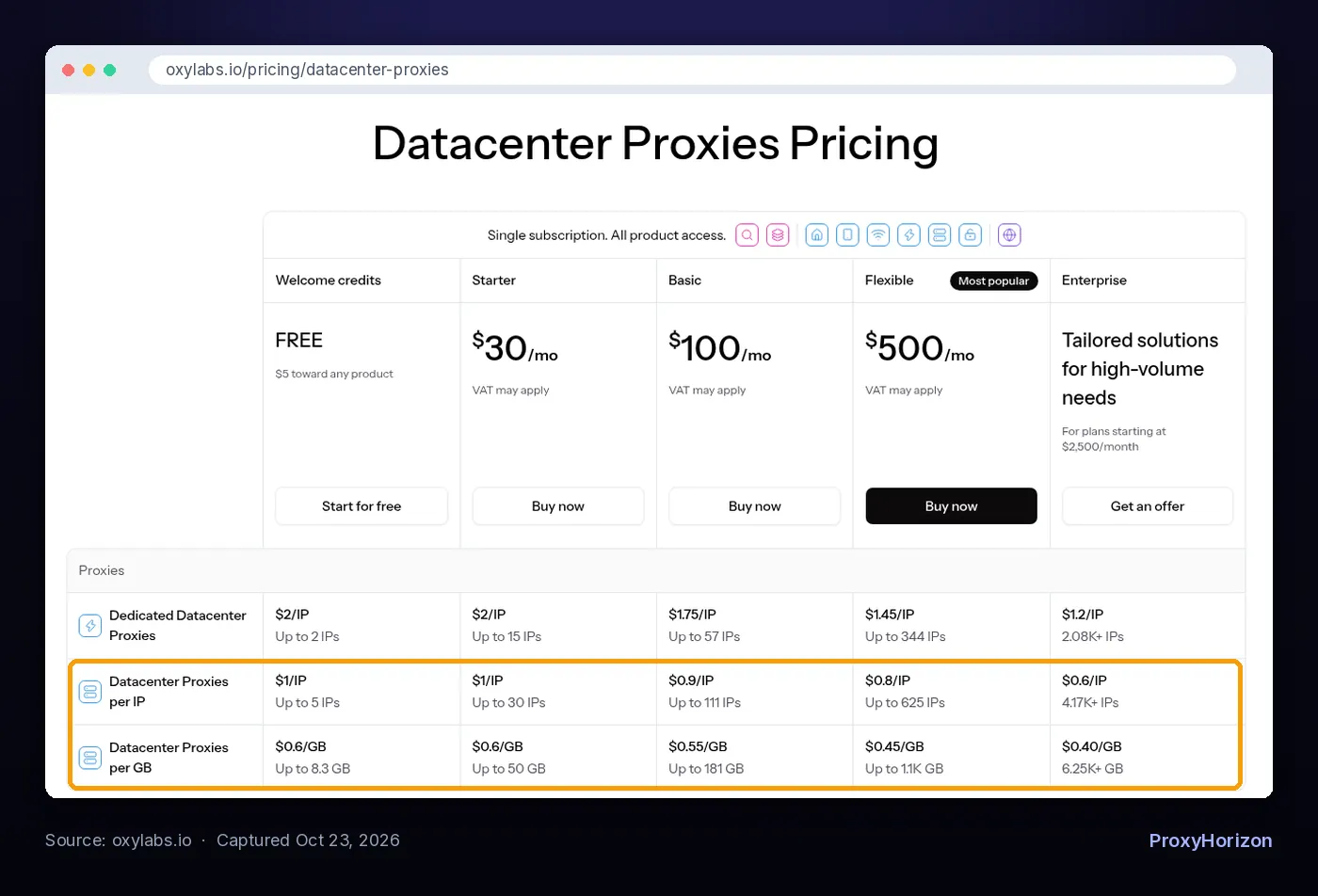
On that table, Oxylabs charges $0.60/GB on its per-GB datacenter plans at the entry tiers, falling to $0.40/GB at the top, or $1/IP on per-IP plans, falling to $0.60/IP. Decodo’s datacenter plans start from $0.60/GB or from $0.10/IP.
| Per-GB plans | Per-IP plans | |
|---|---|---|
| You pay for | Traffic | A set number of IPs |
| Best when | Light pages, many IPs, spiky volume | Heavy traffic through a few stable IPs |
| Typical use | Residential scraping, rotating pools | Account management, browser sessions, long crawls |
| Watch out for | Browser loads and retries draining GB fast | Bandwidth caps that still apply |
That last row matters. “Per IP” doesn’t always mean unlimited data: Decodo’s FAQ says its pay-per-IP datacenter plans cover a number of IPs and a traffic allowance starting at 10 GB. Read the fine print before assuming you can stream gigabytes through each address.
A quick rule: if your estimate is small and spread across many targets, buy per GB. If it’s large and runs through a handful of long-lived sessions, compare per-IP datacenter or ISP proxies. Our breakdown of residential vs datacenter proxies covers which type each job needs.
Choosing a Plan Size Without Overpaying
Bigger plans are cheaper per GB, but only if you use them. A few things to check before committing:
- Unused data can expire. Oxylabs’ agreement says subscription traffic is valid for one calendar month, while residential pay-as-you-go traffic doesn’t expire unless the account sits unused for more than three months.
- Volume tiers drop the rate. Decodo’s residential monthly plans run from $3.75/GB on 3 GB to $2.75/GB on 100 GB, with enterprise plans down to $2/GB at 1 TB. Oxylabs’ residential tiers run from $6/GB to $2.50/GB.
- Start with pay-as-you-go or the smallest plan, run your real workload for a week, then size up using the dashboard figures.
- Set traffic limits per project if your provider supports sub-users, so one runaway crawler can’t eat the whole month.
Prices change often, so treat every figure here as a snapshot from October 2026. For current rates and plan details, see our Decodo pricing breakdown and Oxylabs pricing guide, or our list of the cheapest proxies for web scraping. You can also compare providers side by side in our proxy directory.
Frequently Asked Questions
Estimate First, Then Buy
Proxy bandwidth isn’t a mystery number. Multiply your monthly page loads by what each load actually downloads, add a 20% margin, and you have a defensible estimate.
The method matters more than the site. HTML-only requests can cost a few GB where full browser loads cost hundreds, and blocking images and fonts trims a big slice off the rest.
Our take: measure 100 real pages, start on a small plan, and let the provider’s dashboard tell you when to size up. If you’re still choosing a network, our roundup of the best residential proxies is a good place to start.
Keep Reading
More articles you might enjoy