What Are ISP Proxies? Static Residential IPs Explained (2026)
ISP proxies borrow a home internet provider’s address and run it on a data center server. Here’s how that works, why IP checkers disagree about them, and when they’re worth paying for.
An ISP proxy is a small contradiction that works.
The IP address belongs to a home internet provider, the kind of company that runs your Wi-Fi. The server behind it sits in a data center. Websites see the first part. You get the speed of the second.
That mix is why ISP proxies, also sold as static residential proxies, have become the default for account work and long sessions. It’s also why so many buyers get confused when an IP checker calls their shiny new “residential” IP a data center address.
Both labels can be true at once. Once you see why, you’ll know exactly when an ISP proxy earns its price and when it’s the wrong tool.
- An ISP proxy is a home-internet-provider IP that lives on a data center server.
- You get residential-style trust with datacenter-style speed, and the address doesn’t change.
- IP checkers can label the same address “ISP” and “hosting” at once, and both can be right.
- They shine for logged-in, long-running work and waste money on huge rotating crawls.
What an ISP Proxy Actually Is
An ISP proxy is a static IP registered to a consumer internet provider but hosted on a server you rent access to. Your traffic goes from your device to that server, and the target site sees the ISP-registered address.
Compare that with the two proxy types it borrows from. A residential proxy routes your request through a real household device, so the IP is genuinely residential but can disappear when someone switches off their router. A datacenter proxy runs on a server too, but its IP belongs to a hosting company, which websites spot in one lookup.
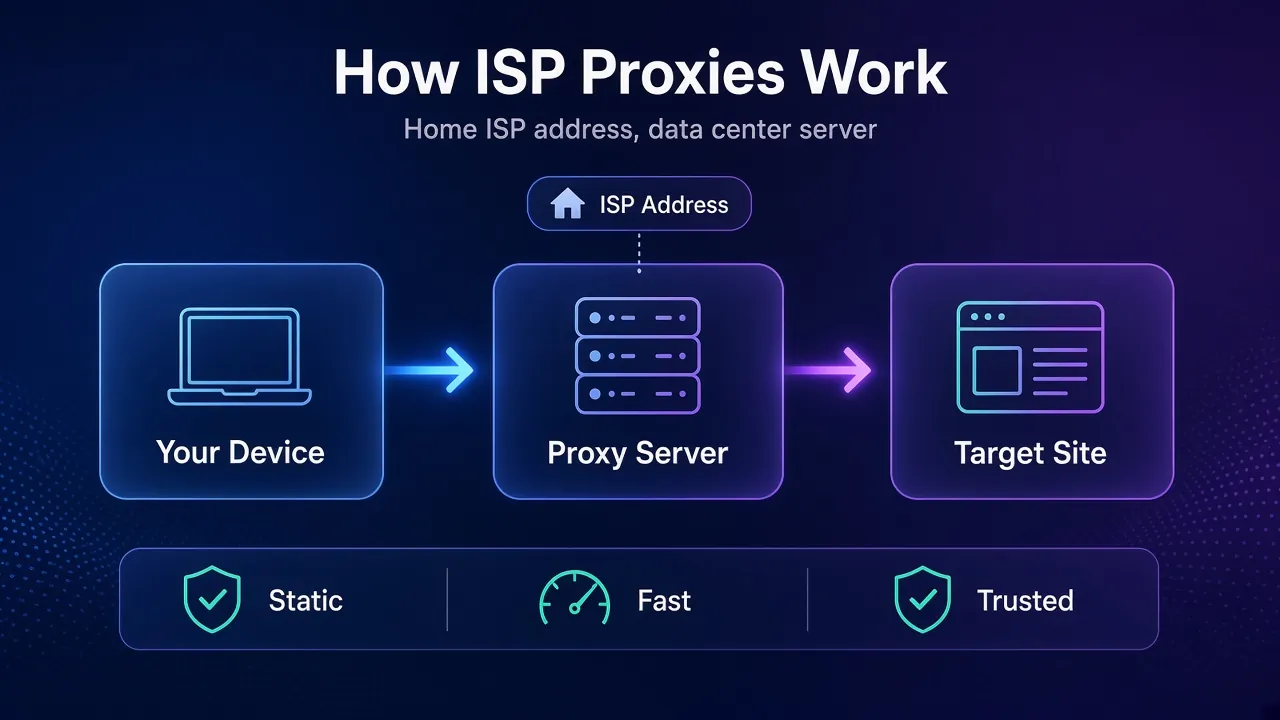
Providers describe the sources plainly. Webshare says its static residential IPs are allocated by residential providers such as AT&T, Comcast and Cox, while Decodo lists AT&T, Verizon, Orange and Tele2 among its ASNs (both checked October 2026).
In plain English: you rent an address that looks like a home connection, and it doesn’t vanish when someone’s laptop goes to sleep.
How an IP Gets Labelled “Home” in the First Place
Websites don’t guess whether an IP is residential. They look it up, and the lookup starts with the autonomous system number (ASN) that announces the address to the rest of the internet.
An autonomous system is a network with its own routing policy. The IETF’s RFC 1930 calls ASes “the unit of routing policy” on the internet. Comcast has ASNs. So do AWS and every hosting company.
IP intelligence vendors then sort those networks into buckets. Here’s what three of the big ones publish in their documentation:
| Database | Field | Labels that matter here |
|---|---|---|
| IPinfo | ASN type | isp, hosting, business, education, government |
| IP2Location | usage_type | ISP (fixed line ISP), MOB (mobile ISP), DCH (data center, web hosting, transit) |
| MaxMind GeoIP Insights | user_type | residential, cellular, business, hosting and more |
An ISP proxy lands in the “isp” or “residential” bucket because its address block is registered under a consumer provider’s network. A datacenter proxy lands in “hosting”. That single label is why datacenter proxies get blocked on strict sites while ISP proxies often sail through.
Here’s the catch. The ASN is only the first question these databases answer.
Why Two IP Checkers Can Give You Two Answers
The same ISP proxy can show up as “residential ISP” in one checker and “hosting” in another, and neither tool is broken. They’re measuring different things.
Webshare’s help center explains it well: tools that check the ASN show the residential provider, while tools that check the hosting environment may say “datacenter”, because that’s physically where the server is. It calls this the most common question it gets.
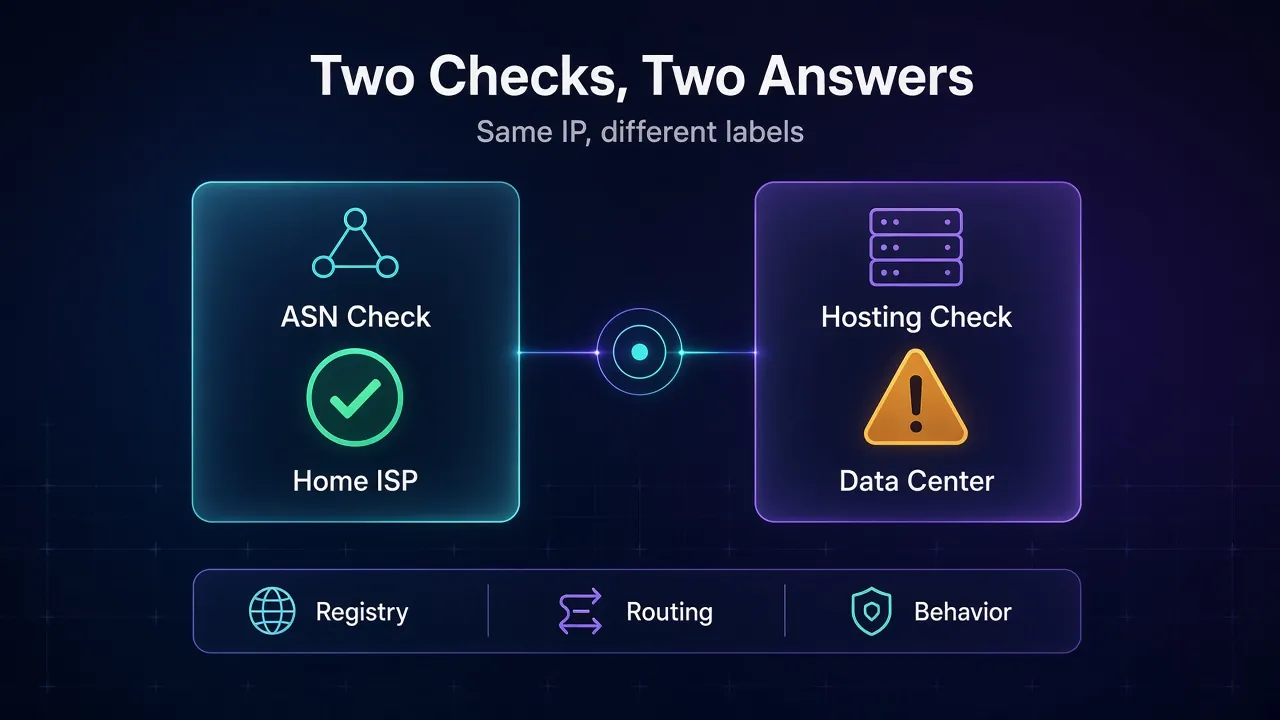
MaxMind’s documentation shows how deep the second kind of check goes. Its Insights service returns a static_ip_score (how rarely an address changes), a user_count (how many users shared it recently) and an is_residential_proxy flag for addresses that belong to a residential ISP but sit on a suspected anonymizing network.
Read that last flag again. A major IP database has a field built specifically to catch residential-looking proxies. So an ISP-registered address raises your trust, but it doesn’t make you invisible.
Our take: treat the ASN result as the entry ticket, not the whole show. What keeps an ISP proxy alive is IP reputation, request pacing and a browser setup that matches the IP’s location.
ISP vs Residential vs Datacenter vs Mobile Proxies
ISP proxies sit between datacenter and residential on almost every axis. This table sums up the trade-offs before we get into specific jobs. For the full family tree, see our guide to types of proxies.
| Trait | ISP (static residential) | Rotating residential | Datacenter | Mobile |
|---|---|---|---|---|
| IP registered to | Consumer ISP | Consumer ISP | Hosting company | Mobile carrier |
| Traffic exits from | A server | A real household device | A server | A real phone or modem |
| Does the IP change? | No, unless you replace it | Yes, by request or timer | No | Often |
| Speed and stability | High | Variable | Highest | Lowest |
| Trust on strict sites | High | High | Low | Highest |
| Usual billing | Per IP, sometimes per GB | Per GB | Per IP | Per GB or per day |
| Pool size | Smaller | Very large | Large | Smaller |
The row most people skip is “traffic exits from”. A residential IP on a real device inherits that household’s connection, which is great for authenticity and terrible when the device goes offline mid-checkout. An ISP proxy never has that problem.
Where ISP Proxies Beat Both Alternatives
ISP proxies win whenever you need the same trusted identity for days or weeks. That’s a narrower set of jobs than the marketing suggests, but it’s an important one.
1Logged-In Accounts
Social, marketplace and ad accounts get nervous when the login IP jumps between cities. One static ISP IP per account keeps the history boring, which is exactly what you want. This is the classic stateful workload: the session matters more than raw volume.
2Allowlists and Fixed Partners
Some APIs, dashboards and B2B portals only accept traffic from approved IPs. A rotating pool can’t be allowlisted. A static ISP IP can, and it still looks like a normal connection to sites that frown on hosting ranges.
3Long Sessions and Checkouts
Multi-step flows like carts, bookings and KYC forms break when the IP changes halfway. Decodo, for example, pitches its dedicated ISP tier at account logins, KYC-sensitive flows and checkout.
4Agents That Need a Fixed Identity
Browser agents that log in, wait and return later behave a lot like human users. Give them a stable ISP IP and they stop tripping “new device, new location” checks on every run.
Best for: anything where “same IP tomorrow” matters more than “new IP every request”.
One Scenario, Three Proxy Types
Say you manage ten online store accounts for clients, and each one logs in every morning to check orders.
On rotating residential proxies, each login arrives from a different household, sometimes in a different city. The marketplace sees ten accounts that never sit still and starts asking for verification codes. You spend your mornings typing codes.
On datacenter proxies, the IPs stay put, but every one of them reads “hosting” in the first lookup. Strict marketplaces treat that as a business tool, not a shopper, and some accounts get extra checks from day one.
On ten dedicated ISP proxies, each account gets one address that looks like a home connection and never moves. The login history stays dull and predictable. That dullness is the product you’re paying for.
The lesson: match the proxy to how the target judges you. Session-heavy targets reward consistency, and that’s where ISP proxies earn their price.
When an ISP Proxy Is the Wrong Tool
Here’s the uncomfortable truth: plenty of people buy ISP proxies for jobs that a cheaper or broader proxy would do better.
- Huge rotating crawls. If you need thousands of fresh IPs per hour, a small static pool runs out fast. Rotating proxies exist for exactly this.
- Rare locations. ISP stock is limited by which providers will lease ranges. Decodo lists around 20 countries for its ISP plans, and IPRoyal advertises 31+. Residential networks reach far more.
- Easy targets. If the site doesn’t filter hosting ranges, you’re paying a premium for trust you don’t need.
- The hardest anti-bot stacks. Because the whole range sits in one data center, a site that spots abuse can block a neighbouring block of addresses in one go. Mobile IPs are harder to ban that way.
Better alternative if you need breadth, not stability: rotating residential for strict targets, datacenter for permissive ones.
How ISP Proxies Are Sold: Shared, Dedicated, Per IP or Per GB
The same product comes in very different packages, and the package decides both your bill and your risk. Decodo’s ISP page lays the options out side by side, which makes it a useful reference even if you buy elsewhere.
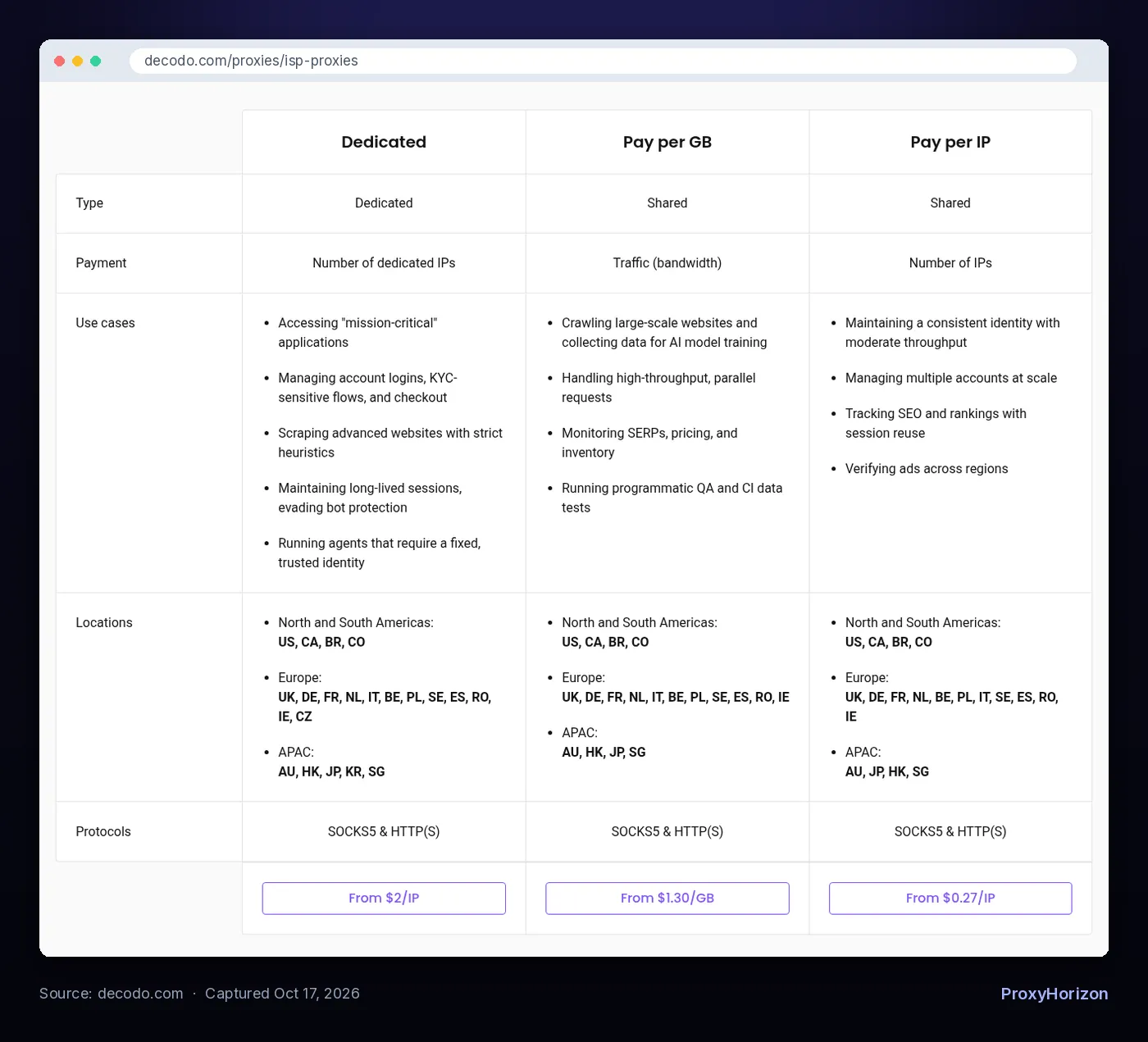
Three models show up across the market:
- Dedicated, per IP. The address is yours alone. Decodo starts at $2 per IP, IPRoyal at $1.80 per proxy, and Bright Data sells pay-per-IP plans with the promise you can keep the IPs “for life” (all checked October 17, 2026).
- Shared, per IP. Cheaper because other customers use the same addresses. Decodo’s shared tier starts at $0.27 per IP.
- Shared, per GB. You pay for traffic instead of addresses, from $1.30 per GB on Decodo’s shared plan.
The maths shifts with your traffic. Say you run 10 lightweight accounts that move 2 GB in total. On a per-GB shared plan at $1.30, that traffic starts at $2.60. Ten dedicated IPs at $2 each start at $20, but nobody else’s behaviour can burn them.
Check before you buy: for accounts, dedicated is worth the premium because a stranger’s spam on a shared IP becomes your problem. For light monitoring, shared per-GB is often plenty. Our best ISP proxy providers roundup compares the full price ladders.
How to Sanity-Check an ISP Proxy in Five Minutes
Don’t trust the product page. Trust a lookup. Run each new IP through these checks before you attach an account to it.
- Look up the ASN. The network name should be a consumer provider, not a hosting brand. In IPinfo’s ASN data, the type field should read “isp”.
- Note the hosting or proxy flags. A hosting label on an ISP proxy is expected, as explained above. A public proxy or VPN flag is a worse sign.
- Confirm the location. Country and city should match what you paid for, and your browser’s timezone and language should match the IP.
- Check reputation. A high fraud score on a brand-new dedicated IP is a reason to ask for a replacement. Webshare, for one, offers a Replace Proxies option for this.
- Test on the real target. Log in, browse for a few minutes and watch for CAPTCHAs before you scale up.
Mistakes That Burn ISP Proxies Fast
Most dead ISP proxies weren’t bad IPs. They were good IPs used like disposable ones.
Sharing one IP across many accounts. Platforms link accounts by IP, so five profiles on one address look like one operator. Give each identity its own IP.
Hammering it like a scraper. A home connection doesn’t fire 50 parallel requests a second. Pace a static IP like a person, or the reputation you paid for drains in an afternoon.
Mismatched fingerprints. A New York IP with a browser set to Berlin time and German language is a red flag no ASN can hide.
Ignoring subnet neighbours. If all your accounts sit on consecutive addresses in one block, a block-level ban takes them out together. Ask whether your provider can spread IPs across ranges.
Frequently Asked Questions
Buy Stability, Not Invisibility
ISP proxies are the right call when your work depends on looking like the same normal user every day: accounts, allowlists, checkouts and agents that come back tomorrow. They’re fast, they don’t drop, and they pass the first lookup every site runs.
They aren’t magic. IP databases can still see the data center behind the address, so behaviour and browser setup decide whether an IP lasts.
Our take: start with a few dedicated ISP IPs, run the five-minute check on each, and test them on your real target before buying in bulk. When you’re ready to compare providers, our proxy directory is a good place to start.