The Best PAM Solutions in 2026
The best PAM (Privileged Access Management) solutions in 2026, compared: CyberArk, BeyondTrust, Delinea, StrongDM, Teleport, and more, with who each is really for.
![The Best PAM Solutions in [year]](/_next/image?url=https%3A%2F%2Fproxyhorizon.com%2Fcdn%2Fblog-images%2Fbest-pam-solutions-1-msog1jix.webp&w=3840&q=75)
Ask any incident responder where the real damage happens, and the answer is almost always the same: privileged accounts. Verizon's Data Breach Investigations Report has found for years that stolen or misused credentials are behind a huge share of breaches, and the accounts attackers want most are the ones with admin rights to your servers, databases, and cloud. Privileged Access Management (PAM) is the discipline built to lock those accounts down.
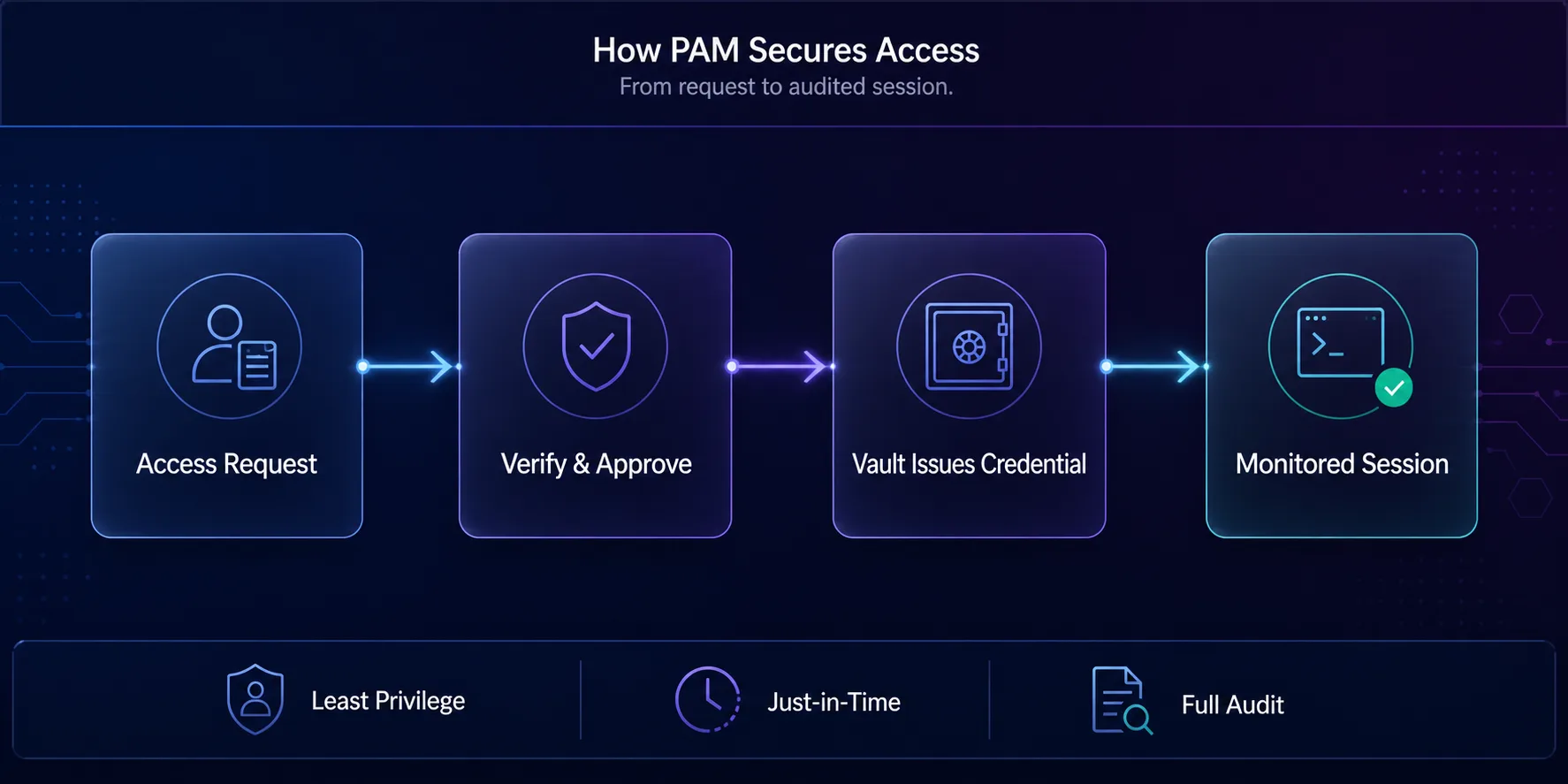
A good PAM platform vaults privileged credentials, hands them out only when needed, records what happens during every session, and gives auditors a clean trail. In 2026, with hybrid infrastructure, sprawling cloud permissions, and machine identities everywhere, PAM has moved from a compliance checkbox to a core security control. This guide explains what PAM does, the features that matter, and the best PAM solutions worth evaluating, from enterprise leaders to modern developer-first platforms.
We'll cover who each tool is genuinely for, so you can shortlist by fit rather than brand recognition. Whether you're a regulated enterprise or a fast-moving engineering team, there's a right answer here.
What Is a PAM Solution?
A PAM solution is software that secures, controls, and monitors privileged access, the accounts and permissions that can change systems, read sensitive data, or administer infrastructure. Instead of admins sharing passwords or holding permanent "god mode" rights, PAM puts a controlled layer in between: credentials live in a vault, access is granted on request, and every privileged session is logged.
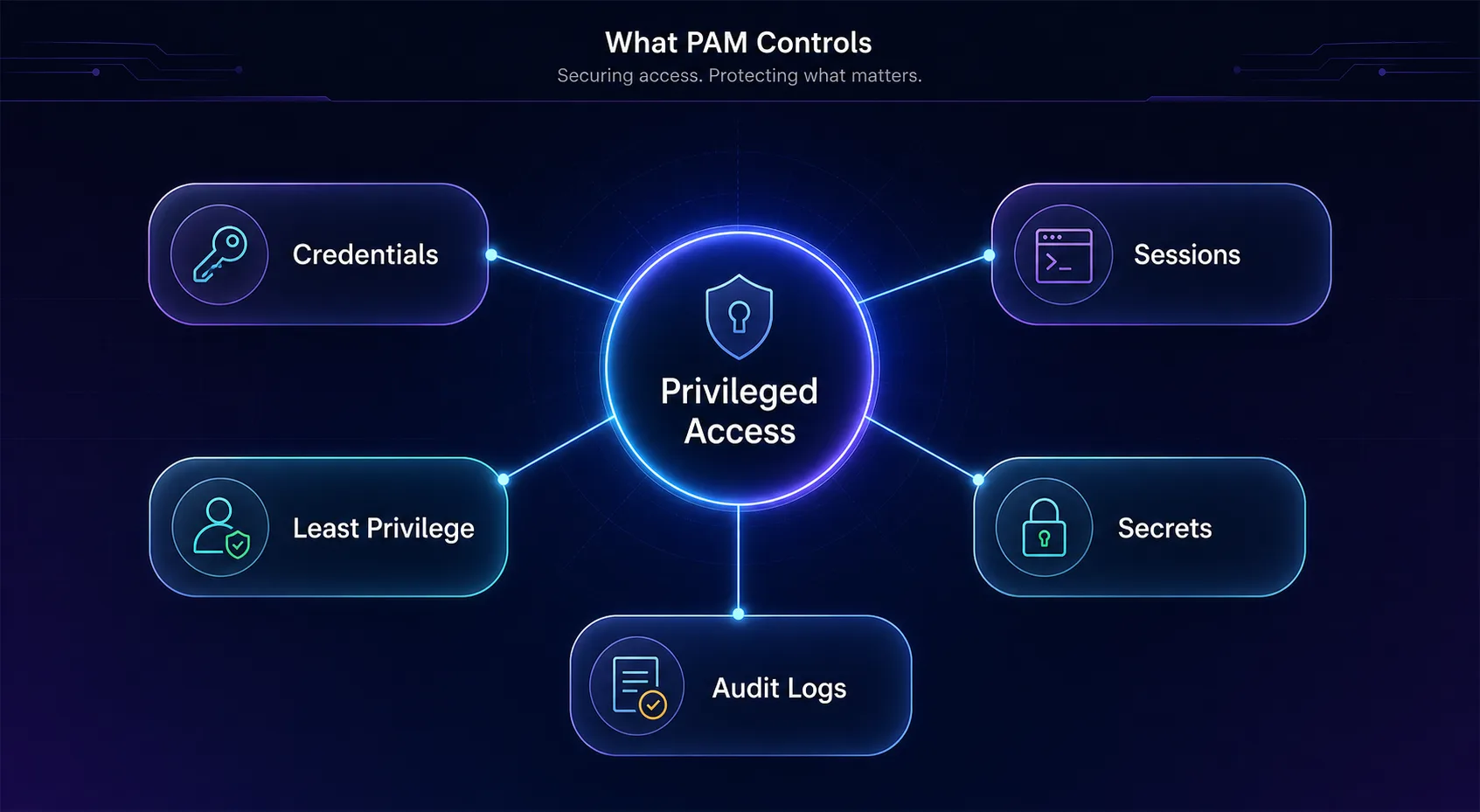
Think of it as the difference between everyone having a master key versus a monitored key cabinet that issues the right key for a specific door, for a limited time, and records who took it. That shift, from standing privilege to controlled, audited, just-in-time access, is the whole point. It's a natural extension of the passwordless direction the industry is heading with passkeys, applied to the highest-risk accounts in the business. If a consumer password manager protects one person's logins, PAM protects an organization's crown-jewel accounts, the same idea at far higher stakes, and part of the security-first mindset every business now needs.
Why PAM Matters More Than Ever in 2026
Three shifts have pushed PAM to the top of security priorities. First, attackers target credentials, not firewalls; once inside, they hunt for privileged accounts to move laterally and reach the crown jewels. Second, infrastructure exploded in complexity: cloud consoles, Kubernetes, databases, and SaaS admin panels each carry their own privileged access, far beyond the old Windows domain admin.
Third, machine identities now outnumber humans. Service accounts, API keys, and CI/CD pipelines all need secrets, and each is a target. PAM is how organizations bring all of that under one policy, enforce least privilege, and prove control to auditors for frameworks like SOC 2, ISO 27001, PCI DSS, and HIPAA. Done well, it shrinks the attack surface and turns a potential breach into a contained, logged event.
Key Features to Look For in a PAM Solution
PAM platforms vary widely, but the core capabilities are consistent. Weigh these against your environment before you shortlist.
| Feature | Why it matters |
|---|---|
| Credential vaulting and rotation | Stores and automatically rotates privileged passwords and keys so they're never exposed or reused |
| Session management | Records, monitors, and can terminate privileged sessions for audit and real-time control |
| Just-in-time access | Grants elevated rights only when needed and revokes them after, eliminating standing privilege |
| Least-privilege enforcement | Strips permanent admin rights so each user gets only what a task requires |
| Secrets management | Secures API keys, tokens, and machine-to-machine credentials across DevOps pipelines |
| Audit and compliance reporting | Produces the logs and reports auditors need for SOC 2, ISO 27001, PCI DSS, and HIPAA |
The Best PAM Solutions in 2026
Seven platforms stand out, each strongest for a different environment and team. How we picked: we weighed capability breadth, deployment flexibility, session and secrets management, audit depth, and real-world fit, drawing on public documentation, analyst coverage such as the Gartner Magic Quadrant for PAM, and hands-on familiarity. A note on links: the buttons below point to each vendor, and some may be partner links; it never changes the ranking or the honest assessment.
1CyberArk
CyberArk is the enterprise standard and the safe default for large, regulated organizations. Its Identity Security Platform covers the full privileged lifecycle, credential vaulting, session isolation and recording, just-in-time access, and secrets management through Conjur, with the depth and certifications that banks, governments, and Fortune 500s demand. If your requirement is "the most complete, battle-tested PAM," this is it.
The trade-off is complexity and cost. CyberArk is powerful but heavy, and rolling it out well usually means dedicated staff or a partner. For a small team it's overkill; for a large enterprise that can't afford a privileged-access gap, its maturity is exactly what you're paying for.
2Delinea
Delinea, formed from the merger of Thycotic and Centrify, is the pick when you want strong PAM without a year-long deployment. Its flagship Secret Server is known for being genuinely usable, teams get vaulting, rotation, and session control running quickly, and its cloud-first options suit organizations that don't want to manage appliances. It hits a sweet spot of capability and speed-to-value.
It scales from mid-market to enterprise, though the very largest, most complex environments sometimes still favor CyberArk's depth. For most organizations that want serious PAM they can actually operate, Delinea is one of the easiest to recommend.
3BeyondTrust
BeyondTrust is the choice when privileged remote access and endpoint control are your priority. Its suite pairs Password Safe (vaulting and session management) with Privileged Remote Access and Endpoint Privilege Management, so you can secure vendor and admin logins and remove local admin rights across workstations and servers. That endpoint least-privilege strength is a genuine differentiator.
The breadth means there's more to learn and configure than a single-purpose tool, but for organizations wrestling with remote third-party access or endpoint privilege sprawl, BeyondTrust covers ground others don't.
4StrongDM
StrongDM is the modern, infrastructure-first take on privileged access, and it's ideal for cloud and DevOps teams. Rather than vaulting passwords for humans to copy, it proxies access to databases, servers, Kubernetes, and cloud resources, enforcing fine-grained, policy-based control with a full audit trail of every query and command. Engineers get frictionless access; security gets complete visibility.
It's less about classic password vaulting for every legacy use case and more about controlling access to modern infrastructure. For teams whose "privileged access" is really about who can touch production systems, StrongDM fits how they actually work.
5Teleport
Teleport is the open-source, identity-native option built for cloud-native engineering teams. It secures access to SSH servers, Kubernetes clusters, databases, and web apps using short-lived certificates instead of passwords or static keys, which eliminates a whole class of credential risk. Every session is recorded, and access maps to identity, not shared secrets.
Because it's open-source with a managed cloud option, it appeals to teams that want transparency and control, though self-hosting adds operational work. For modern infrastructure where certificates and zero standing keys are the goal, Teleport is a standout.
6One Identity Safeguard
One Identity Safeguard is a strong fit for hybrid environments anchored in Active Directory. It delivers credential vaulting and excellent privileged session management, monitoring, recording, and analytics, in an appliance-based or cloud form, and integrates deeply with AD and broader identity governance. For enterprises that live in a Microsoft-centric, hybrid world, that alignment matters.
It's enterprise-oriented and pairs naturally with One Identity's wider IAM portfolio, so it shines most when identity governance and PAM are being solved together rather than in isolation.
7ManageEngine PAM360
ManageEngine PAM360 is the value pick for mid-market organizations that need real PAM without enterprise pricing. Part of the ManageEngine (Zoho) family, it bundles credential vaulting, session management, just-in-time controls, and audit into one reasonably priced platform, and it slots neatly alongside other ManageEngine IT tools many teams already run.
It doesn't have the sheer depth of CyberArk or BeyondTrust at the top end, but for a growing company that wants unified privileged access management it can afford and operate, PAM360 delivers strong coverage for the money.
PAM Solutions Compared
Here's the shortlist side by side. Use the "best for" column to jump to the fit that matches your environment.
| Solution | Best for | Deployment | Standout strength |
|---|---|---|---|
| CyberArk | Large regulated enterprises | Cloud & on-prem | Market-leading breadth and maturity |
| Delinea | Fast, easy rollout | Cloud & on-prem | Secret Server usability |
| BeyondTrust | Remote & endpoint privilege | Cloud & on-prem | Privileged Remote Access |
| StrongDM | Infrastructure / DevOps access | Cloud proxy | Fine-grained access with full audit |
| Teleport | Cloud-native engineering teams | Self-host & cloud | Certificate-based, open-source |
| One Identity | Hybrid Active Directory | Appliance & cloud | Session management + AD depth |
| ManageEngine PAM360 | Mid-market value | On-prem & cloud | Unified PAM at a lower price |
How to Choose the Right PAM Solution
The best PAM tool is the one that matches your environment and team, not the one with the biggest name. Answer these before you commit.
1What Does Your Infrastructure Actually Look Like?
A Windows and Active Directory shop has different needs from a cloud-native, Kubernetes-heavy engineering team. Map where your privileged access lives, servers, databases, cloud consoles, pipelines, and pick a platform built for that reality. CyberArk and One Identity suit traditional enterprises; StrongDM and Teleport suit modern infrastructure.
2Who Will Operate It?
Some PAM platforms need a dedicated team to run well; others are designed for lean IT groups. Be honest about your staffing. If you don't have specialists, favor a tool known for usability and fast deployment, like Delinea or PAM360, over one whose power you can't fully operate.
3What Are Your Compliance Requirements?
If you're chasing SOC 2, ISO 27001, PCI DSS, or HIPAA, prioritize strong audit trails, session recording, and reporting that map to those frameworks. Most leaders cover this, but the depth and ease of producing audit evidence varies, so test it against your actual controls.
4Cloud, On-Prem, or Hybrid?
Deployment model matters. Some teams want a SaaS platform with nothing to host; others need on-prem or appliance-based control for regulatory reasons. Confirm the tool supports your preferred model, and check how it handles the hybrid mix most organizations actually run.
Common Mistakes When Deploying PAM
PAM projects fail for predictable reasons, rarely the technology itself. Sidestep these.
1Boiling the Ocean
Trying to bring every privileged account under control on day one stalls projects and frustrates users. Start with your highest-risk accounts, domain admins, cloud root, critical databases, prove value, then expand. A phased rollout beats a stalled big bang.
2Ignoring the User Experience
If PAM makes admins' jobs painful, they'll route around it, and shadow access defeats the purpose. Choose a tool that fits how your teams work and involve them early. Frictionless access with strong control is the goal, not security theater people bypass.
3Forgetting Machine Identities
Focusing only on human admins misses the service accounts, API keys, and pipeline secrets that now outnumber people. A PAM strategy that ignores secrets management leaves a huge gap. Make machine credentials a first-class part of the plan.
4Treating PAM as Set-and-Forget
Privileged access changes constantly as people, systems, and cloud resources come and go. A PAM deployment needs ongoing review of who has access to what, regular credential rotation, and audit of the logs it produces. The tool enables control; the discipline sustains it.
5Skipping the Audit Trail
Collecting session recordings and logs but never reviewing them wastes half of PAM's value. The audit trail is how you catch misuse and prove compliance. Build reviewing it, and alerting on anomalies, into your security operations from the start.
Frequently Asked Questions
The Bottom Line
Privileged accounts are where breaches turn catastrophic, and PAM is the control that keeps them contained. The right platform vaults your credentials, enforces least privilege, grants access just in time, and records every session, turning your riskiest accounts from a liability into a monitored, auditable system. In 2026, with cloud sprawl and machine identities everywhere, that's not optional for any serious organization.
Match the tool to your reality: CyberArk for enterprise depth, Delinea for fast, usable deployment, BeyondTrust for remote and endpoint control, StrongDM and Teleport for modern infrastructure, One Identity for hybrid AD, and ManageEngine PAM360 for value. Start with your highest-risk accounts, pick the platform that fits your team, and expand from there. Securing privileged access is one of the highest-return moves in all of cybersecurity. And where remote access is part of your risk picture, pair PAM with the right network controls, from a hardened VPN to zero-trust access.
![The Best Data Extraction APIs to Try in [year]](/_next/image?url=https%3A%2F%2Fproxyhorizon.com%2Fcdn%2Fblog-images%2Fbest-data-extraction-apis-1-mufdevwh.webp&w=3840&q=75)
![Best SERP APIs ([year]): Compared for Accuracy, Pricing & AI](/_next/image?url=https%3A%2F%2Fproxyhorizon.com%2Fcdn%2Fblog-images%2Fbest-serp-apis-1-mufdet7y.webp&w=3840&q=75)
![How to Add an MTProto Proxy to Telegram ([year])](/_next/image?url=https%3A%2F%2Fproxyhorizon.com%2Fcdn%2Fblog-images%2Fhow-to-add-mtproto-proxy-telegram-1-mu9ha99k.webp&w=3840&q=75)