Best SERP APIs (2026): Compared for Accuracy, Pricing & AI
Nine SERP APIs compared on what actually decides accuracy and cost: location and device controls, AI Overview support, billing rules, the num=100 price shock, and the legal risks most roundups skip.
![Best SERP APIs ([year]): Compared for Accuracy, Pricing & AI](/_next/image?url=https%3A%2F%2Fproxyhorizon.com%2Fcdn%2Fblog-images%2Fbest-serp-apis-1-mufdet7y.webp&w=3840&q=75)
Your rank tracker says you’re third. Your client googles the same keyword and finds you seventh.
Who’s wrong? Often, nobody. The API searched from a different city, on a different device, maybe an hour earlier.
That’s the part most SERP API roundups skip. They compare the price of 1,000 searches and stop there. But a cheap search that returns the wrong page isn’t cheap at all.
The past year made it messier. Google quietly broke the trick that kept deep rank tracking affordable. It’s also in court with one of the biggest vendors on this list.
So which one deserves your money? It comes down to two things most buyers never check: how deep you track, and whether you need rankings or answers.
- SerpApi covers the most engines and SERP features, but it’s one of the priciest per search.
- DataForSEO is the cheapest way to track rankings at volume, as long as you can wait a few minutes for results.
- Serper is the fast, low-cost pick for AI agents that only need Google.
- Tracking the top 100 now costs around ten times more than the top 10 on most APIs.
- If you want to know what ChatGPT or AI Overviews say about you, a classic SERP API isn’t enough.
Why There’s No Official Search API to Fall Back On
Here’s the first surprise for anyone new to this: you can’t buy Google’s results from Google.
Microsoft retired the Bing Search APIs on August 11, 2025. The replacement, Grounding with Bing, feeds web context to Azure AI agents. It doesn’t hand your app a list of ranked results.
Google’s Custom Search JSON API is closed to new customers and shuts down on January 1, 2027. Even when it worked, it capped you at 10,000 queries a day. Its results also often differed from what people see on google.com.
So almost every tool on this list does the same basic job. It sends your query through a pool of proxies, loads the results page, and parses it into JSON. It’s web scraping, packaged so you never see the blocks.
In plain English: a SERP API is a proxy network, a browser and a parser behind one HTTP request. You’re paying so you don’t have to build all three.
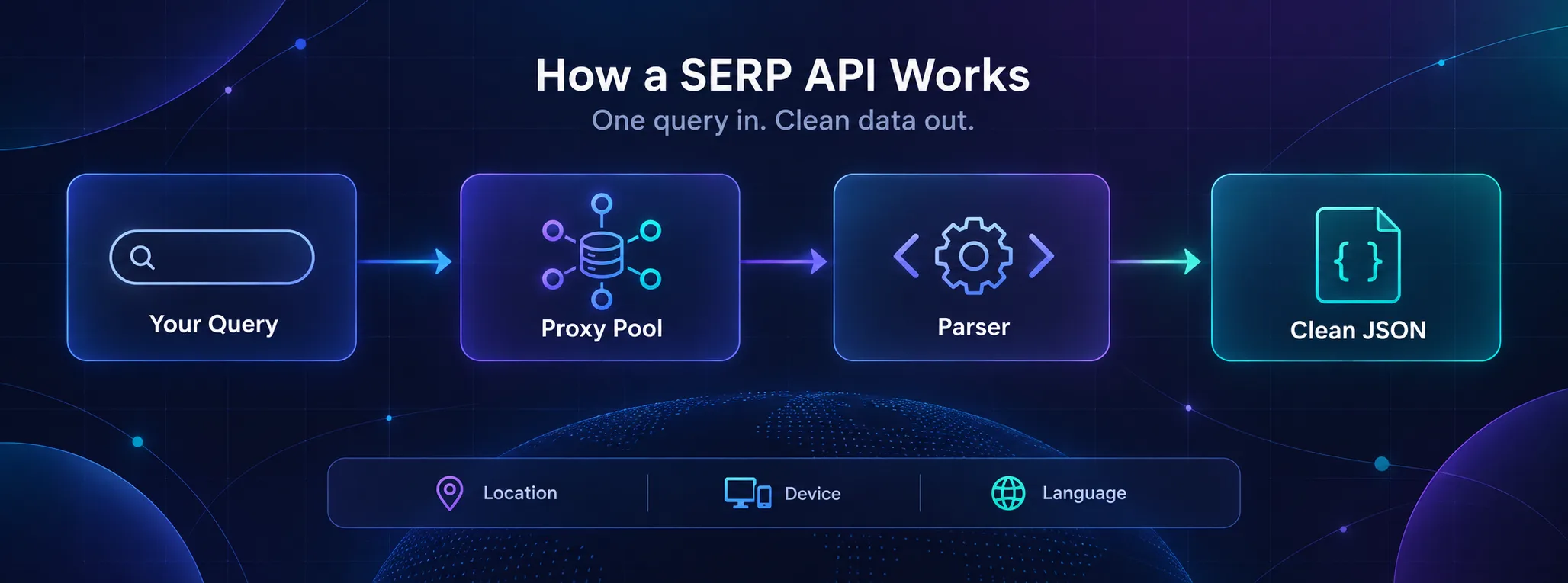
Brave is the one exception: it searches its own index instead of scraping Google. That matters more than it sounds, and we’ll come back to why.
What Accuracy Actually Means for SERP Data
Google doesn’t have one results page. It has millions. The page shifts with the searcher’s city, device, language and even the hour.
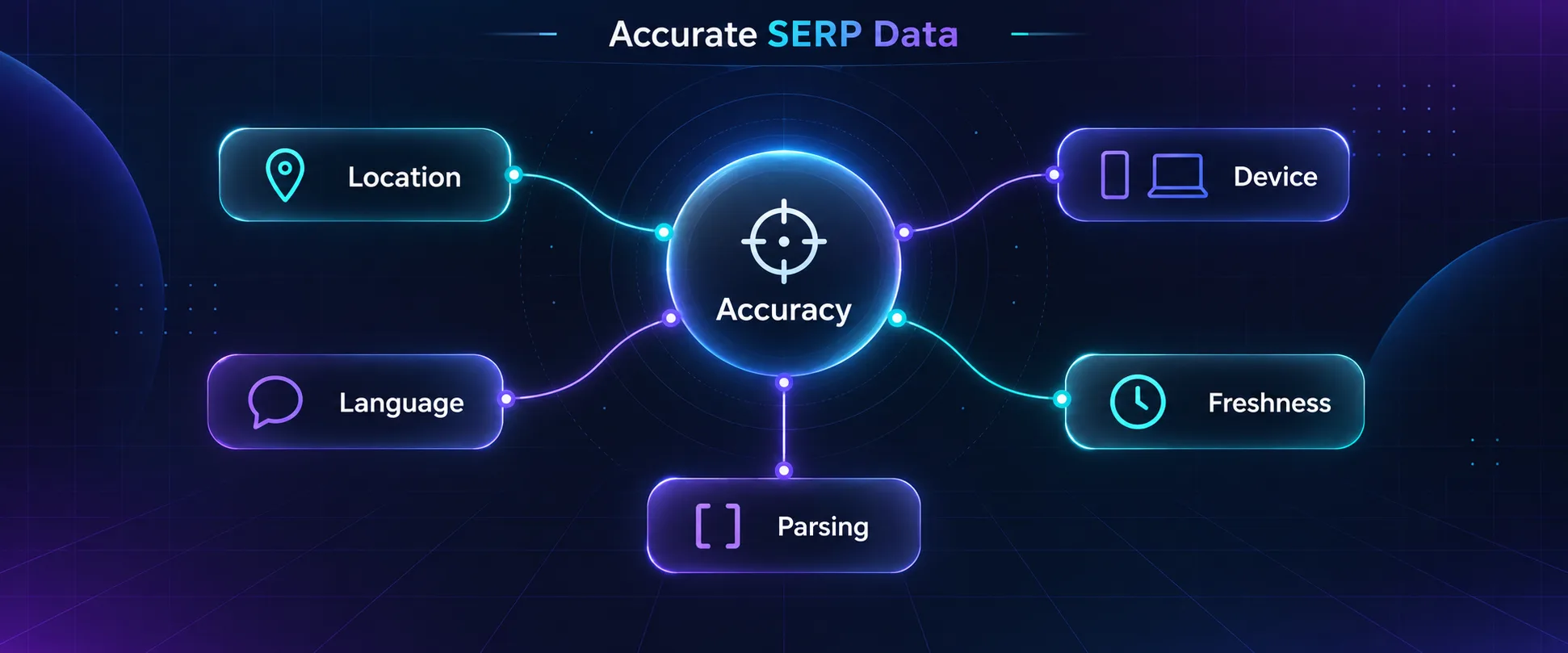
So an accurate SERP API isn’t one that returns the ranking. It’s one that lets you ask the question the way your customer asks it. Five controls decide that.
- Location: country level isn’t enough for local terms. Better APIs accept a city or Google’s encoded
uulelocation. - Device: mobile and desktop results often differ. Check which one your API uses by default.
- Language: the
glandhlsettings change which pages rank, even inside the same city. - Freshness: some APIs serve cached results. SerpApi keeps an identical search for one hour and doesn’t bill it.
- Parsing: a result you can’t parse is a result you don’t have. Check AI Overviews, People Also Ask, local packs and ads.
Now back to that third-versus-seventh argument. The tracker checked a country-level location on desktop. The client searched on a phone, from their office across town.
Both numbers were right. They just answered different questions.
Our take: before you compare prices, write down the city, device and language your customers actually use. Then only shortlist APIs that can ask exactly that. Our guide to SEO monitoring goes deeper on local and device checks.
How We Compared These APIs
We didn’t run a paid benchmark across all nine vendors. We went through each one’s official pricing page and documentation in September 2026, and compared what decides accuracy and cost.
- Location, device and language controls
- Coverage of AI Overviews, AI Mode and other SERP features
- Billing rules: what counts as a billable search, and what’s free
- Real cost at 30,000 searches a month, not the headline price
- Legal cover and vendor risk
Some buttons below are affiliate links (Bright Data, Oxylabs, Decodo and Cloro), so we may earn a commission if you sign up. No brand paid for its spot on this list.
The 9 Best SERP APIs in 2026
They’re ordered by how many teams each one suits, with the strongest all-rounder first. Every entry ends with its catch, because every one of them has one.
1SerpApi
SerpApi is the tool the rest of this market gets measured against. It’s the best fit when you need many engines and every SERP feature, parsed cleanly.
It covers Google Search, Maps, Shopping, News, Scholar, AI Overviews and AI Mode. Bing, Baidu, YouTube and many other engines sit behind the same key. Location goes down to city level, and you can set the device.
Only successful searches count, and cached ones are free. The free plan gives you 250 searches a month, and plans from $150 up include a U.S. Legal Shield worth up to $2 million.
The catch: it’s expensive per search. The $75 Developer plan buys 5,000 searches, which is $15 per 1,000. Google is also suing SerpApi, which we cover further down.
2DataForSEO
DataForSEO is built for rank tracking at volume, and it’s the cheapest serious option here. There’s no subscription: you deposit money and pay per result.
You choose a speed: the standard queue costs $0.0006 per results page and returns within minutes. Priority costs $0.0012, and live, real-time results cost $0.002.
That’s $0.60 per 1,000 searches in the standard queue. The minimum payment is $50, and new accounts get $1 of credit to test with. The same balance also pays for its keyword and backlink APIs.
The catch: since September 19, 2025, it bills per 10 results. A top-100 check costs $0.006, ten times a top-10 one. And the cheap queue isn’t built for agents that need an answer now.
3Serper
Serper does one thing: Google results, fast. It’s the best low-cost pick for AI agents and prototypes that only need Google.
It returns JSON for web search, images, news, places, videos, shopping, Scholar, patents and autocomplete. Serper says most requests come back in one to two seconds.
You get 2,500 free queries with no card. After that, $50 buys 50,000 queries, which works out to $1 per 1,000. LangChain and other agent frameworks ship ready-made Serper integrations, so wiring it into an agent takes minutes.
The catch: it’s Google only, and credits expire six months after purchase. We also didn’t find dedicated AI Overview or AI Mode endpoints in its public materials.
4Bright Data
Bright Data’s SERP API suits teams that already buy its proxies or need enterprise paperwork. It runs on the same network that powers its Google scraping proxies.
Pay-as-you-go costs $1.50 per 1,000 requests, and you only pay for successful ones. The $499 monthly plan includes 380,000 requests, with extras at $1.30 per 1,000. A free trial needs no card.
Results come back as raw HTML or parsed JSON, and it covers the major search engines rather than Google alone.
The catch: it’s not the cheapest per query, and the dashboard takes some learning. If you only need Google rankings, DataForSEO or Oxylabs cost less.
5Oxylabs
Oxylabs sells Google results through its Web Scraper API, and it’s the fairest big-vendor price for mid-sized volume. You pay per successful result, and the rate depends on the target.
For Google, the $49 Micro plan charges $1.00 per 1,000 results, about 49,000 a month. Starter at $99 drops to $0.90. The $999 Business plan reaches $0.60, the same as DataForSEO’s queue price, but in real time.
JavaScript rendering costs more: $1.35 per 1,000 on Micro. The free trial includes 2,000 results with no card.
The catch: Oxylabs is also named in Reddit’s scraping lawsuit, alongside SerpApi. And the per-target pricing takes a minute to read before you can budget properly.
6Decodo
Decodo, formerly Smartproxy, is the budget way into a big proxy vendor’s SERP scraper. It’s best for small budgets that still want templates and support.
Its Web Scraping API has ready templates for Google Search, Google AI Mode, Google Lens, Ads and Hotels, plus Bing, Yahoo and Baidu. Output comes as JSON, CSV, Markdown, HTML or a screenshot.
The free plan gives you 2,000 requests a month. Paid plans start at $19, with success-only billing and a 14-day money-back guarantee.
The catch: it’s subscription only, with no pay-as-you-go. The cost per 1,000 also ranges from about $0.14 to $1.50, depending on plan, proxy type and rendering, so test your real queries first.
7SearchApi
SearchApi is the closest like-for-like SerpApi alternative, at a lower price per search. It suits teams that want breadth without SerpApi’s premium.
It covers Google Search, AI Overviews, AI Mode, Shopping, News and Scholar, plus Bing, YouTube, Amazon, TikTok and dozens more. Failed requests aren’t billed.
The $40 Developer plan includes 10,000 searches, or $4 per 1,000. Compare that with $15 on SerpApi’s plan of the same name. From the $100 Production plan up, it includes legal protection worth up to $2 million.
The catch: you can only use about 20% of your monthly searches in any one hour. The free trial is small too, at 100 requests.
8Brave Search API
Brave doesn’t scrape Google at all. It queries its own index of over 30 billion pages, and that makes it the cleanest option for AI apps that need live web results.
Search costs $5 per 1,000 requests, and every account gets $5 of free credit each month. That’s roughly 1,000 free searches. An LLM Context endpoint returns results shaped for grounding a model.
There’s no scraping and no Google lawsuit hanging over the data source. For a chatbot that needs fresh facts, that’s a real advantage.
The catch: these aren’t Google’s rankings, so it’s useless for rank tracking. Storing results to train AI also needs a plan that grants storage rights.
9Cloro
Cloro tracks the newest kind of results page: the AI answer. It’s the best pick when you need to know what ChatGPT, Perplexity or Google’s AI features say about your brand.
One API queries ChatGPT, Perplexity, Gemini, Copilot, Google AI Mode and AI Overviews, plus classic Google Search and News. Every response comes back as structured JSON with sources and citations.
Pricing runs on credits. A Google search costs 3 credits, an AI Overview with the SERP costs 5, and a full ChatGPT answer costs 7. The free plan has 500 credits a month, and $30 buys 37,500.
The catch: if you only track classic rankings, DataForSEO is cheaper. Cloro earns its place once AI answers matter to you.
What 1,000 Keywords a Day Really Costs
Headline prices hide the number that matters. So here’s a real workload: 1,000 keywords checked once a day. That’s 30,000 searches a month.
First, the change that reshaped this table: in September 2025, Google stopped honoring the num=100 parameter. One request used to return the top 100 results, and now it returns 10.
So tracking the top 100 takes ten requests instead of one. Rank-tracking costs jumped overnight across the industry, and some tools cut their tracking depth to cope.
| API | Pricing model | 30,000 top-10 checks | Top 100 instead |
|---|---|---|---|
| DataForSEO | Pay as you go | About $18 (standard queue) | About $180 |
| Bright Data | Pay as you go | About $45 | About $450 |
| Oxylabs | Monthly plan | $49 (Micro covers it) | Needs a bigger plan |
| Serper | Prepaid credits | $50 pack covers it | About ten times the credits |
| SearchApi | Monthly plan | $100 (Production) | Needs a bigger plan |
| Cloro | Monthly credits | $100 (Hobby) | $250 (Starter) |
| SerpApi | Monthly plan | $275 (Big Data) | Needs a much bigger plan |
Prices come from each vendor’s pricing page in September 2026. DataForSEO needs a $50 minimum deposit. Decodo is left out because its Google cost depends on which proxy tier your queries need.
Two things jump out. DataForSEO wins on raw price by a mile, as long as you can wait for the queue.
The surprise is Cloro at depth. Extra pages cost 2 credits instead of 3, and its plans scale generously. So the top-100 bill lands at $250, not $1,000.
Our take: decide your depth before you pick a vendor. Most sites get almost all their clicks from page one, so tracking the top 20 is usually the smarter trade.
SERP API or AI Search API? Rankings vs Answers
Here’s the second question from the top of this guide: do you want to know where pages rank, or do you want an answer?
Those are different products: a SERP API copies Google’s page. An AI search API, like Brave’s LLM Context endpoint, Tavily or Exa, returns web content shaped for a model to read.
| Your goal | What you need | Good picks |
|---|---|---|
| Track where your pages rank | SERP API | DataForSEO, Oxylabs, SerpApi |
| Monitor ads, shopping or local packs | SERP API with rich parsing | SerpApi, SearchApi, Bright Data |
| Give an AI agent live web results | AI search API | Brave, Serper, Tavily, Exa |
| See what AI answers say about your brand | AI answer API | Cloro, SerpApi (AI Overview, AI Mode) |
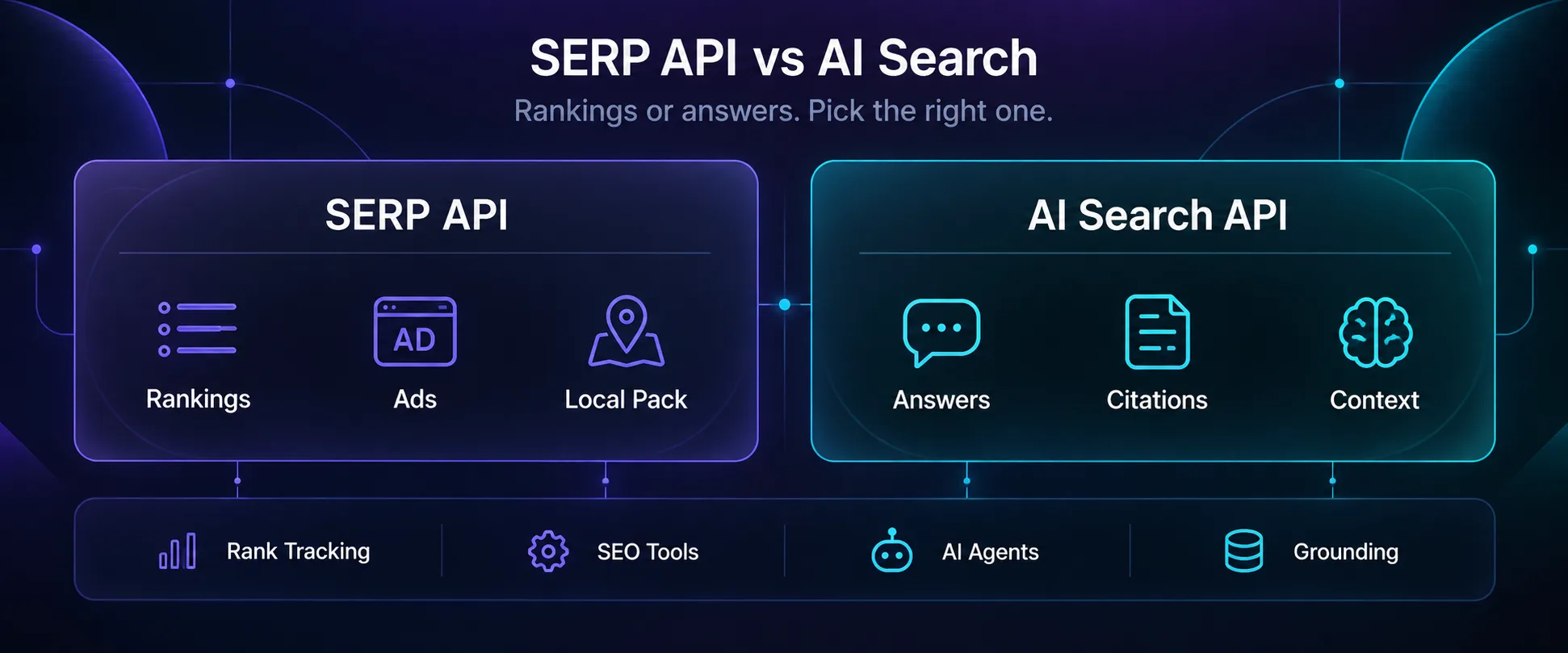
Serper sits in both rows for a reason. It’s a SERP API, but it’s cheap and fast enough that agent builders use it as a search tool.
If your project leans toward research and agents, our guide to AI research and data extraction tools covers Tavily, Exa and Perplexity in depth.
And once a SERP API has found the pages you care about, the next job is pulling fields out of them. That’s where data extraction APIs take over.
The Legal Question Missing From Most Comparison Tables
Most roundups skip this, but it’s worth two minutes, because it affects which vendor you’d want to depend on.
Google sued SerpApi in late 2025, claiming it got around Google’s SearchGuard bot protection in breach of copyright law. In July 2026, a federal judge dismissed much of the case.
The court found that scraping search results without copyrighted content didn’t break that law. Google filed an amended complaint on August 10, 2026, focused on content it licenses from partners like Reddit. SerpApi has moved to dismiss again.
Separately, Reddit is suing SerpApi, Oxylabs, AWMProxy and Perplexity over scraping Reddit content through Google. In mid-2026, a New York judge let most of that case continue. These are allegations, not findings.
What it means for you: your API keeps working while this plays out. But if your product depends on one vendor, keep a second one wired in.
Legal cover helps, but read the fine print. SerpApi’s Legal Shield and SearchApi’s guarantee cover claims about collecting and parsing search results. SerpApi’s terms exclude copyright and DMCA violations, the very claims in Google’s lawsuit.
So be careful about storing or reselling licensed content from results pages, such as images and third-party snippets. This isn’t legal advice, so talk to a lawyer before you build a business on scraped results.
How to Choose the Right SERP API
1Do You Need Results Now or in Five Minutes?
Rank tracking can wait, and waiting is cheap. DataForSEO’s standard queue costs less than a third of its live mode. AI agents can’t wait, so they need a real-time API like Serper, SearchApi or Oxylabs.
2How Deep Do You Need to Track?
Every extra page of results costs money now. If you need the top 100, favor per-page pricing like Cloro’s. Otherwise, cap depth at 20 or 30 and put the savings into more keywords.
3Which Engines and Features Matter?
List them before you shop. Google only? Serper or DataForSEO will do. Need AI Overviews, Bing and YouTube in one place? SerpApi or SearchApi. Need ChatGPT and Perplexity too? Cloro.
4What Happens When a Search Fails?
Most vendors here bill only for successful searches, but read how each one defines success. Also check whether cached results count, and how long the cache lasts. A free cached result is a bargain until it’s an hour old.
Mistakes That Quietly Make SERP Data Wrong
1Checking Rankings From the Wrong Place
A country-level check shows national results. Local searches like plumbers or restaurants can look completely different city to city. Use city-level location for anything local, and match the device to your audience.
2Trusting Cached Results for Rank Checks
Caching saves money on dashboards, but for rank tracking it can hand you an hour-old result. On SerpApi, set no_cache when the result needs to be fresh.
3Missing Half the AI Overview
Google doesn’t always put the AI Overview in the main results. SerpApi sometimes returns a token instead, and you fetch the overview with a second request.
That token expires within four minutes. Queue the follow-up for later, and you’ll record an empty overview that wasn’t empty at all.
4Building Your Own Scraper to Save Money
At a few hundred searches a day, it’s tempting. But Google blocks datacenter IPs fast, so you’d need SEO proxies built for SERP scraping, usually residential ones.
Then you need a browser, and a parser you keep fixing every time Google changes its layout. At DataForSEO’s price, your own time costs more.
Frequently Asked Questions
Pick Your Depth First, Then Your Vendor
If you remember one thing, make it this: the cheapest SERP API is the one that asks Google the same question your customers do.
For most rank tracking, DataForSEO is the best value by a wide margin. SerpApi is worth its premium when you need every engine and feature under one key. Serper is the easy win for agents that only need Google, and Cloro is the pick once ChatGPT and Perplexity answers matter to you.
Here’s the next step: run 20 keywords you know well through two free tiers, set to the city that matters to you. Then compare both with a search on your phone. You’ll know which one to trust within an hour. Building your own scraper instead? Start with the proxy directory.
![The Best Data Extraction APIs to Try in [year]](/_next/image?url=https%3A%2F%2Fproxyhorizon.com%2Fcdn%2Fblog-images%2Fbest-data-extraction-apis-1-mufdevwh.webp&w=3840&q=75)
![How to Add an MTProto Proxy to Telegram ([year])](/_next/image?url=https%3A%2F%2Fproxyhorizon.com%2Fcdn%2Fblog-images%2Fhow-to-add-mtproto-proxy-telegram-1-mu9ha99k.webp&w=3840&q=75)
![How to Set Up a Proxy in Telegram on Android ([year])](/_next/image?url=https%3A%2F%2Fproxyhorizon.com%2Fcdn%2Fblog-images%2Ftelegram-proxy-android-setup-1-mu9ha6tn.webp&w=3840&q=75)