What Is a Passkey & How It Actually Works (2026)
What a passkey is and how it actually works: the public-private key pair, the login handshake, why passkeys can't be phished, how they sync, and how to start.
![What Is a Passkey & How It Actually Works ([year])](/_next/image?url=https%3A%2F%2Fproxyhorizon.com%2Fcdn%2Fblog-images%2Fwhat-is-a-passkey-1-mskbm20h.webp&w=3840&q=75)
Passwords are the weakest link in almost everyone's digital life. Verizon's long-running Data Breach Investigations Report has found year after year that stolen or weak credentials sit behind a huge share of breaches, and no amount of "use a strong password" advice has fixed it. Passkeys are the industry's actual answer, and unlike most security buzzwords, they genuinely change the math.
Backed by the FIDO Alliance and every major platform (Apple, Google, and Microsoft), a passkey lets you sign in with your fingerprint, face, or device PIN, with no password to type, forget, reuse, or hand to a phishing page. But "it's like a password but better" undersells what's happening. So this guide answers what a passkey is and how it actually works, down to the cryptography, in plain English.
You'll understand the key pair behind every passkey, the exact login handshake, why passkeys are effectively impossible to phish, where they're stored and how they sync, their honest limitations, and how to start using them today. If you've already tightened up your logins by securing your browser autofill data, passkeys are the next step up.
What Is a Passkey?
A passkey is a passwordless login credential based on public-key cryptography. Instead of a secret string you memorize and type, a passkey is a pair of cryptographic keys created for one specific website or app. You prove who you are by unlocking your device with a biometric or PIN, and your device does the cryptographic work behind the scenes.
Technically, passkeys are the consumer-friendly name for FIDO2/WebAuthn credentials, an open standard built by the FIDO Alliance and the W3C. The crucial shift is this: with a password, you and the server share the same secret, so anyone who obtains it can log in as you. With a passkey, the secret half never leaves your device and is never sent anywhere, which removes the thing attackers have been stealing all along.
How a Passkey Actually Works
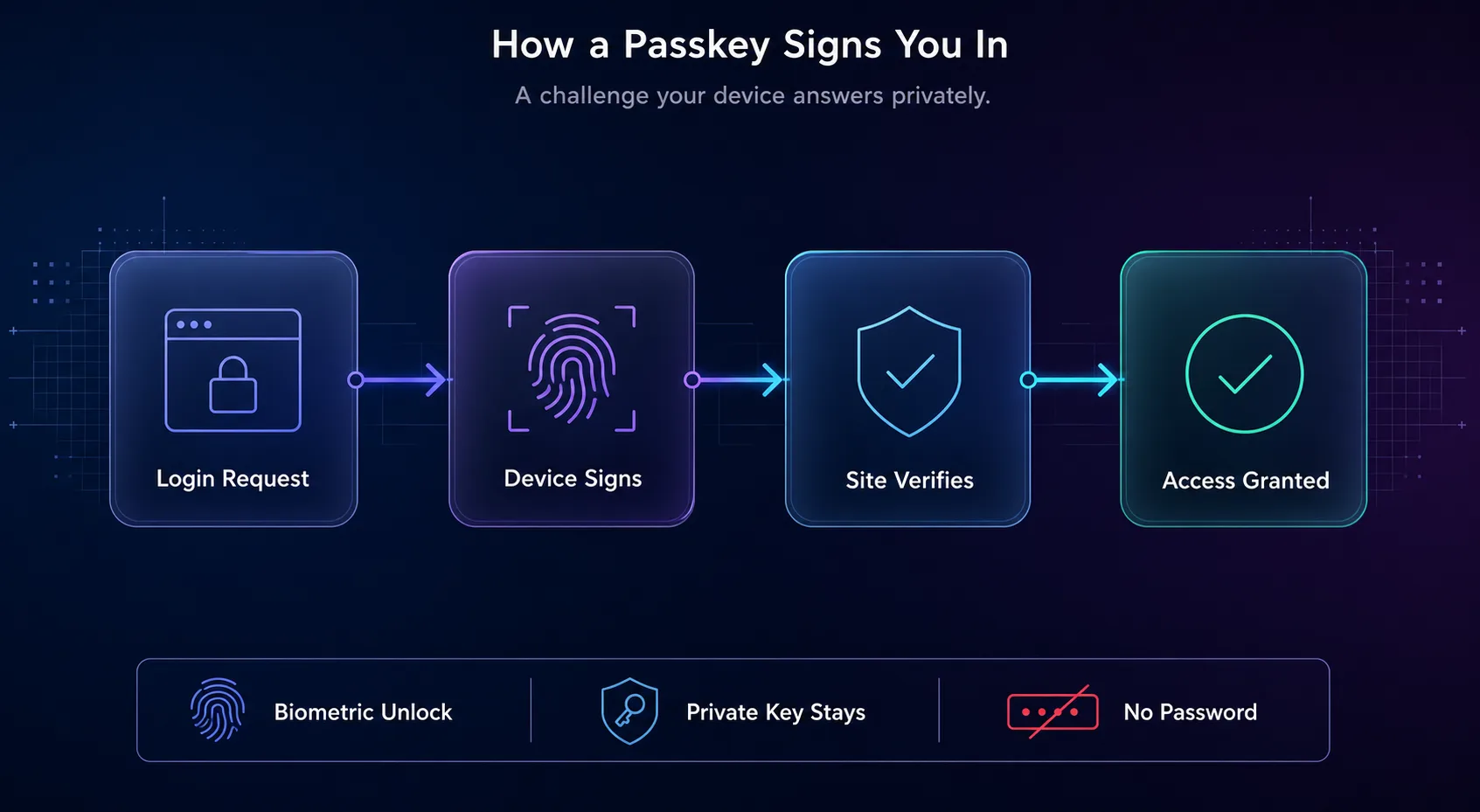
The magic is a challenge-and-response handshake using two mathematically linked keys. It happens in a fraction of a second, but breaking it into its two moments, creating the passkey and using it, makes the whole thing click.
1When You Register a Passkey
When you create a passkey for a site, your device generates a brand-new key pair just for that site: a private key and a public key. The private key is stored securely on your device, in hardware like a secure enclave or TPM, and never leaves it. The public key is sent to the website, which stores it against your account. That public key is useless on its own, which is the whole point.
2When You Sign In
On login, the website sends your device a random one-time challenge. Your device asks you to unlock it with your fingerprint, face, or PIN, then uses the private key to sign that challenge, producing a unique signature. It sends only the signature back, never the key. The site checks the signature against your stored public key, and if the math verifies, you're in. No secret ever crossed the wire.
The Key Pair, in Plain English
If public and private keys sound abstract, here's the mental model. Think of the public key as a padlock the website keeps, and the private key as the only key that opens it, a key that lives locked inside your phone or laptop. Anyone can have the padlock; only your device has the key, and it never makes a copy to send out.
Two properties fall out of this design, and they're what make passkeys special. First, the private key never leaves your device, so there's nothing on the server for a breach to steal, just useless public keys. Second, the biometric or PIN you use doesn't get sent anywhere either; it only unlocks the private key locally. Your fingerprint stays on your phone. This is a fundamentally different trust model from typing a shared secret into a box on a web page.
Passwords vs Passkeys
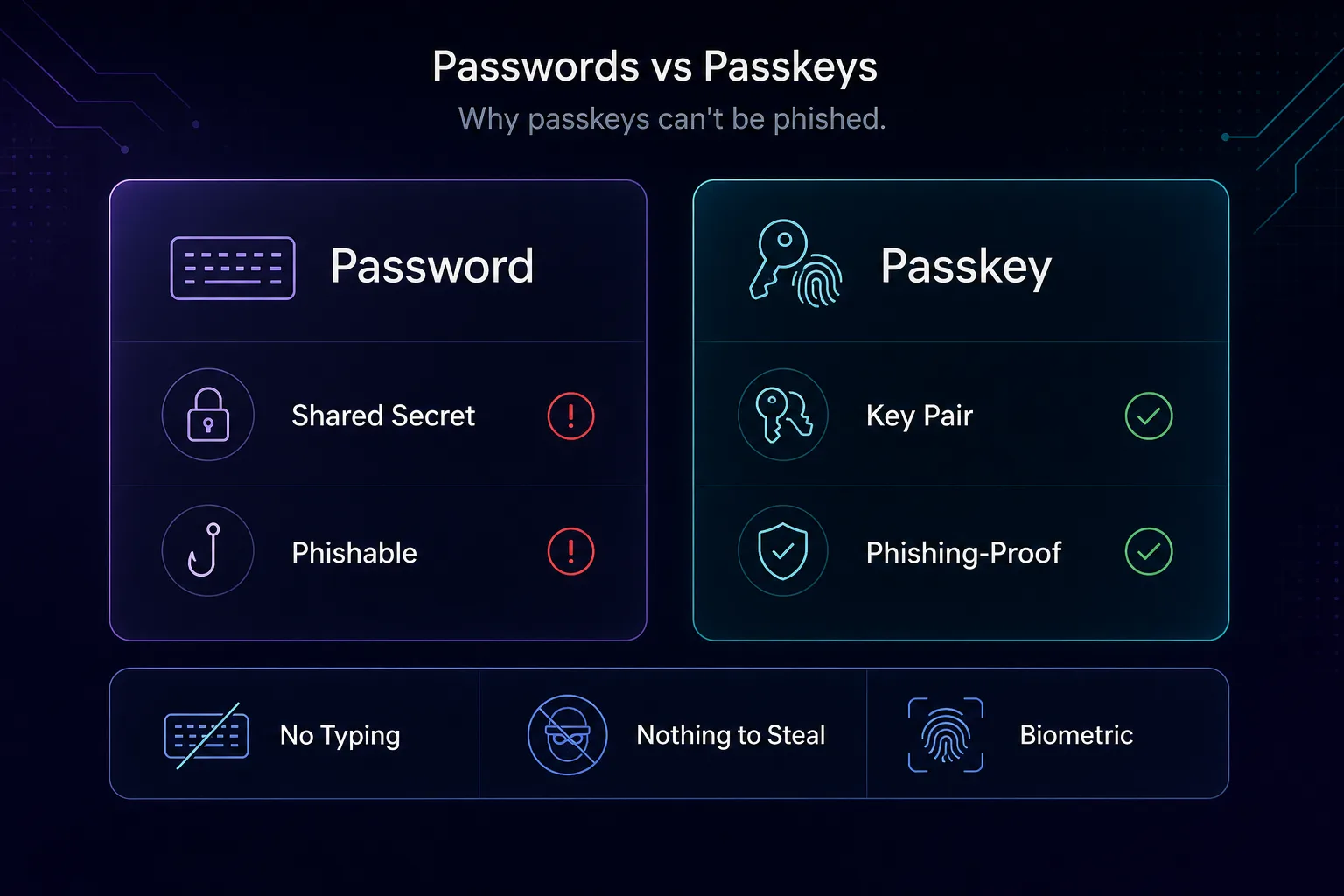
Lining the two up side by side shows why this is an upgrade rather than a rebrand. The differences aren't cosmetic; they change what an attacker can and can't do.
| Aspect | Password | Passkey |
|---|---|---|
| What it is | A shared secret you memorize | A cryptographic key pair |
| Where the secret lives | On the server and in your head | Private key stays on your device |
| Phishing risk | High, you can be tricked into revealing it | Practically none, bound to the real domain |
| Breach exposure | A server leak exposes usable passwords | A server leak exposes only useless public keys |
| How you use it | Type it, often plus a 2FA code | Unlock with fingerprint, face, or PIN |
| Reuse risk | People reuse across sites | Unique per site automatically |
For the everyday habits that still matter while the world transitions, our guide on why online privacy matters puts this in context.
Passkeys vs Passwords vs 2FA: Where Each Fits
Passkeys don't just beat passwords; they also fold in what two-factor authentication was bolted on to provide. Seeing all three side by side clarifies why a passkey is a genuine one-step upgrade rather than another layer to juggle.
| Method | What it proves | Phishing-resistant? | Steps to log in |
|---|---|---|---|
| Password alone | Something you know | No | Type it |
| Password + SMS code | Know + a texted code | Weak (codes get phished or SIM-swapped) | Two steps |
| Password + app code | Know + an app code | Better, but still phishable | Two steps |
| Passkey | Your device + your biometric | Yes | One tap |
A password answers only "do you know the secret," which is exactly what attackers phish out of people. Adding an SMS or app code helps, but those codes can still be phished in real time, and SMS can be intercepted through SIM swaps. A passkey collapses two factors, something you have (the device holding the private key) and something you are or know (your biometric or PIN), into a single tap that no fake site can replay. For most accounts, that means one passkey can replace both the password and the separate 2FA step at once. That is the rare security upgrade that is also more convenient: fewer steps for you, and far less for an attacker to steal, which is exactly why the whole industry is moving this way instead of adding yet another code to type.
Why Passkeys Can't Be Phished
This is the headline benefit, and it's worth understanding exactly why it holds. A passkey is cryptographically bound to the real website's domain. Your browser or device will only use a passkey on the exact site it was created for, so a look-alike phishing page at a slightly-wrong URL simply can't trigger it. The passkey won't fire, which is a clue in itself.
On top of that, there's nothing to hand over. Phishing works by tricking you into typing a secret into a fake box. With a passkey, there's no secret to type; the private key stays on your device and only ever produces a one-time signature for a specific challenge on a specific domain. Even a convincing fake page gets nothing usable. And because servers store only public keys, a data breach at the company doesn't hand attackers anything they can log in with. Three of the biggest attack routes, phishing, credential stuffing, and breach-based takeover, all lose their footing at once.
Where Passkeys Live and How They Sync
A common worry is "if the key is on my device, what happens when I get a new phone?" Modern passkeys solve this with secure syncing. On Apple devices, passkeys sync through iCloud Keychain; on Android and Chrome, through Google Password Manager; on Windows, through Windows Hello and increasingly the same cross-platform sync. In each case the passkeys are end-to-end encrypted, so the provider syncs them without being able to read them.
You can also store passkeys in a dedicated password manager like 1Password, Bitwarden, or Dashlane, which is handy if you live across different ecosystems, since it isn't tied to a single vendor's cloud. Signing in on a device that doesn't have your passkey, say a friend's Windows PC when yours are on an iPhone, works through a QR code: you scan it with your phone, confirm with your biometric, and a secure Bluetooth-verified channel authenticates you without the passkey ever leaving your phone. If you already lean on a password manager, our piece on securing autofill and password data pairs directly with this.
The Honest Limits of Passkeys
Passkeys are a genuine leap forward, but they're not magic, and pretending otherwise helps no one. The rough edges are real, even if they're shrinking fast.
Cross-ecosystem use is still clunky. Moving between Apple and Windows, or Android and a work laptop, often means the QR-code dance rather than a seamless sync, because the big platforms sync within their own walls first. Account recovery is the other soft spot: if you lose access to the device or account that holds your passkeys, recovery frequently falls back to, yes, a password or an email link, which reintroduces the very weakness passkeys remove. And adoption is uneven: major sites support passkeys now, but plenty of smaller services still don't, so you'll be living in a hybrid world for a while.
There's also a design tension worth knowing: synced passkeys (convenient, backed up to your cloud) versus device-bound passkeys (never leave one piece of hardware, stronger but riskier if that device is lost). Most consumers want the synced kind; high-security users sometimes prefer device-bound hardware keys. Neither is wrong; they're different points on the convenience-versus-control line.
How to Start Using Passkeys Today
You don't need to wait or do anything technical. If you own a modern phone or laptop, you can create your first passkey in under a minute on any site that supports them (look for "set up a passkey" in account security settings).
1On Apple Devices
Passkeys are built into iOS and macOS and sync through iCloud Keychain automatically. When a site offers a passkey, approve it with Face ID or Touch ID, and it's instantly available on your other Apple devices signed into the same Apple account.
2On Android and Chrome
Android and Chrome store passkeys in Google Password Manager, synced across devices signed into your Google account. Creating one is a single fingerprint or screen-lock confirmation, and Chrome offers the passkey automatically next time you sign in.
3On Windows
Windows Hello handles passkeys using your PIN, fingerprint, or face camera. You can create and use passkeys in Edge and Chrome, and Windows increasingly supports syncing and importing them rather than binding each one to a single machine.
4With a Password Manager
Cross-platform password managers like 1Password, Bitwarden, and Dashlane now create and store passkeys too, syncing them across every operating system. This is the smoothest route if you mix Apple, Android, and Windows, since your passkeys follow the manager, not the vendor.
Frequently Asked Questions
The Bottom Line
A passkey replaces the fragile shared secret at the heart of password security with a key pair whose private half never leaves your device. You unlock it with your face or fingerprint, your device signs a one-time challenge, and the site verifies it, with nothing to type, phish, reuse, or steal from a server. That single design change neutralizes phishing, credential stuffing, and breach-based takeovers in one move.
They aren't flawless yet: cross-ecosystem use can be clunky and account recovery still leans on older methods. But the direction is clear, and you can start now. Create a passkey on one important account today, ideally storing it in a synced password manager so it works everywhere, and layer it with the rest of your privacy stack, from locked-down autofill to a trustworthy VPN on public networks. The password era is ending, and passkeys are what comes next.
![The Best Data Extraction APIs to Try in [year]](/_next/image?url=https%3A%2F%2Fproxyhorizon.com%2Fcdn%2Fblog-images%2Fbest-data-extraction-apis-1-mufdevwh.webp&w=3840&q=75)
![Best SERP APIs ([year]): Compared for Accuracy, Pricing & AI](/_next/image?url=https%3A%2F%2Fproxyhorizon.com%2Fcdn%2Fblog-images%2Fbest-serp-apis-1-mufdet7y.webp&w=3840&q=75)
![How to Add an MTProto Proxy to Telegram ([year])](/_next/image?url=https%3A%2F%2Fproxyhorizon.com%2Fcdn%2Fblog-images%2Fhow-to-add-mtproto-proxy-telegram-1-mu9ha99k.webp&w=3840&q=75)