What Is SmartDNS & How Does It Work? 2026 Guide
What is SmartDNS and how does it work? A clear guide to SmartDNS for streaming, plus how it compares to a VPN and a proxy — and why it offers no privacy.
If you have ever wanted to watch a show that is not available in your country, you have probably run into SmartDNS — often sold as a faster, simpler alternative to a VPN. And it is genuinely brilliant at one job: unblocking geo-restricted streaming on almost any device, with zero speed loss. But here is the part the marketing skips: SmartDNS does nothing for your privacy.
That distinction matters, because SmartDNS is frequently confused with a VPN, and the two are not interchangeable. SmartDNS does not encrypt your traffic and does not hide your IP address. It is a streaming tool, full stop — fast and effective for unblocking, useless for security.
This guide explains exactly what SmartDNS is, how it works under the hood, and how it compares to a VPN and a proxy so you can pick the right tool. If you want the broader privacy picture first, our proxy vs VPN guide is a useful companion.
The Quick Answer
Our take: SmartDNS is a service that reroutes only the part of your connection that reveals your location, letting you unblock geo-restricted streaming content at full speed on any device — including smart TVs and consoles that cannot run a VPN. It does not encrypt your traffic or hide your IP, so it is a streaming tool, not a privacy tool. If you only want to stream, SmartDNS is great; if you also want privacy, use a VPN (and most good VPNs include SmartDNS anyway).
What Is SmartDNS?
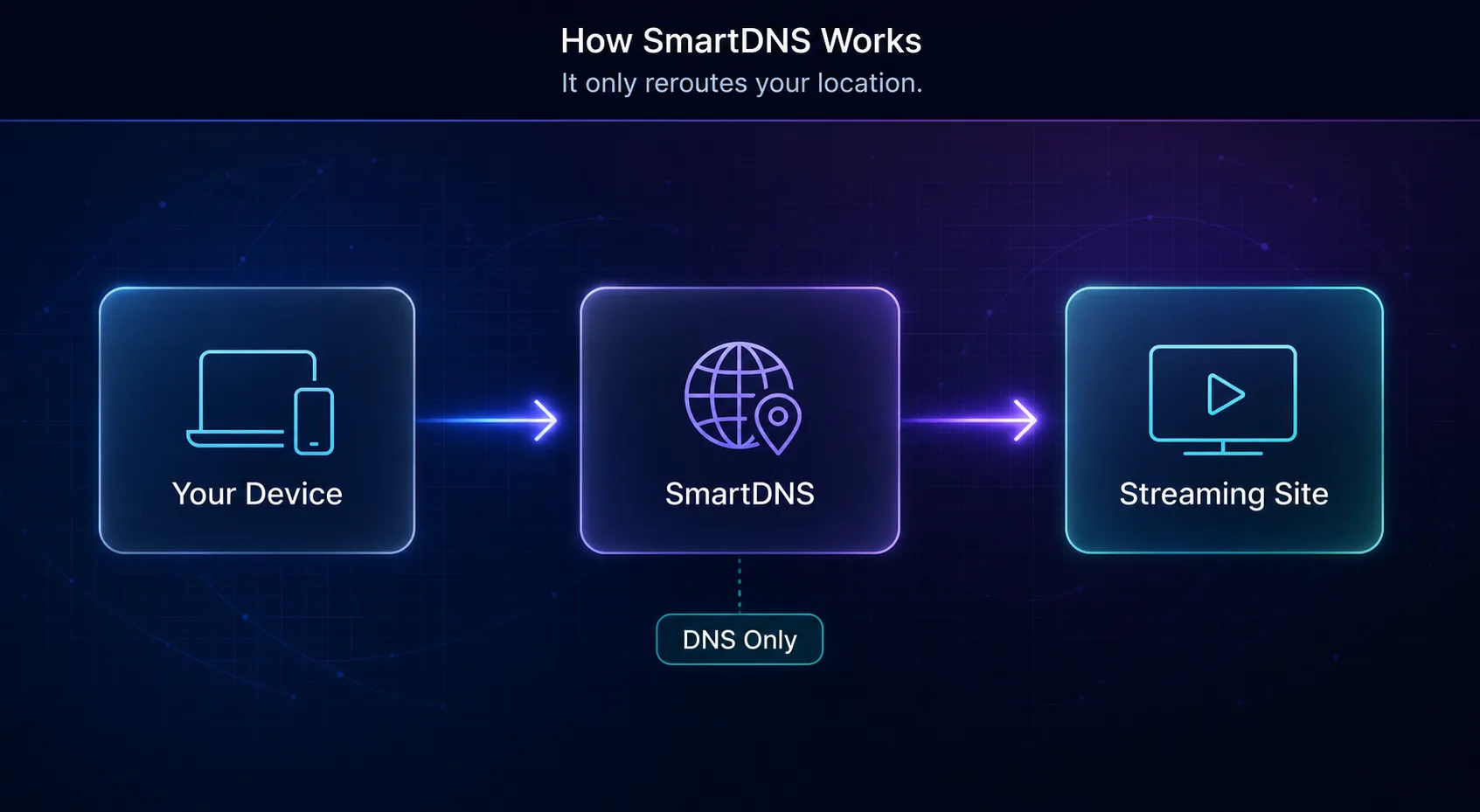
SmartDNS (Smart Domain Name System) is a service that makes streaming platforms think you are located in a different country, so you can access content that is otherwise blocked in your region. It does this by changing how your device resolves certain website addresses, without touching the rest of your connection.
The key idea is that it is selective. A VPN reroutes and encrypts everything; SmartDNS only reroutes the small pieces of data that give away your location for specific streaming services. That selectiveness is exactly why it is so fast — and also why it offers no security.
How Does SmartDNS Work?
To understand SmartDNS, you need one quick fact about how the internet works: when you visit a site, your device uses DNS to translate the domain name (like a streaming service) into an IP address. That DNS process, and the request itself, can reveal where you are.
SmartDNS intercepts just those location-revealing DNS queries and routes them through a proxy server in the country where the content is available. The streaming service sees a request that appears to come from an allowed region and serves the content — while the actual video streams directly to you at full speed. Nothing is encrypted and your real IP is unchanged; only the location signal is swapped. For the underlying concept, Cloudflare has a clear primer on how DNS works.
What Is SmartDNS Used For?
SmartDNS has a narrow but genuinely useful set of jobs, all centered on unblocking content quickly.
- Streaming geo-blocked content — access libraries from other regions on Netflix, Prime Video, BBC iPlayer, and more.
- Streaming on devices that cannot run a VPN — smart TVs, game consoles, and media players where VPN apps are not available.
- Full-speed viewing — because there is no encryption overhead, you keep your full bandwidth for smooth 4K.
- Reducing buffering — no VPN slowdown means fewer interruptions on high-bitrate streams.
What it is not for is privacy, security, or anything involving public Wi-Fi safety — for those you want a VPN, as we cover in can websites see your IP address.
SmartDNS vs VPN
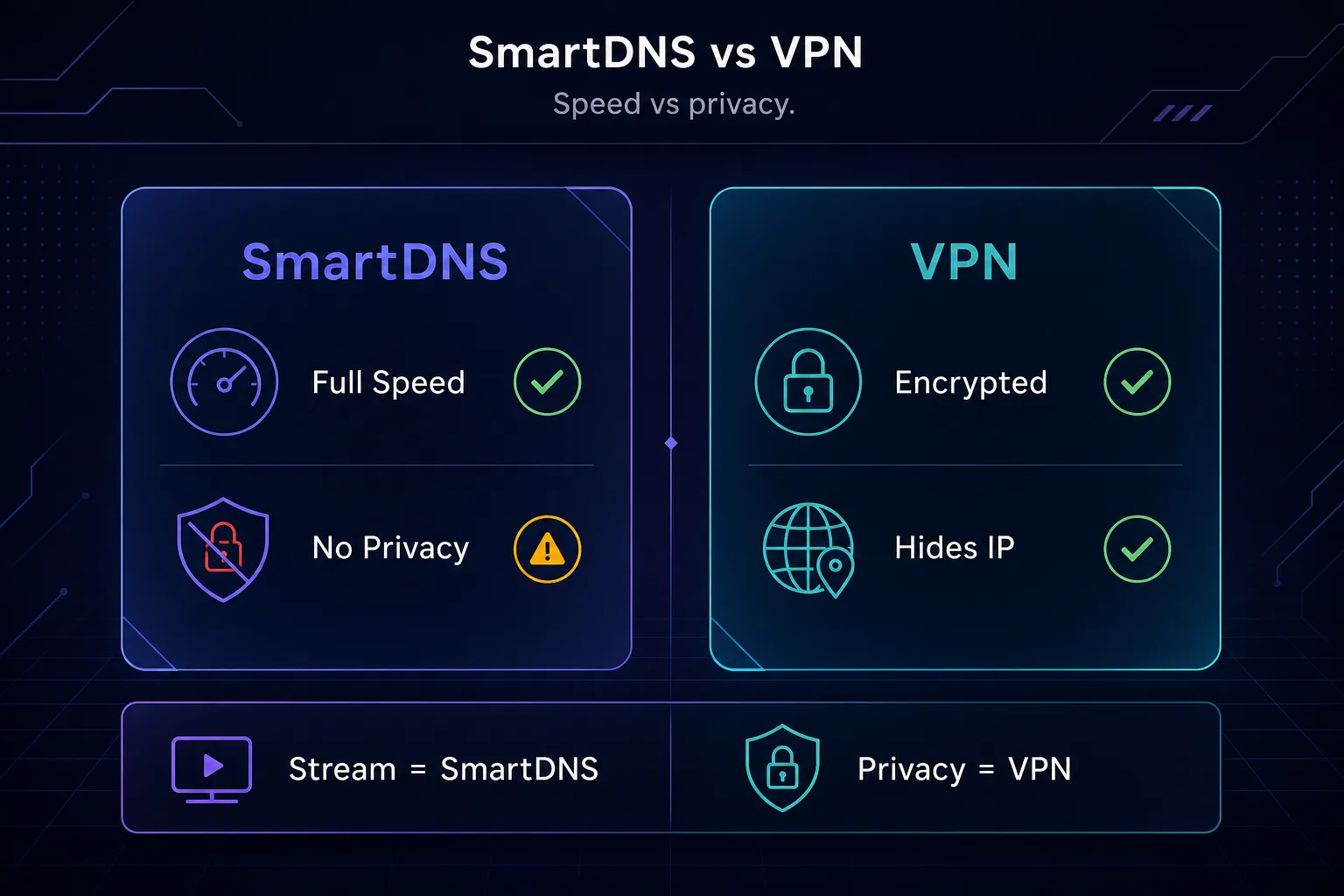
This is the comparison that matters most, because the two are so often confused. They overlap on one thing — unblocking streaming — and differ on everything else.
| Feature | SmartDNS | VPN |
|---|---|---|
| Encrypts your traffic | No | Yes |
| Hides your IP address | No | Yes |
| Speed | Full speed (no slowdown) | Slight slowdown |
| Unblocks streaming | Yes | Yes |
| Privacy & security | None | Strong |
| Works on smart TVs / consoles | Yes, easily | Needs router setup |
Our take: choose SmartDNS if your only goal is fast streaming on any device. Choose a VPN if you want privacy and security alongside unblocking. Since top VPNs now include SmartDNS features, a VPN is often the better all-round buy — you get both. For streaming specifically, see our best VPNs for Netflix.
SmartDNS vs Proxy
SmartDNS and proxies both change how the internet sees you, but they work at different levels and suit different jobs. A proxy routes your actual traffic through a different IP address; SmartDNS only reroutes DNS location signals for specific services.
A proxy — especially a residential or datacenter proxy — actually changes your visible IP address, which makes it powerful for web scraping, multi-account management, and automation at scale. SmartDNS does not change your IP at all, so it cannot do any of that; it is built purely for unblocking streaming. In short: proxies are for data work and IP control; SmartDNS is for watching geo-blocked video quickly.
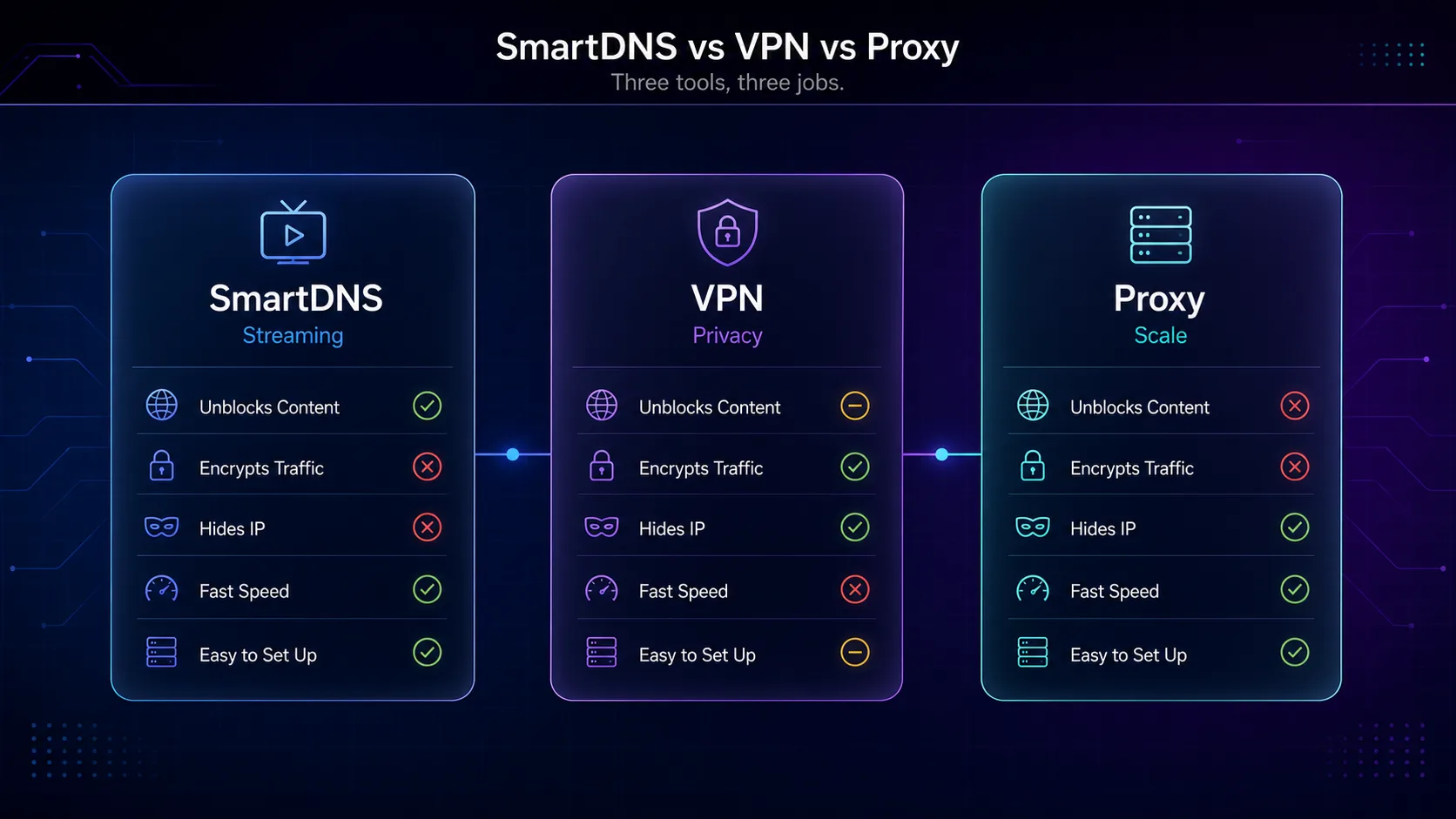
SmartDNS vs VPN vs Proxy: The Full Picture
To bring it all together, here is where each tool sits. They are complementary, not competitors — each is best at a different job.
| Aspect | SmartDNS | VPN | Proxy |
|---|---|---|---|
| Main purpose | Unblock streaming | Privacy + unblocking | Change IP at scale |
| Encryption | No | Yes | Usually no |
| Hides your IP | No | Yes | Yes |
| Speed | Fastest | Slower | Fast |
| Best for | Streaming on any device | Privacy & security | Scraping, multi-account |
Is SmartDNS Safe and Private?
Here is the honest answer nobody should soften: SmartDNS provides no privacy or security whatsoever. It does not encrypt your traffic, so anyone on your network or your ISP can still see everything you do. It does not hide your IP, so websites still know your real address. And because your DNS queries pass through a third-party server, you are trusting that provider with visibility into which services you access.
None of that makes SmartDNS "dangerous" for its intended use — streaming — but it does mean you should never treat it as a security tool. On public Wi-Fi, for banking, or for any privacy-sensitive activity, SmartDNS offers nothing. That is a VPN's job. Use SmartDNS for what it is good at, and do not mistake speed for safety.
How to Set Up SmartDNS
Setup is refreshingly simple, which is part of the appeal. The exact steps vary by provider and device, but the pattern is always the same.
- Step 1: Sign up for a SmartDNS service (many VPNs include one).
- Step 2: Register your home IP address in the provider's dashboard so it recognizes you.
- Step 3: Enter the provider's DNS server addresses into your device's network settings — on a TV, console, router, or computer.
- Step 4: Restart the device and start streaming; geo-blocked libraries should now be available.
Because it lives in DNS settings, SmartDNS works on devices that cannot install apps at all, which is its standout practical advantage over a VPN.
Best VPNs With SmartDNS Built In
Here is the pragmatic recommendation: rather than buying SmartDNS alone, get a VPN that includes it. You gain full privacy and encryption plus the SmartDNS streaming feature for devices that need it. These are the VPNs we rate most highly for exactly that — see the full list in our VPN directory.
1NordVPN

NordVPN includes SmartDNS (branded SmartPlay) built into every plan, so you get fast streaming on smart TVs and consoles alongside its audited no-logs privacy and fast NordLynx protocol, meaning one plan covers both your streaming and your everyday security needs. It is our best all-round pick for combining both, and SmartPlay works automatically on supported apps, so there is often nothing extra to configure — you simply connect and stream.
2ExpressVPN

ExpressVPN offers its SmartDNS as MediaStreamer, which is excellent for unblocking on devices without VPN support. Paired with its polished apps and strong reliability, it is a premium choice for streaming households. MediaStreamer is straightforward to enable from your account dashboard and pairs neatly with the same subscription's full VPN when you switch to a phone or laptop.
3Surfshark

Surfshark bundles SmartDNS with unlimited device connections at a budget price, making it the best value for covering a whole household's TVs, consoles, and phones. Great for families who stream across many devices. With a single subscription covering every TV, phone, and console in the house, it is the most cost-effective way to unblock streaming on a whole household of screens.
Pros and Cons of SmartDNS
A quick, honest balance sheet before you decide.
1The pros
SmartDNS is fast (no encryption overhead), easy to set up, works on virtually any device including TVs and consoles, and is excellent at unblocking streaming libraries. For pure streaming on a device that cannot run a VPN app, it is genuinely hard to beat on speed and convenience.
2The cons
It offers no encryption, no IP hiding, and no security of any kind. It only helps with streaming — not privacy, torrenting, or public Wi-Fi safety — and it requires reconfiguring when your home IP changes. It is a specialist tool, not an all-rounder.
Does SmartDNS Work With Netflix and Other Services?
Mostly yes, but with an important caveat. SmartDNS is popular precisely because it can unblock a wide range of streaming platforms — Netflix regional libraries, BBC iPlayer, Prime Video, Hulu, Disney+, and more — often more smoothly than a VPN thanks to the full-speed streaming.
The caveat is that streaming services actively fight geo-unblocking. Netflix in particular runs a constant cat-and-mouse game, detecting and blocking known SmartDNS and VPN servers. That means any given service may work brilliantly one week and get blocked the next, until the provider rotates its servers. A quality SmartDNS or VPN provider stays ahead of this better than a cheap one, which is why provider choice matters. If reliable Netflix access is your goal, our best VPNs for Netflix guide covers the services that keep up.
Common Mistakes to Avoid With SmartDNS
The errors that lead to frustration or a false sense of security.
1Treating SmartDNS as a privacy tool
The biggest mistake by far. SmartDNS does not encrypt anything or hide your IP, so relying on it for privacy — especially on public Wi-Fi — leaves you fully exposed. Use a VPN when security matters.
2Forgetting to update your IP
Most home connections have a dynamic IP that changes periodically. Since SmartDNS is tied to your registered IP, streaming will suddenly stop working when it changes. If content stops loading, re-register your current IP in the provider dashboard.
3Expecting it to unblock everything forever
Streaming services rotate their blocks constantly, so a service that works today may be blocked tomorrow. This is normal; a good provider restores access quickly. Judge a SmartDNS service by how fast it recovers, not by a single test.
4Buying standalone SmartDNS when a VPN includes it
Paying for SmartDNS on its own often makes little sense when leading VPNs bundle it for a similar price and add full privacy on top. Unless you have a very specific reason, a VPN with SmartDNS is the better value — you are not leaving encryption on the table.
Frequently Asked Questions
The Bottom Line
SmartDNS is a specialist that does one thing exceptionally well: unblocking geo-restricted streaming at full speed on any device. It works by rerouting only your location-revealing DNS queries, which is why it is so fast — and why it offers no encryption, no IP hiding, and no privacy at all. Never mistake it for a security tool.
The practical takeaway is simple. If you only want fast streaming on a smart TV or console, standalone SmartDNS does the job. But for almost everyone, a VPN with SmartDNS built in is the smarter buy — you get privacy, encryption, and the streaming feature together. Compare your options in our VPN directory, see our best VPNs for streaming, and if you are still weighing tools, our proxy vs VPN guide will settle it.