What Is a VPN Tunnel? How It Works
A VPN tunnel is an encrypted path through the public internet. Here is what it is, how encryption and encapsulation build it, the protocols, and split tunneling explained.
When people say a VPN "encrypts your connection," what they’re really describing is a tunnel. It’s the single most useful mental model in all of VPN tech, and once it clicks, everything else about VPNs makes sense.
A VPN tunnel is a private, encrypted path carved through the public internet. Your data goes in one end scrambled, travels through the open web where nobody can read it, and comes out the other end at the VPN server. Anyone watching the wire sees traffic moving, but not what’s inside.
This guide breaks the tunnel down properly: what it actually is, the two things it does to your data, the protocols that build it, and split tunneling, the feature that decides what goes through the tunnel and what doesn’t. Let’s open it up.
- A VPN tunnel is a private, encrypted path through the public internet between your device and a VPN server.
- It works in two steps: encryption scrambles your data, and encapsulation wraps it so only the VPN server can read the outside.
- The protocol behind it (WireGuard, OpenVPN, or IKEv2) decides how fast and secure it is, so avoid the obsolete PPTP.
- Use a kill switch so nothing leaks if the tunnel drops, and keep full tunneling on by default for maximum privacy.
What Is a VPN Tunnel?
A VPN tunnel is the secured connection between your device and a VPN server. The name is a good metaphor. Picture a public motorway, which is the internet, with cars everyone can see. A tunnel is a private, enclosed passage through that traffic. Your data travels inside it, hidden from the vehicles around it.
The "tunnel" isn’t a physical thing, of course. It’s created in software through two processes working together: encapsulation and encryption. Understanding those two is understanding the whole concept. If you want the wider picture first, our guide on what a VPN is and how it works sets the scene.
How a VPN Tunnel Works
Every packet you send through a VPN goes through the same two-step treatment. This is the core mechanism.
1Encryption
First, your data is scrambled with a strong cipher, usually AES-256 or ChaCha20. Without the key, it’s meaningless noise. This is what stops your ISP, a snooper on public Wi-Fi, or anyone in between from reading your traffic. Even if they capture it, they can’t decode it.
2Encapsulation
Next, that encrypted data is wrapped inside another packet, a process called encapsulation. Think of it as putting your sealed letter inside a second envelope addressed only to the VPN server. This outer wrapper is what actually forms the tunnel, hiding not just the contents but the structure of your original request.
3Transit and Exit
The wrapped packet travels across the public internet to the VPN server. There, the outer envelope is removed and the data is decrypted, then forwarded to its real destination, whether that’s a website, an app, or a service. The reply comes back the same way, encrypted and encapsulated for the return trip.
The result: to the website you visit, the request appears to come from the VPN server, not you. To anyone watching your connection, there’s only an unreadable stream heading to a VPN. That’s the tunnel doing its job in both directions.
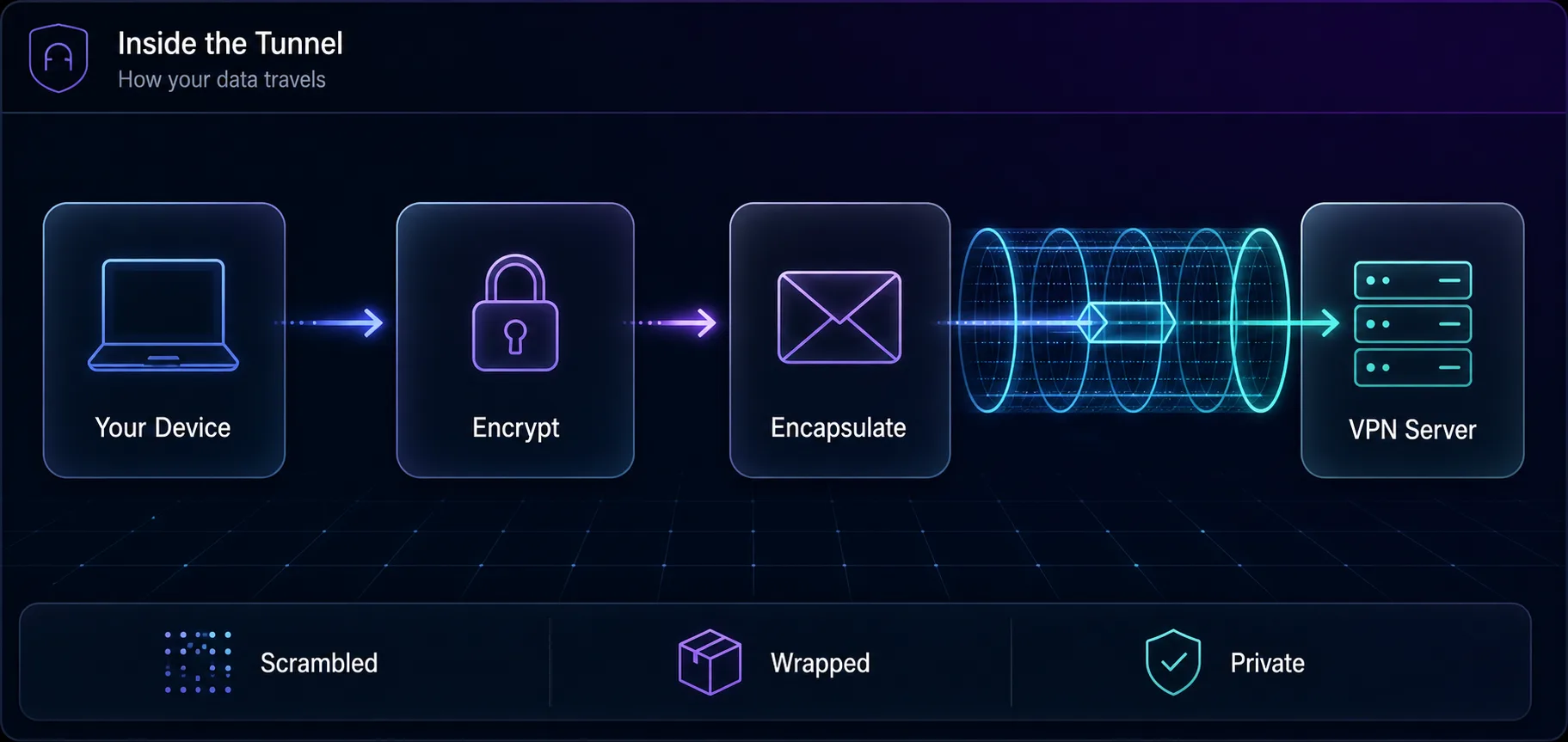
Encrypt, then encapsulate, then send through the tunnel to the VPN server.
VPN Tunneling Protocols
The protocol is the rulebook that defines how the tunnel is built and secured. It’s the biggest factor in your VPN’s speed and safety, and it’s worth knowing the main ones.
1WireGuard
The modern favourite. WireGuard uses a lean codebase and state-of-the-art cryptography to deliver fast connections with low overhead. Most top providers now build on it, sometimes under their own branding like NordVPN’s NordLynx. If you want speed and security, this is the default.
2OpenVPN
The trusted veteran. OpenVPN is open-source, heavily audited, and highly configurable, running over either TCP or UDP. It’s a little heavier than WireGuard but rock-solid, and it’s been the industry standard for years. See how the two compare in our OpenVPN vs WireGuard breakdown.
3IKEv2/IPsec
The mobile specialist. IKEv2 reconnects quickly and handles network switches smoothly, so it shines when you move between Wi-Fi and cellular. It’s a common default in mobile VPN apps for exactly that reason.
4L2TP/IPsec and PPTP
The old guard. L2TP paired with IPsec still appears in legacy setups, while PPTP is effectively obsolete. Avoid PPTP entirely, as it has known, serious security weaknesses and offers no real protection today.
Protocol | Speed | Security | Best For |
|---|---|---|---|
WireGuard | Fastest | Excellent | Most users, everyday use |
OpenVPN | Moderate | Excellent | Maximum compatibility |
IKEv2/IPsec | Fast | Strong | Mobile devices |
PPTP | Fast | Broken | Nothing, avoid it |
Split Tunneling: Choosing What Goes Through
Here’s the feature most guides gloss over, and it’s genuinely useful. By default, a VPN sends all your traffic through the tunnel. Split tunneling lets you decide what goes through and what uses your normal connection instead.
Say you want your browser routed through a VPN server abroad, but your banking app to use your real local connection so it doesn’t flag a foreign login. Split tunneling handles exactly that. You might also keep a fast local download outside the tunnel while your sensitive traffic stays protected inside it.
Mode | What’s tunneled | Best for |
|---|---|---|
Full tunnel | All traffic | Maximum privacy, public Wi-Fi |
Split tunnel | Only chosen apps or sites | Speed, mixed local and remote needs |
Our take: full tunneling is the safe default, especially on untrusted networks. Reach for split tunneling when you have a specific reason, like keeping a local service reachable, not as a way to cut corners on privacy.
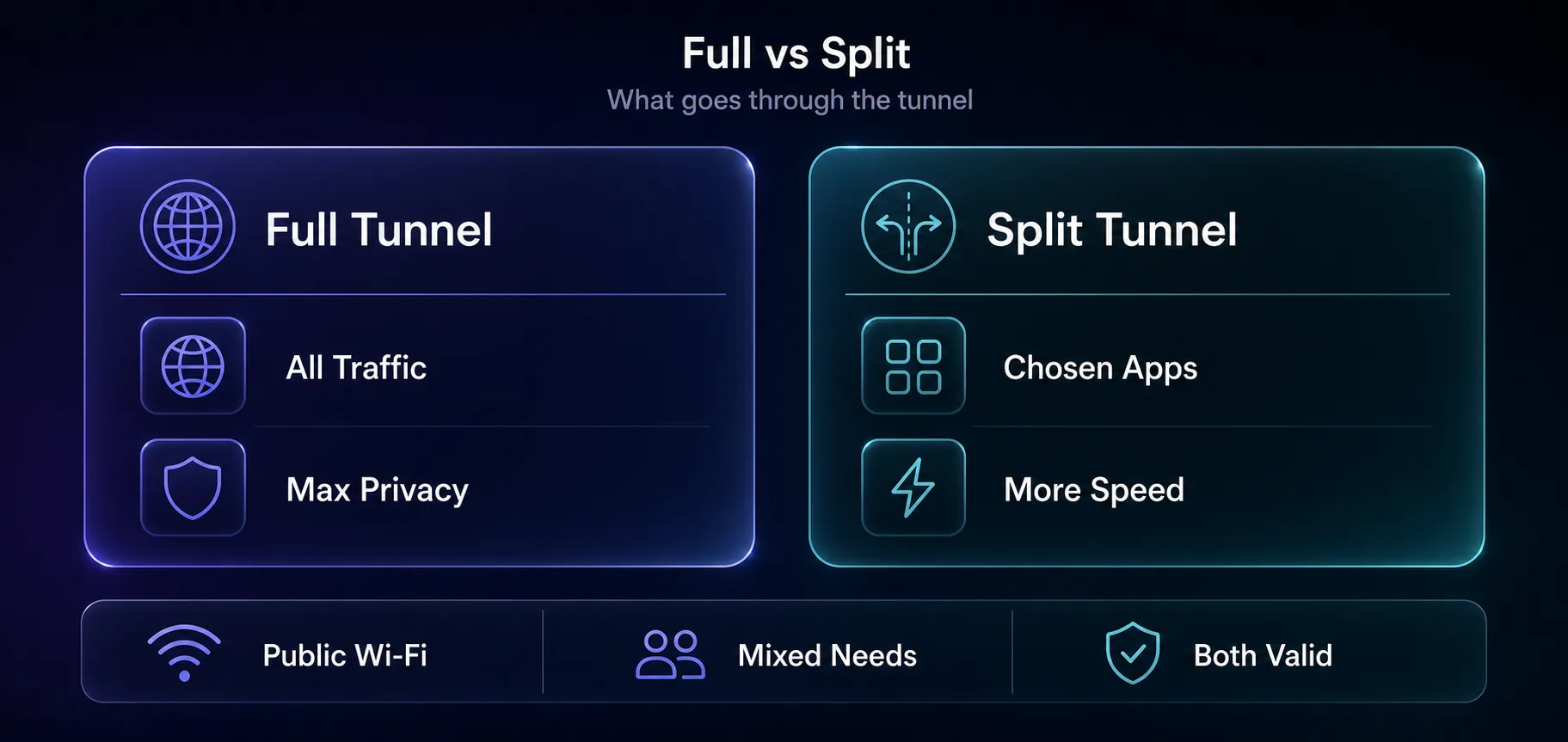
Full tunnel protects everything; split tunnel routes only what you choose.
When You Actually Need a VPN Tunnel
A tunnel is not something you need every second of every day, but there are moments where it genuinely matters, and knowing them helps you decide when to switch it on.
The clearest case is public Wi-Fi. On coffee shop, airport, or hotel networks, others can potentially watch unencrypted traffic, and a tunnel shuts that down completely. It is also essential when you want to stop your ISP from logging the sites you visit, since without a tunnel your provider sees every destination, as we explain in can Wi-Fi owners see your browsing history. Other everyday reasons include accessing content from another region, since the tunnel makes your traffic appear to come from the server’s location, beating ISP throttling of streaming or gaming, and connecting securely to a work network from home. What a tunnel does not do is make you untraceable, so it is worth understanding whether you can still be tracked with a VPN before assuming it hides everything.
Are VPN Tunnels Secure?
A properly built tunnel is very secure. Modern encryption like AES-256 is not something anyone is brute-forcing, and a current protocol closes the gaps that older ones left open. For protecting your traffic on public Wi-Fi or from a snooping ISP, the tunnel does its job well.
But be clear about what it protects, because a tunnel isn’t magic. It secures data in transit between you and the VPN server. It doesn’t hide your activity from the VPN provider itself, which is why a no-logs provider you trust matters. It also doesn’t stop browser fingerprinting or tracking once your traffic exits the tunnel and reaches a website.
The honest truth: a VPN tunnel moves your trust from your ISP to your VPN provider. It doesn’t remove trust from the equation. That’s exactly why which provider you pick matters as much as the encryption itself.
One more essential: a kill switch. If the tunnel drops, a kill switch cuts your internet instantly so nothing leaks out on your real connection while the tunnel is down.
VPN Tunnel vs Proxy: What Is the Difference?
People often confuse a VPN tunnel with a proxy, because both reroute your traffic and can change your apparent IP. The difference comes down to encryption and scope. A proxy simply forwards your traffic through another server, usually for a single app or browser, and most proxies do not encrypt what passes through them. A VPN tunnel encrypts everything and typically protects your whole device, not just one app.
That makes a proxy lighter and often faster for tasks like scraping or managing multiple accounts, where you want a different IP but do not need full encryption. A VPN tunnel is the better choice for privacy and security, because it hides the contents of your traffic as well as your IP. Plenty of people use both for different jobs. To understand the proxy side in depth, see our guide to HTTP, HTTPS, and SOCKS5 proxies, and if privacy is your goal, our VPN vs Tor breakdown covers the trade-offs between the strongest options.
Best VPNs with Strong Tunneling
The tunnel is only as good as the provider building it. Three we rate for fast protocols and solid no-logs records.
1NordVPN

Its NordLynx protocol, built on WireGuard, is among the fastest anywhere, backed by audited no-logs and RAM-only servers. A strong all-rounder with split tunneling on most platforms. See it in NordVPN vs Surfshark.
2Surfshark

WireGuard speeds, unlimited simultaneous connections, and a friendly price make it the value pick. Camouflage mode disguises VPN traffic where that matters.
3Proton VPN

Open-source apps, independent audits, and Secure Core routing through hardened servers make it the choice when trust is the priority. Compare privacy-first options in our VPN vs Tor guide, or browse the full field in the VPN directory.
Can a VPN Tunnel Be Blocked?
Yes, and it is worth knowing how. Some networks and countries actively try to detect and block VPN traffic. Because a standard tunnel still produces a recognisable pattern, deep-packet inspection can sometimes spot it and cut the connection, even though it cannot read what is inside.
This is where obfuscation comes in. Many good VPNs offer a stealth or camouflage mode that disguises the tunnel as ordinary HTTPS traffic, so it slips past filters that would otherwise block it. If you are on a restrictive school, workplace, or national network, an obfuscated tunnel is often the difference between connecting and being stuck. It is also a reminder that a tunnel protects your data but does not make your VPN use invisible to a determined network, a nuance we cover in whether governments can track VPN users.
Common Misconceptions About VPN Tunnels
1"The Tunnel Makes Me Anonymous"
It hides your traffic and IP from outside observers, but not from the VPN provider, and not from sites that fingerprint your browser. It’s strong privacy, not invisibility.
2"All Tunnels Are Equally Secure"
Far from it. A WireGuard or OpenVPN tunnel is excellent, while a PPTP tunnel is broken. The protocol behind the tunnel decides how safe it actually is.
3"A VPN Tunnel Encrypts My Whole Device Forever"
It encrypts traffic while the tunnel is up. If the connection drops without a kill switch, your data can slip out unprotected until it reconnects. The tunnel needs that safety net.
4"Split Tunneling Is More Secure"
It’s more flexible, not more secure. Anything you route outside the tunnel travels unprotected, so use split tunneling deliberately and keep sensitive traffic inside.
Frequently Asked Questions
How Do You Turn On a VPN Tunnel?
The good news is you never build a tunnel by hand. When you install a reputable VPN app and tap connect, it creates the encrypted tunnel for you automatically, choosing a modern protocol and handling the encryption and encapsulation behind the scenes. Your only real decisions are which server to connect to, whether to enable the kill switch (you should), and whether to use full or split tunneling. Everything technical, the cipher, the handshake, the encapsulation, happens in seconds without you ever seeing it, which is exactly why VPNs have become so easy to use.
The Bottom Line
A VPN tunnel is a simple idea done carefully: encrypt your data, wrap it so only the VPN server can read the outside, and send it through the public internet where nobody else can look inside. Encryption protects the contents, encapsulation builds the passage, and the protocol decides how well both are done.
Get the fundamentals right and the tunnel is genuinely strong: use a modern protocol like WireGuard, keep a kill switch on, choose a no-logs provider you trust, and use full tunneling by default. Reach for split tunneling only when you have a specific reason.
Want to put a solid tunnel to work? Compare providers in our VPN directory, line two up with the comparison tool, or read up on remote access VPNs if you’re connecting into a private network rather than just browsing.
Keep Reading
More articles you might enjoy