Selenium Web Scraping With Proxy Rotation 2026
A complete Selenium web scraping guide with proxy rotation — selenium-wire code for rotating proxy lists and gateways, rotation cadence, and how to actually avoid blocks.

Run a Selenium scraper without rotating proxies and you are on a countdown to a ban. One IP address firing hundreds of automated, identical requests is the single most obvious bot signal there is — and most sites will block it long before your job finishes. Proxy rotation is how you keep Selenium running past those first few hundred requests without hitting a wall.
But here is the honest caveat most tutorials skip: rotation alone is not a silver bullet. If your browser fingerprint and behavior still scream "automation", cycling through IPs just delays the inevitable block. Rotation is essential, but it works best as one layer of a stealthy setup, not a magic fix.
This guide shows you exactly how to rotate proxies in Selenium — two proven methods with copy-paste code — how often to rotate, and how to make rotation actually stick by pairing it with the right habits. New to proxies in Selenium? Start with our guide on setting up proxies in Selenium.
The Quick Answer
Our take: the practical way to rotate authenticated proxies in Selenium is with selenium-wire, which accepts a proxy (username and password included) that plain Selenium cannot. You can either rotate through a list of proxies yourself, picking a new one per driver, or — easier — point selenium-wire at a provider's rotating gateway that swaps the IP for you. Pair either method with residential proxies, realistic behavior, and sensible pacing to actually stay unblocked.
Why You Need Proxy Rotation in Selenium
Websites track the IP address of every request. A normal user sends a handful of requests from one home IP; a Selenium scraper can send hundreds in minutes. That pattern is trivial to detect, and the response is a rate limit, a CAPTCHA, or an outright IP ban.
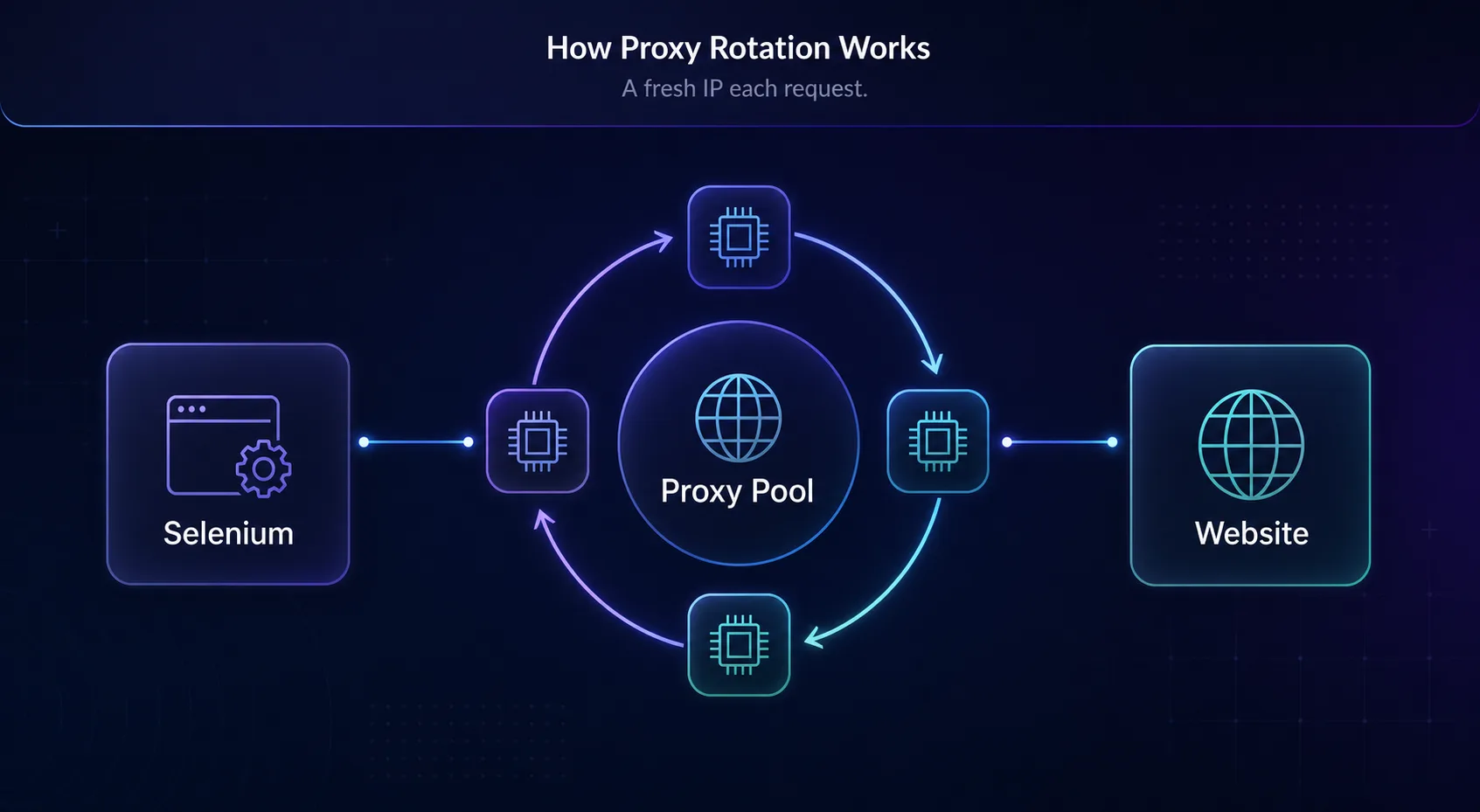
Rotating proxies spreads your requests across many different IP addresses, so no single one stands out. Instead of one IP making 500 requests, you have 100 IPs making 5 each — which looks far more like organic traffic from many separate visitors rather than one relentless machine. This is the core reason web scraping needs proxies, and it is non-negotiable for any Selenium job at scale. The bigger and more frequent your scrape, the more IPs you need in rotation to stay beneath each site's per-IP thresholds.
The Selenium Proxy Challenge
There is a catch that trips up almost everyone: plain Selenium cannot handle authenticated proxies cleanly. When your proxy requires a username and password — which every commercial proxy does — Chrome pops up a login dialog that Selenium cannot fill, and your script hangs.
The practical fix is selenium-wire, a drop-in extension of Selenium that accepts a proxy with credentials at the network level, no popup involved. It is the foundation for everything below, because without it, authenticated rotating proxies simply will not work in a Selenium script. You could hack around auth with a custom Chrome extension, but selenium-wire is far simpler and is what we recommend. For the underlying WebDriver behavior, the official Selenium documentation is the authoritative reference.
Method 1: Rotating a Proxy List
The most direct approach is to keep a list of proxies and pick a fresh one each time you create a driver. This gives you full control over which IPs you use and when.
# pip install selenium-wire
import random
from seleniumwire import webdriver

PROXIES = [
    "http://USER:PASS@198.51.100.1:7000",
    "http://USER:PASS@198.51.100.2:7000",
    "http://USER:PASS@198.51.100.3:7000",
]

def make_driver():
    proxy = random.choice(PROXIES)
    opts = {"proxy": {"http": proxy, "https": proxy, "no_proxy": "localhost,127.0.0.1"}}
    return webdriver.Chrome(seleniumwire_options=opts)

for url in target_urls:
    driver = make_driver()      # fresh IP per page
    driver.get(url)
    # ... scrape the page ...
    driver.quit()
Each new driver picks a random proxy, so your requests spread across the pool. The trade-off is that you have to source, test, and maintain that list of working proxies yourself, replacing any that go stale. For a more advanced, self-healing version with health checks, see our guide on building a rotating proxy script.
Method 2: Provider Rotating Gateway (Easier)
Most premium providers offer a single endpoint that rotates the exit IP automatically on every connection. You set it once and forget the list entirely — the provider handles freshness, replacement, and rotation for you.
from seleniumwire import webdriver

# One endpoint that rotates the exit IP for you on each new connection
gateway = "http://USER:PASS@gate.provider.com:7000"

opts = {"proxy": {"http": gateway, "https": gateway, "no_proxy": "localhost,127.0.0.1"}}
driver = webdriver.Chrome(seleniumwire_options=opts)

driver.get("https://httpbin.org/ip")
print(driver.find_element("tag name", "body").text)   # confirms a rotating IP
driver.quit()
Our take: for most teams this beats hand-rolling a list. You offload pool maintenance to the provider and keep your code dead simple, which is why the gateway approach is our default recommendation for Selenium rotation. It also scales effortlessly: the same one-line endpoint works whether you are running one driver or fifty.
Rotation Methods Compared
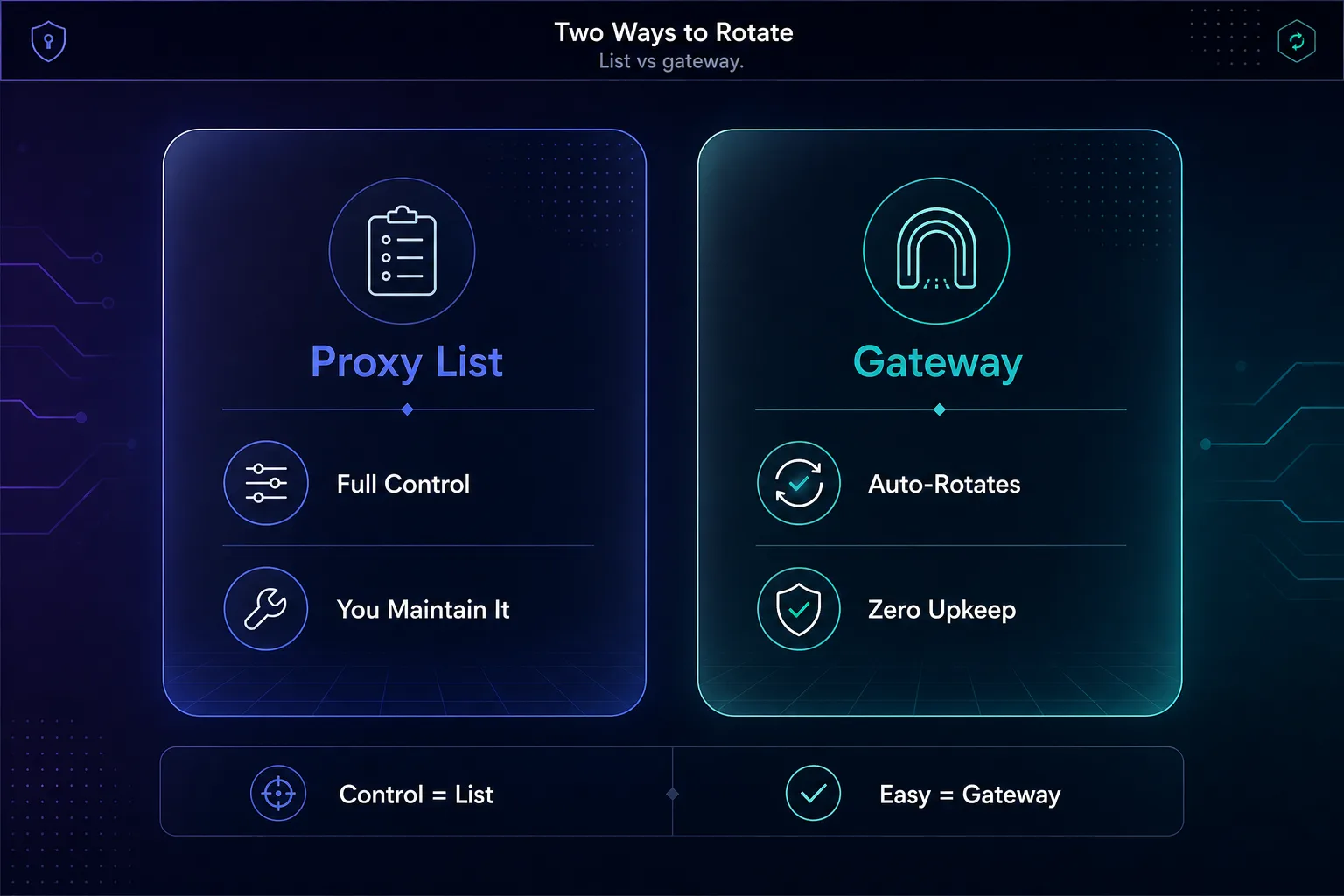
Both approaches work; the right one depends on how much control versus convenience you want.
| Method | How it works | Best for |
|---|---|---|
| Proxy list | You pick a proxy per driver | Full control, custom logic |
| Provider gateway | One endpoint auto-rotates | Simplicity, scale, less upkeep |
Best Rotating Proxies for Selenium
Rotation is only as good as the IPs behind it — a pool of dead or flagged proxies rotates you straight into blocks. These are the providers we rate most highly for Selenium, all offering rotating residential proxies. See more in our best residential proxies guide.
1Decodo

Decodo is our all-round default, with a large residential pool and a rotating gateway that drops straight into the Method 2 snippet. Its balance of price, reliability, and ease of use suits everyone from solo scrapers to teams, and its dashboard makes it easy to switch between rotating and sticky endpoints as a task demands.
2Oxylabs

Oxylabs is the enterprise pick, with a massive network and excellent geo-targeting for Selenium jobs at serious scale. It costs more, but the success rates and support justify it for high-volume work, and its infrastructure holds up when you are running many Selenium instances concurrently.
3IPRoyal

IPRoyal is the value champion, with non-expiring residential traffic and both rotating and sticky sessions at approachable prices — a great fit for smaller or intermittent Selenium projects where you do not want unused bandwidth expiring each month.
How Often Should You Rotate?
Rotation cadence is a real decision, not a default. The right frequency depends on whether your task needs a stable session or maximum spread.
| Strategy | When to use |
|---|---|
| Per request / per page | Scraping many independent pages |
| Sticky session (hold IP) | Logins, carts, multi-step flows |
For broad scraping of unrelated pages, rotate aggressively — a new IP per page keeps you spread thin. But if a task spans multiple steps under one identity, such as logging in or paginating a cart, switching IPs mid-flow looks like a hijacked session and triggers security checks. Use a sticky session there, then rotate between tasks. Matching your rotation cadence to the nature of the task — spread for breadth, stability for depth — is one of the most underrated skills in reliable scraping.
Verifying Your Rotation Works
Never assume rotation is working — confirm it. The simplest check is to load httpbin.org/ip on each new driver and log the returned address. If it changes across drivers, rotation is working; if it stays the same, your proxy is not being applied.
Do this early, before you scale up, so you do not discover mid-job that every request came from your real IP — the exact address that then gets banned. A quick five-second verification saves hours of silent, wasted failure.
Rotation Alone Is Not Enough
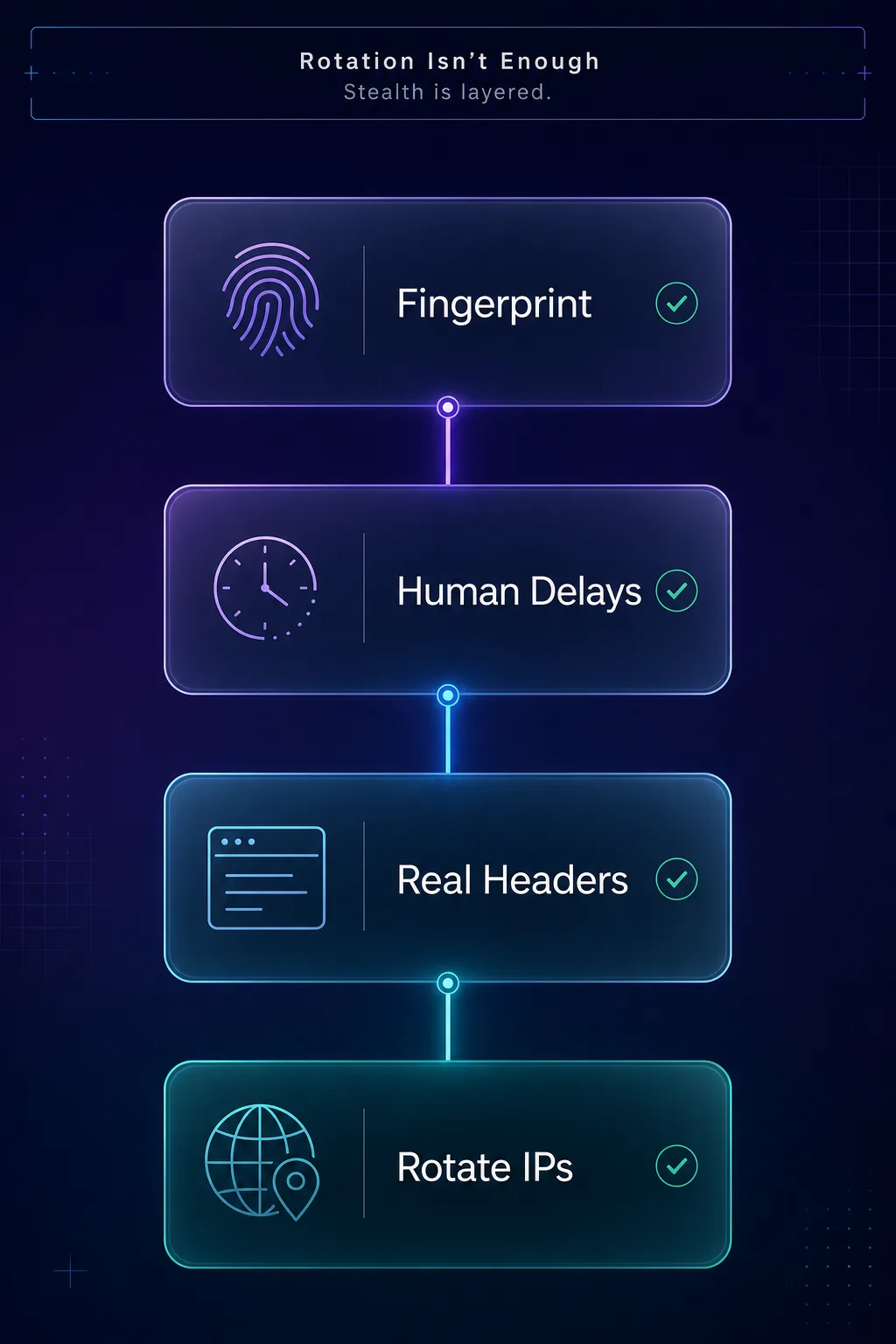
This is the part that separates scrapers that last from ones that get blocked in an hour. Rotating IPs hides one signal — the repeated address — but modern anti-bot systems look at far more. If everything else about your requests screams automation, rotation just buys you a little time.
To actually stay unblocked, pair rotation with a realistic setup: run headless mode with anti-automation flags, send proper browser headers and user-agents, add randomized delays so your timing looks human, and consider your browser fingerprint. Rotation plus stealth plus pacing is the real formula. For tough targets specifically, see our guide on bypassing Cloudflare when scraping, and for the broader technique set, our Selenium web scraping guide.
Best Practices for Selenium Proxy Rotation
- Use selenium-wire for authenticated proxies — it is the path of least pain.
- Prefer residential proxies for tough targets; datacenter IPs get flagged faster.
- Rotate per page for broad scraping, but use sticky sessions for logged-in flows.
- Verify the exit IP on each driver before scaling up.
- Add randomized delays and real headers — rotation alone will not save a botty setup.
- Build in retries — expect some proxies to fail, and rotate to a fresh one automatically.
Handling Failed Proxies and Retries
Even good proxies fail sometimes — an IP gets temporarily blocked, times out, or returns a bad response. A production Selenium scraper needs to expect this and simply rotate to a fresh proxy and try again, rather than crashing. A small retry wrapper handles it cleanly.
from seleniumwire import webdriver

def scrape_with_retry(url, attempts=3):
    for attempt in range(attempts):
        driver = make_driver()          # fresh proxy on each attempt
        try:
            driver.get(url)
            return driver.page_source
        except Exception:
            print("Proxy failed, rotating and retrying...")
        finally:
            driver.quit()
    return None                          # all attempts exhausted
Because make_driver() picks a new proxy every call, each retry automatically uses a different IP. This one pattern — rotate, try, and retry on failure — is the difference between a scraper that limps along and one that runs unattended for hours.
Should You Also Rotate User-Agents?
Yes, and it is an easy win that complements IP rotation. If every request carries the identical user-agent string, sites can fingerprint your scraper even as the IP changes — so the rotation is only half-disguised. Varying the user-agent alongside the proxy makes each request look like a different real browser.
Keep a small pool of realistic, current user-agent strings and pick one per driver, the same way you pick a proxy. Do not overdo it with absurd or outdated agents, which stand out more than they blend in. The goal is believable variety: different IP, different browser signature, consistent human-like behavior. Rotating IPs and user-agents together is far stronger than rotating either alone.
Common Mistakes to Avoid
The errors that get rotating Selenium scrapers blocked anyway.
1Relying on rotation alone
The biggest mistake. Rotating IPs while your fingerprint, headers, and timing scream bot just delays the block. Rotation is one layer — pair it with realistic headers, delays, and anti-automation flags.
2Using datacenter proxies on tough sites
Cheap datacenter IPs are detected fast on well-defended targets, so rotating through them just cycles you between blocks. Use rotating residential proxies where the site fights bots.
3Rotating mid-session
Switching IPs during a logged-in or multi-step flow looks like account hijacking and triggers security checks. Hold a sticky session for those tasks and rotate only between independent ones.
4Never verifying rotation
If you do not check the exit IP, you will not notice when rotation silently fails and every request comes from your real address — the one that then gets banned. Verify before you scale.
Frequently Asked Questions
The Bottom Line
Proxy rotation is what makes Selenium scraping survivable at scale. Without it, a single IP firing automated requests gets blocked almost immediately; with it, your traffic spreads across many addresses and blends in with ordinary visitors. The practical toolkit is selenium-wire for authenticated proxies, plus either a self-managed proxy list or — easier and more scalable — a provider's rotating gateway.
Just remember the honest rule: rotation is one layer, not the whole answer. Pair it with residential proxies, realistic headers, human-like pacing, and sensible rotation cadence, and your scraper will run for the long haul. Ready to build it? Grab rotating residential IPs from our proxy directory, compare the best residential proxies, and if you are weighing frameworks, see Playwright vs Selenium.