What Is a Backconnect Proxy? Gateways and Proxy Pools Explained (2026)
A backconnect proxy is one gateway that fronts a whole IP pool. Learn how it picks exit IPs, the four ways providers let you steer it, and how rotation and sticky sessions work.

You buy a residential proxy plan expecting a list of thousands of IPs. Instead, you get one hostname, one port and a username that looks like a sentence.
That single address is a backconnect proxy. It’s the front door to the provider’s whole IP pool, and once you understand how it reads your credentials, you can control rotation, location and sessions without touching a proxy list again.
This guide explains how a backconnect gateway works, the four ways providers let you steer it, how rotation and sticky sessions behave behind it, and how to check what it’s actually doing.
- A backconnect proxy is one gateway host and port that fronts a whole pool of exit IPs.
- The gateway picks the exit for each request, so websites never see the gateway itself.
- Providers read your instructions from the username, the password, the port or the hostname.
- Most residential gateways rotate on every request by default; a session ID keeps one IP.
- Always verify rotation and location with an IP echo endpoint before you scale.
What Is a Backconnect Proxy?
A backconnect proxy is a single gateway address that sits in front of a large pool of exit IPs. You send every request to the same host and port, and the gateway picks which IP in the pool carries each request to the target site.
The target never sees the gateway. It sees the exit IP the gateway chose, which might be a home connection, a mobile device or a datacenter server, depending on the product.
Providers use the term openly. Oxylabs’ residential proxy docs tell you to send your credentials to the “backconnect entry node” pr.oxylabs.io:7777, and say each request then routes through a random IP address. Decodo’s quick start puts it simply: “Endpoints are like gateways to IP pools.”
Why Is It Called “Backconnect”?
With a classic proxy, you connect to a specific proxy IP, and that IP is what websites see. If you want a different IP, you change the address in your config.
A backconnect setup flips that. You connect to the gateway, and the gateway connects back out through whichever exit it selects. Your configuration stays the same while the outgoing IP changes behind it.
That’s also why “backconnect proxy”, “rotating proxy” and “proxy gateway” often describe the same product. Backconnect describes the architecture. Rotation describes how often the exit changes. Residential, ISP, mobile and datacenter describe where the exits come from. If you’re new to the basics, our guide on how proxies work covers the plain forward proxy first.
Despite the name, a backconnect gateway is still a forward proxy. It acts on behalf of you, the client, not on behalf of the website. The “back” part only describes how the gateway hands your traffic to an exit. If that distinction is fuzzy, our explainer on forward vs reverse proxies clears it up.
How a Backconnect Gateway Handles a Request
Here’s what happens each time your scraper sends a request through the gateway:
- Your client connects to the gateway. One hostname and port, such as
gate.decodo.com:7000orbrd.superproxy.io:44445. - The gateway authenticates you. Usually with a username and password, or by checking your whitelisted IP. Wrong credentials get a
407 Proxy Authentication Requiredresponse, defined in RFC 9110. - It reads your instructions. Country, city, session ID and duration are parsed from the username, password, port or hostname.
- It picks an exit. A random IP from the matching part of the pool, or the same IP as last time if you asked for a sticky session.
- The exit fetches the page. For HTTPS, your client opens a
CONNECTtunnel, so the gateway sees the target host and port but not the encrypted content. - The response comes back the same way. Your client never learns the exit IP unless it asks.
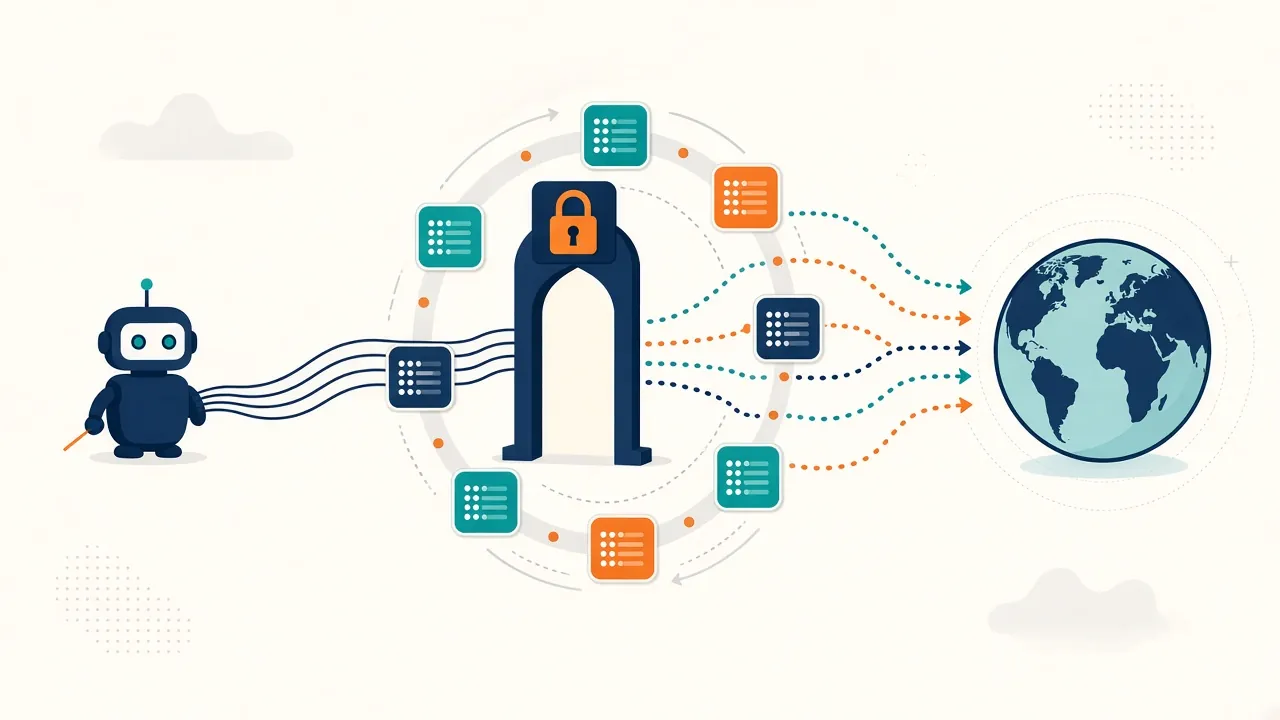
Bright Data calls these gateway machines Super Proxies: routing servers responsible for selecting and managing the actual proxy peers. Different name, same job.
Backconnect Gateway vs a Proxy List
The alternative to a gateway is a list of individual proxies, one IP:port per line. Both still exist, and they suit different jobs.
| Question | Proxy list | Backconnect gateway |
|---|---|---|
| What you configure | Many IP:port entries | One host and port |
| Who rotates IPs | Your code | The provider |
| Dead or offline IPs | You detect and remove them | The gateway routes around them |
| Changing location | Swap to different IPs | Change a parameter |
| Keeping one IP | Use the same entry | Ask for a sticky session |
| Knowing the exact IP in advance | Yes | No, unless you pay for dedicated IPs |
Lists make sense for a handful of static ISP proxies you want to own for months. For large residential proxy pools, where devices go on and offline all day, a gateway is the only practical way in. You couldn’t keep a list of millions of home connections fresh.
Gateways aren’t limited to residential traffic, though. Bright Data offers the same username controls on datacenter and ISP zones, and its docs note those two only support country targeting.
Four Ways Providers Let You Steer the Gateway
Every provider has to answer the same question: how do you tell one shared gateway what you want? There are four common answers, and many providers mix them.
1Parameters in the Username
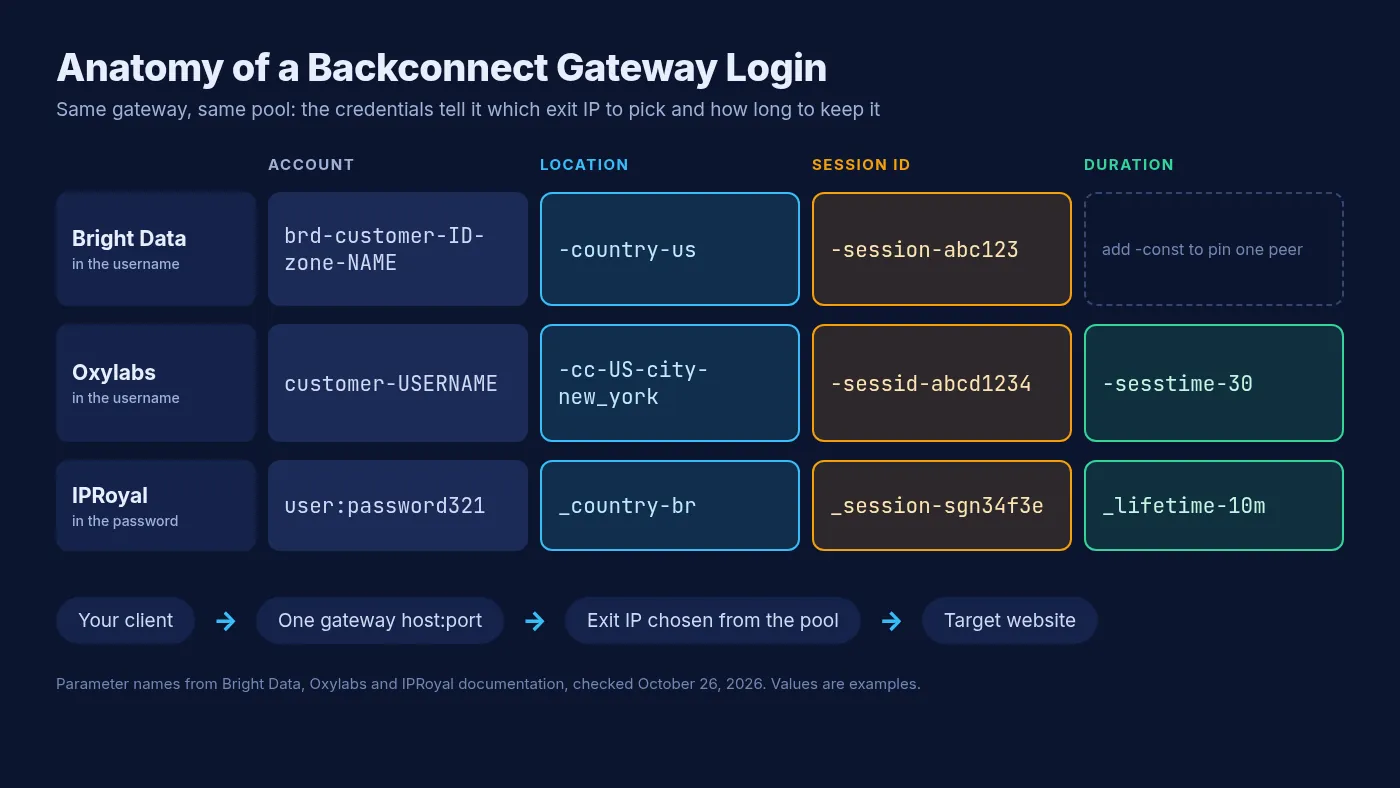
This is the most common method. Bright Data’s docs say its proxy username “is not just an identifier, it also defines how the proxy behaves”. The structure is brd-customer-[customerID]-zone-[zone name], followed by optional parameters such as -country-us, -city-sanfrancisco, -asn-56386 or -session-mystring12345.
Oxylabs works the same way with different keys. A username like customer-USERNAME-cc-DE-sessid-abcd1234 asks for a German exit and a sticky session. Its location settings also support city, state, continent, ZIP code, geohash and ASN.
2Parameters in the Password
IPRoyal puts the settings on the other side of the colon. Its proxy documentation says residential proxies use the password segment to hold all configuration. A password like password321_country-br_session-sgn34f3e_lifetime-10m asks for Brazil, a named session and a 10-minute lifetime.
The practical difference is small, but it matters when a tool only lets you edit one field. Some scraping tools hide the password, so check where your provider expects parameters before you blame the gateway.
3Port Numbers
Some gateways use the port itself as an instruction. Decodo’s endpoints and ports page lists gate.decodo.com with rotating ports 7000 and 10000, plus a sticky port range of 10001 to 49999. Each sticky port holds its own IP.
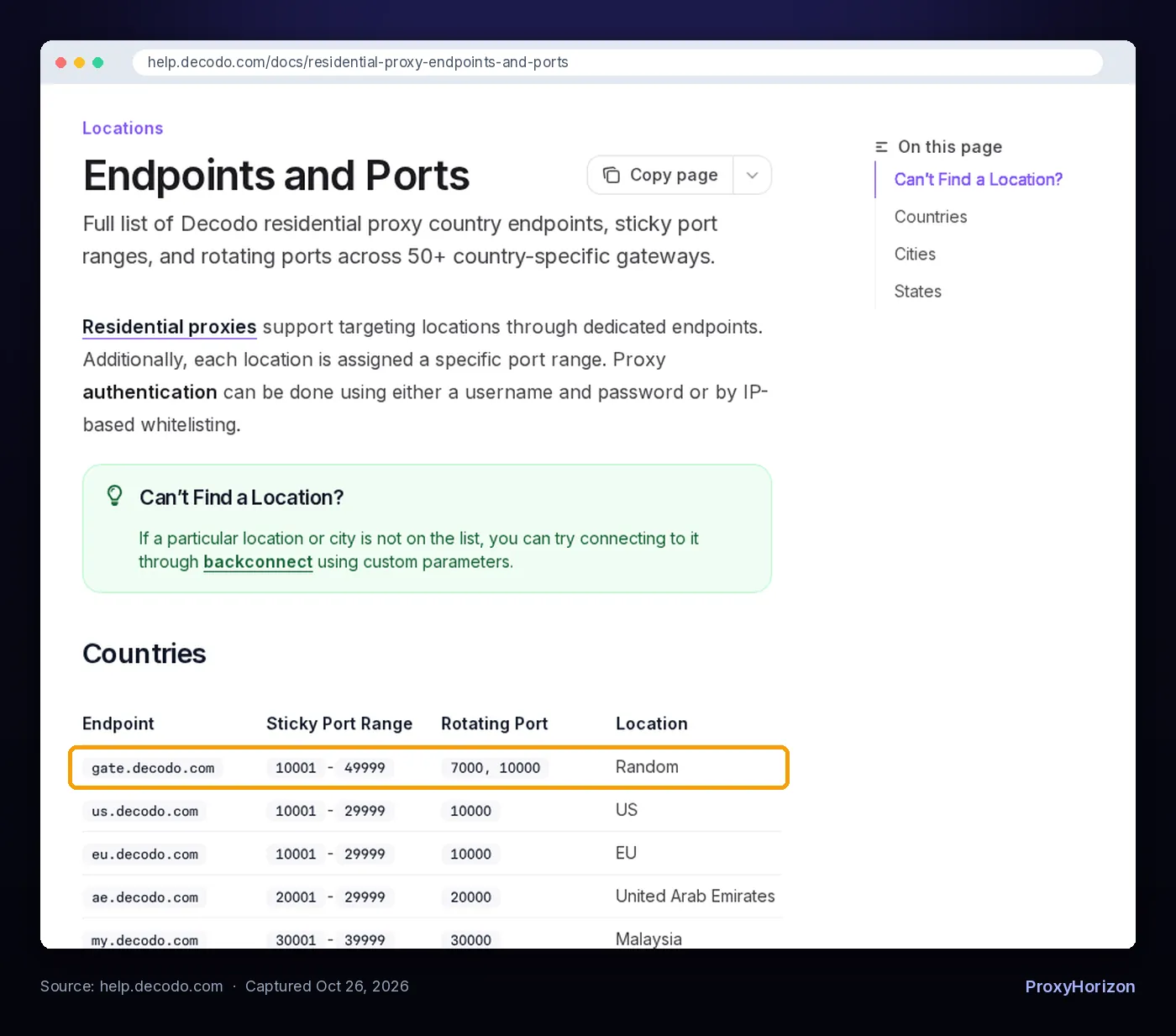
Oxylabs offers the same idea: its sticky entry ports from 10001 to 49999 keep an IP for up to 10 minutes with no username parameters at all. Ports are handy for tools that accept a plain host:port list.
4Hostnames
Finally, the hostname can carry the location. Oxylabs runs country-specific entry nodes such as us-pr.oxylabs.io:10000, and Decodo lists endpoints like us.decodo.com and de.decodo.com.
Watch for one trap here. Some regional hostnames choose where the gateway is, not where the exit is. IPRoyal’s geo.iproyal.com picks the best gateway region based on your own IP location, and you still set the exit country in the password.
How Rotation Works Behind the Gateway
Out of the box, most residential gateways rotate on every request. Oxylabs says its residential proxies “rotate automatically with every request by default”. Decodo’s rotating port assigns a new IP every time you load a page.
That default suits high-volume scraping where each request stands alone, like product pages or search results. Our guide to rotating proxies covers when that pattern works best.
Rotation happens per request or per connection, not per minute. If your client keeps one connection open and reuses it, several requests may leave through the same exit. When you need a fresh IP for every request, test it rather than assuming it.
Session Parameters: Keeping One IP Through the Gateway
A login, a cart or a multi-step form needs the same IP from start to finish. You get that with a session ID: a random string you invent and add to your credentials. Same ID, same exit. New ID, new exit.
The details vary more than most people expect:
- Oxylabs:
sessidkeeps an IP for 10 minutes by default, or ends after 60 seconds without requests.sesstimeextends it up to 1,440 minutes. - Decodo: sticky sessions of 1, 10, 30 or 60 minutes in the dashboard, or a custom 1 to 1,440 minutes with
sessionduration. - IPRoyal:
_session-must be exactly 8 alphanumeric characters, and_lifetime-runs from 1 second to 7 days. - Bright Data: each unique
-session-value gets a unique IP. Adding-constbinds the session to one peer and returns a 502 “no peer available” error if that peer drops.
Residential exits are real devices, so a session can end early when a phone or router goes offline. Decodo’s docs warn that longer sessions are more likely to rotate before their time. Our guide to sticky vs rotating proxy sessions covers that fallback behavior in detail.
Using a Backconnect Gateway in Python
Here’s a minimal pattern using Oxylabs’ documented username format. It builds one sticky identity per task, so each logical session gets its own IP.
import secrets
import requests

GATEWAY = "pr.oxylabs.io:7777"
USER, PASSWORD = "USERNAME", "PASSWORD"

def gateway_session(country="DE", minutes=10):
    sid = secrets.token_hex(4)  # 8 random characters
    login = f"customer-{USER}-cc-{country}-sessid-{sid}-sesstime-{minutes}"
    proxy = f"http://{login}:{PASSWORD}@{GATEWAY}"
    s = requests.Session()
    s.proxies = {"http": proxy, "https": proxy}
    return s

s = gateway_session()
print(s.get("https://ip.oxylabs.io/location", timeout=30).text)
print(s.get("https://ip.oxylabs.io/location", timeout=30).text)  # same exit
Drop the sessid and sesstime parts and every request rotates instead. Swap the parameter names and the same code works with other providers. Our tutorial on using proxies with Python Requests covers authentication, SOCKS5 and retries.
How to Check What the Gateway Is Doing
Don’t trust the config. Check it. Every major provider runs an IP echo endpoint that reports the exit IP and its location: ip.oxylabs.io/location, ip.decodo.com/json and brdtest.com/myip.json are all used in their official examples.
- Rotation test: send five requests without a session ID. You should see five different IPs.
- Session test: send five requests with one session ID. You should see one IP.
- Location test: compare the reported country with the one you asked for.
Expect occasional location disagreements. Oxylabs notes it maps exits with the MaxMind GeoIP2 database, and other IP databases may show different locations. Check the IP against the database your target site is likely to use.
One more thing to remember: resolving the gateway hostname gives you the gateway’s IP, not the exit’s. Only a request through the gateway shows what websites see.
Common Backconnect Mistakes
- Reusing one session ID everywhere. Every worker then shares the same exit IP, and you lose the point of a pool.
- Assuming rotation per minute. Residential gateways rotate per request by default, not on a timer, unless you set a session.
- Putting parameters in the wrong field. Username for Bright Data and Oxylabs, password for IPRoyal.
- Over-targeting. City or ASN filters shrink the pool your gateway can draw from, which can mean slower or failed connections.
- Ignoring bandwidth. Residential gateways usually bill per GB. Our proxy bandwidth calculator guide helps you estimate usage first.
If you’re still choosing a network, our roundup of the best residential proxy providers compares pools and pricing, and the proxy directory lists gateway options side by side.
Frequently Asked Questions
One Address, a Whole Pool Behind It
A backconnect proxy trades control over individual IPs for one stable address that does the rotating, routing and dead-IP cleanup for you. For residential and mobile pools, that trade is almost always worth it.
The skill is in the credentials. Learn where your provider expects location and session parameters, then verify rotation and stickiness with an IP echo endpoint before you scale.
Our take: treat the gateway username as configuration code. Version it, test it and keep one session ID per identity.
Keep Reading
More articles you might enjoy