What Is a Transparent Proxy? Anonymity Levels Explained (2026)
A transparent proxy passes your real IP to every site you visit. Learn what transparent, anonymous and elite proxies are, which headers give them away, and how to test yours.

You set up a proxy, run your first request, and the site still knows exactly who you are. That’s not a bug. Some proxies are built to pass your real IP along.
Those are transparent proxies, and they sit at the bottom of a three-level ladder: transparent, anonymous and elite. Where your proxy lands on that ladder decides what every website on the other end can see.
This guide explains both meanings of “transparent proxy”, the headers that give each level away, why HTTPS changes the picture, and a short script you can run to test your own proxy in under a minute.
- A transparent proxy doesn’t hide you: it’s either forced on you by your network or passes your real IP to sites.
- Anonymous proxies hide your IP but still announce they’re proxies.
- Elite proxies add no proxy headers, so requests look direct.
- Via, X-Forwarded-For and Forwarded are the headers that give proxies away.
- Test over plain HTTP, since HTTPS tunnels hide headers from most proxies.
What Is a Transparent Proxy?
A transparent proxy is a proxy that doesn’t hide you. The term gets used in two related ways, and it helps to know both.
- The network meaning: a proxy you never configured. Your network silently routes your web traffic through it. The HTTP standard calls this an interception proxy.
- The anonymity meaning: a proxy that forwards your real IP address to the website, usually in an
X-Forwarded-Forheader, and announces itself with aViaheader.
The two often overlap. A school or office filter is usually both: you didn’t choose it, and it isn’t trying to hide anyone. If you need a refresher on the basics first, start with our guide to how a proxy server works.
Transparent Proxies on Your Network: Interception Explained
An interception proxy catches your traffic on the way out, without any setting on your device. RFC 9110, the current HTTP standard, describes it as a proxy that “is not chosen by the client.” Instead, it filters or redirects outgoing TCP port 80 packets, and occasionally other common ports.
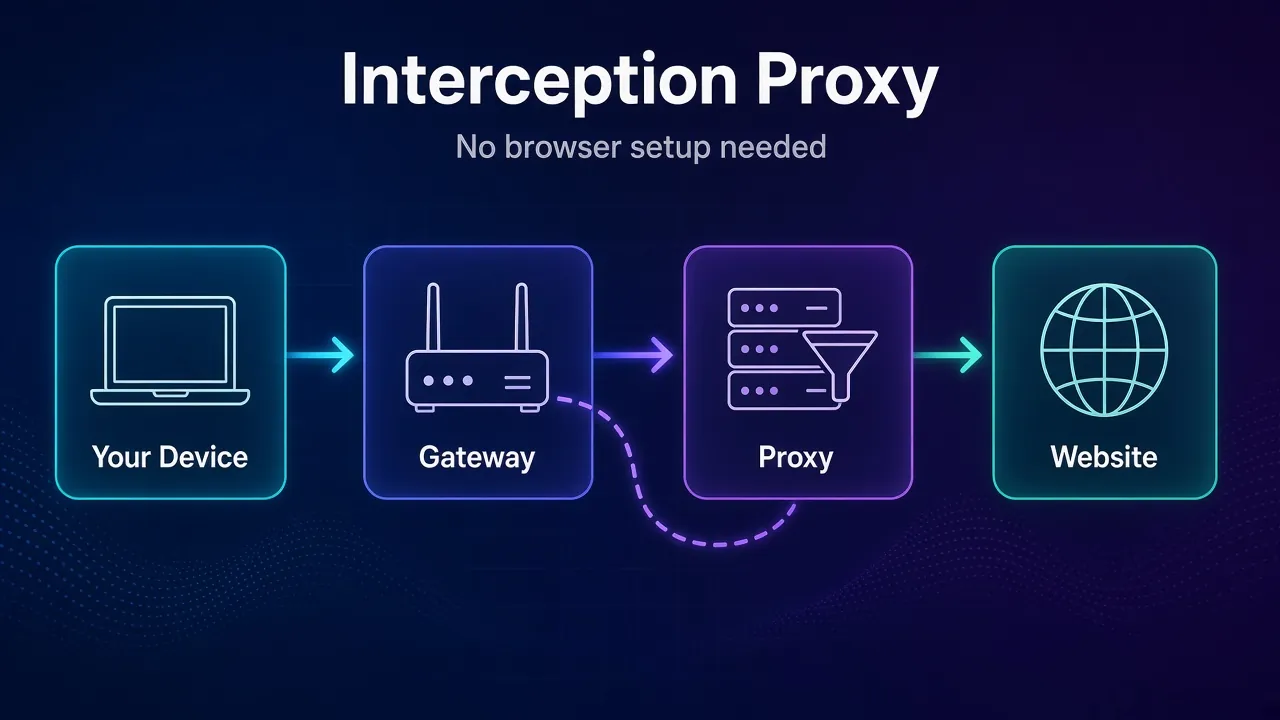
The older RFC 3040 explains where the name came from. Caching people called these proxies “transparent” because they needed zero configuration in the browser. The standard now prefers “interception proxy”, because the word transparent caused confusion.
RFC 9110 names the two places you’ll meet them most:
- Public network access points, like hotel or airport Wi-Fi, where the proxy makes you log in or pay before you get online.
- Corporate firewalls, where it enforces usage policies such as blocked categories.
Schools, ISPs and caching appliances use the same idea to filter content or save bandwidth. This is a forward proxy, just one the network owner picked for you.
1How to Tell If Your Network Uses One
There’s no single sure sign, but these clues are worth checking:
- A login or terms page appears before any site loads. That’s a captive portal, often backed by an interception proxy.
- Plain HTTP responses carry a
Viaheader you didn’t expect. Runcurl -sI http://example.comand look for it. - A header echo page, like
http://httpbin.org/headers, showsViaorX-Forwarded-Foreven though you set no proxy. - HTTPS sites show a certificate issued by your company or a security product instead of a public certificate authority. That points to TLS inspection, which goes a step beyond plain interception.
The Three Proxy Anonymity Levels
Proxy anonymity levels describe what a website can learn about you from the request the proxy forwards. They aren’t defined in any RFC. They’re an industry convention, used by proxy lists, checkers and providers, and they’re based entirely on headers.
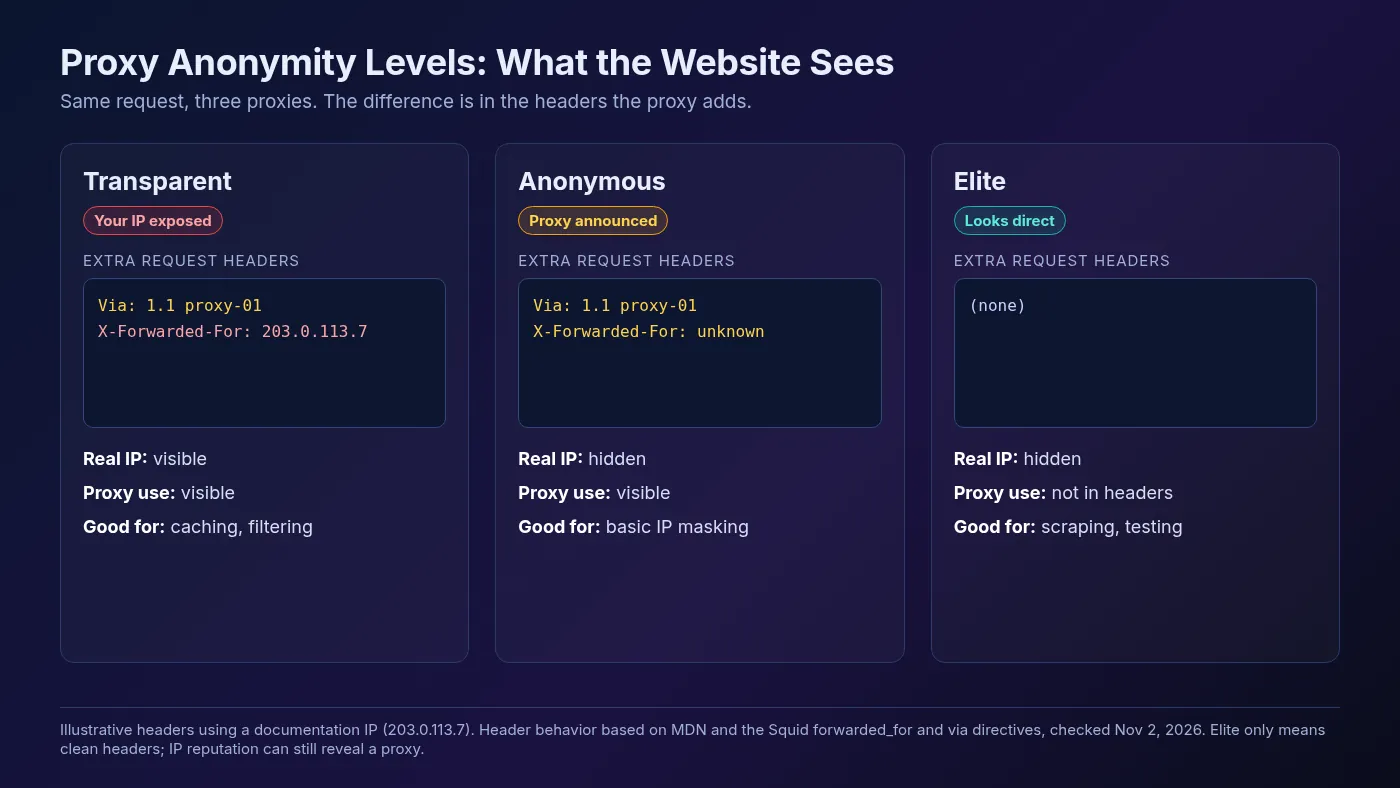
| Level | Hides your IP? | Reveals proxy use? | Typical extra headers |
|---|---|---|---|
| Transparent | No | Yes | Via, X-Forwarded-For with your real IP |
| Anonymous | Yes | Yes | Via, or X-Forwarded-For: unknown |
| Elite (high anonymity) | Yes | Not through headers | None |
1Transparent
The website sees the proxy’s IP as the connecting address, but your real IP sits right there in X-Forwarded-For. It hides nothing. That’s fine for its real jobs, caching and filtering, and useless for privacy or scraping.
2Anonymous
Your IP is gone, but the proxy still says it’s a proxy, usually with a Via header or a placeholder forwarding header. The site can’t see who you are. It can see you’re not connecting directly, and many sites treat that alone as a reason to challenge or block you.
3Elite (High Anonymity)
An elite proxy forwards your request without adding any proxy headers, so it looks like a direct visit from the proxy’s IP. This is the level you want for scraping, ad verification or account work.
Which Headers Give a Proxy Away
A proxy’s anonymity level comes down to a handful of request headers. Here’s what each one does, based on MDN and the HTTP specs, checked November 2, 2026.
X-Forwarded-For: MDN calls it the de-facto standard for identifying the original client IP behind a proxy. The leftmost address is the client and the rightmost is the most recent proxy. If your real IP is in it, your proxy is transparent.Via: added by forward and reverse proxies to track the path, for exampleVia: 1.1 proxy-01. RFC 9110 actually says a proxy must send it, so a strictly standards-following proxy is never elite.Forwarded: the standardized version ofX-Forwarded-For, withfor=,by=,host=andproto=fields. It’s less common, but it can carry your IP the same way.X-Real-IPandClient-IP: non-standard headers some proxies and load balancers use for the same job.Proxy-Connection: an old header that RFC 9112 says clients are encouraged not to send. Seeing it on the server side can hint that a proxy client or a sloppy proxy is involved.
Popular proxy software makes these settings a switch. Squid, the open-source caching proxy, has a forwarded_for directive with five options, and its default is on, which appends your client IP. Out of the box, a Squid proxy is transparent.
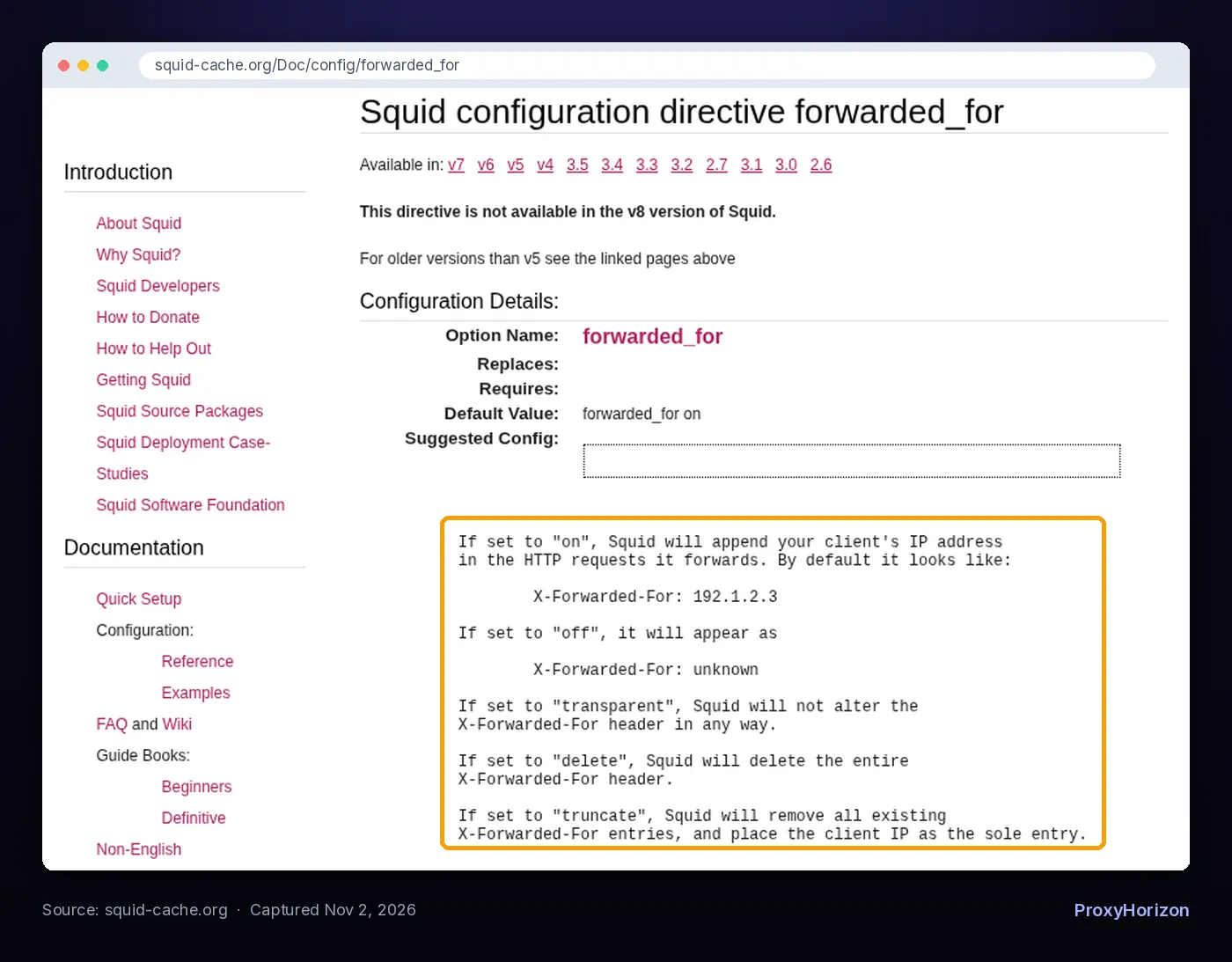
Set it to off and the header reads X-Forwarded-For: unknown, which is anonymous. Set it to delete and also turn off Squid’s via directive, which defaults to on, and the request carries no proxy headers at all. Squid’s docs note that turning via off requires a build with HTTP violations enabled, since the spec expects that header.
Why HTTPS Changes the Picture
For HTTPS traffic, most proxies can’t add or read headers at all. When your client asks a proxy for an HTTPS site, it sends a CONNECT request. RFC 9110 says the proxy then switches to “blind forwarding of data” until the tunnel closes.
Your encrypted request travels end to end, so the proxy has no way to slip Via or X-Forwarded-For into it. In practice, a transparent-level proxy usually leaks your IP only on plain HTTP requests.
Two exceptions matter:
- TLS-inspecting proxies, common in companies, decrypt and re-encrypt traffic with their own certificate. They can see and change everything, headers included.
- The
CONNECTrequest itself reaches the proxy, so the proxy always knows your IP and which host you asked for. The anonymity levels describe what the website sees, never what the proxy operator sees.
That’s why you should test anonymity over plain HTTP. It’s the only path where header leaks can show up.
How to Test Your Proxy’s Anonymity Level
Send a request through the proxy to a page that echoes your headers back, then look for proxy headers and your real IP. You can do it with one cURL command or a short Python script.
1The Quick cURL Check
curl -s https://api.ipify.org          # your real IP, without the proxy
curl -s -x http://user:pass@proxy.example.com:8080 http://httpbin.org/headers
A direct request to httpbin.org/headers shows only basics like Accept, Host and User-Agent. If the proxied output also lists Via, X-Forwarded-For or Forwarded, you’ve found your answer. Our cURL proxy guide covers the flags and authentication formats.
2A Python Script That Labels the Level
This script checks for the common tell headers and decides the level for you. It needs the requests library.
import sys
import requests

PROXY = sys.argv[1] if len(sys.argv) > 1 else "http://user:pass@proxy.example.com:8080"
ECHO_URL = "http://httpbin.org/headers"  # plain HTTP on purpose
REAL_IP = requests.get("https://api.ipify.org", timeout=10).text.strip()

TELL_HEADERS = ["via", "x-forwarded-for", "forwarded", "x-real-ip",
                "client-ip", "x-client-ip", "proxy-connection", "x-proxy-id"]

resp = requests.get(ECHO_URL, proxies={"http": PROXY, "https": PROXY}, timeout=15)
seen = {k.lower(): v for k, v in resp.json()["headers"].items()}
tells = {name: seen[name] for name in TELL_HEADERS if name in seen}

if any(REAL_IP in value for value in tells.values()):
    level = "Transparent: your real IP is visible"
elif tells:
    level = "Anonymous: IP hidden, but the proxy announces itself"
else:
    level = "Elite: no proxy headers seen"

print("Proxy headers found:", tells or "none")
print("Anonymity level:", level)
Run it as python check_anonymity.py http://user:pass@host:port. We checked the logic against a local test proxy set up three ways, one adding Via and X-Forwarded-For, one adding only Via, and one adding nothing. It printed these results:
Proxy headers found: {'via': '1.1 testproxy', 'x-forwarded-for': '127.0.0.1'}
Anonymity level: Transparent: your real IP is visible

Proxy headers found: {'via': '1.1 testproxy'}
Anonymity level: Anonymous: IP hidden, but the proxy announces itself

Proxy headers found: none
Anonymity level: Elite: no proxy headers seen
Testing a whole list? Our free proxy checker runs anonymity checks in bulk. For speed, success rate and leak tests on top, follow our full guide on how to test proxy speed and anonymity.
Elite Doesn’t Mean Invisible
Clean headers only beat the header check. Websites have several others. An elite proxy on a known datacenter IP still gets flagged by an IP reputation lookup before headers even matter.
Sites also look at the IP’s network owner, open proxy ports, WebRTC and DNS leaks, and mismatches between your IP’s location and your browser’s time zone. Our breakdown of how websites detect proxy traffic walks through each signal.
Two practical takeaways:
- Pick the IP type for the target. Strict sites usually need residential or mobile IPs. Our residential vs datacenter proxies guide helps you choose.
- Close browser leaks too. In a real browser, a WebRTC leak can expose your IP no matter how elite the proxy is.
Which Anonymity Level Do You Need?
Match the level to the job. Most people who buy proxies need elite.
| Use case | Level you need | Why |
|---|---|---|
| Office or school content filtering | Transparent | Nobody needs hiding; admins want logs and control |
| Caching to save bandwidth | Transparent | Speed and savings are the goal, not privacy |
| Running your own reverse proxy or load balancer | Transparent on purpose | Your app needs the visitor’s real IP in X-Forwarded-For |
| Basic IP masking on lenient sites | Anonymous works | Your IP stays hidden even if proxy use shows |
| Web scraping and price monitoring | Elite | Proxy headers invite blocks and CAPTCHAs |
| Ad verification, SEO checks, account management | Elite | You need to look like a normal local visitor |
When you shop, treat “elite” as a claim to verify, not a feature to trust. Run the test above during a trial, and compare providers in our proxy directory.
Frequently Asked Questions
The Bottom Line
A transparent proxy is either one your network forces on you or one that hands your real IP to every site. Either way, it isn’t hiding you.
Anonymous proxies hide your IP but announce themselves. Elite proxies add no proxy headers, which makes them the baseline for scraping and any privacy-sensitive work.
Our take: don’t take a provider’s anonymity label on faith. Test over plain HTTP, check that the IP type fits your target, and remember that clean headers are only the first of several checks a website runs.
Keep Reading
More articles you might enjoy