What Is a Proxy Chain? How Chaining Proxies Works (2026)
A proxy chain sends your connection through two or more proxies in a row. Here’s what each hop can see, how chains compare with VPNs and Tor, and how to build one.

One proxy hides your IP address from the website. A proxy chain stacks two or more of them, so your request hops from proxy to proxy before it reaches the site.
It sounds like a clear upgrade. In practice, every extra hop adds delay and another point of failure, and plain proxies don’t encrypt anything between the hops, so a chain is weaker than it looks.
This guide explains how a proxy chain actually works, what each hop can see, how it compares with VPN plus proxy setups and Tor, and how to build one in Proxifier, proxychains-ng and cURL.
- A proxy chain routes your connection through two or more proxies in a set order.
- The website only sees the last proxy, but plain proxies don’t encrypt the hops.
- The first proxy can often read where you’re going, so chains aren’t a Tor substitute.
- Every hop adds latency, and one failed proxy breaks a simple chain.
- Proxifier, proxychains-ng and cURL’s --preproxy can all build chains.
What Is a Proxy Chain?
A proxy chain is a setup where your connection passes through two or more proxy servers in a fixed order before it reaches the destination. The website only sees the last proxy’s IP address.
Proxifier’s documentation describes it as a connection “performed sequentially from one proxy server to another.” The proxychains-ng README draws it the same way: your host, then proxy 1, then proxy 2, then the target host.
If you’re still getting comfortable with proxies in general, our explainer on HTTP vs HTTPS vs SOCKS5 proxies covers the protocols that end up inside a chain.
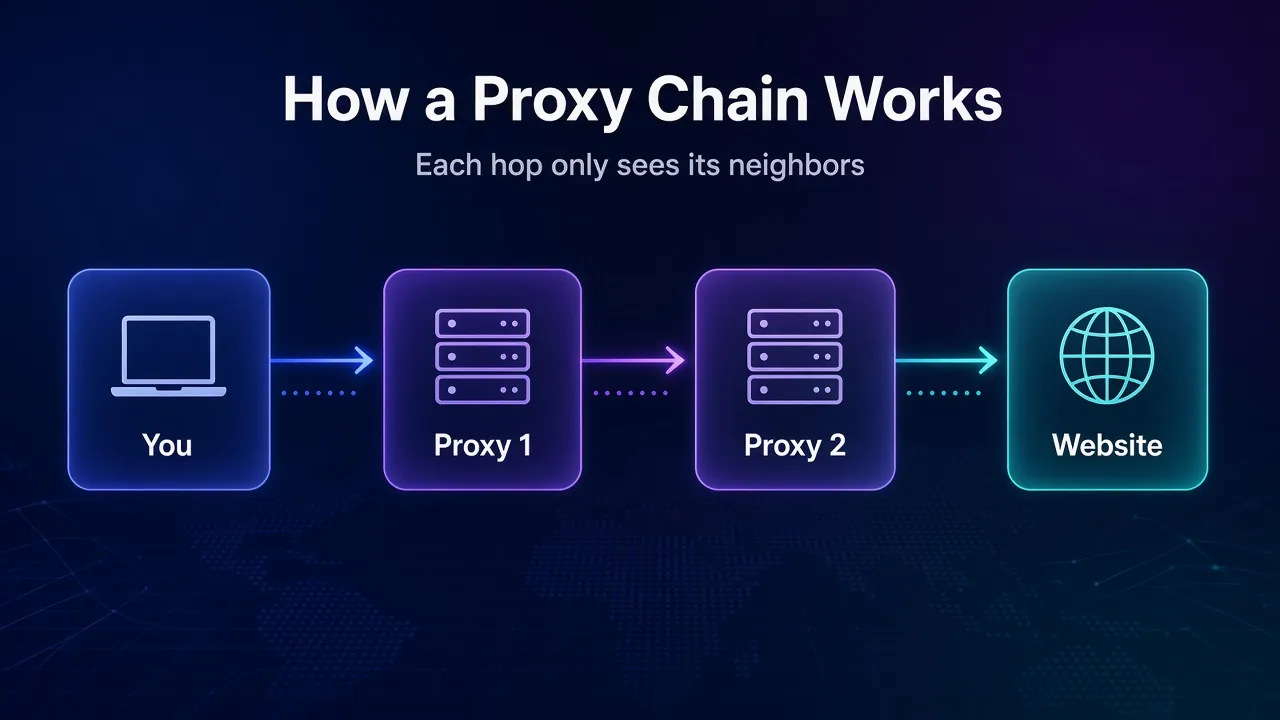
How Chaining Proxies Works, Hop by Hop
Your client builds the chain one tunnel at a time, asking each proxy to connect to the next one. Here’s the sequence for a two-hop chain:
- You connect to proxy 1 and ask it to open a connection to proxy 2.
- Through that tunnel, you talk to proxy 2 and ask it to connect to the website.
- Proxy 2 opens the connection to the site, which sees proxy 2’s IP address.
- The response travels back through proxy 2, then proxy 1, then to you.
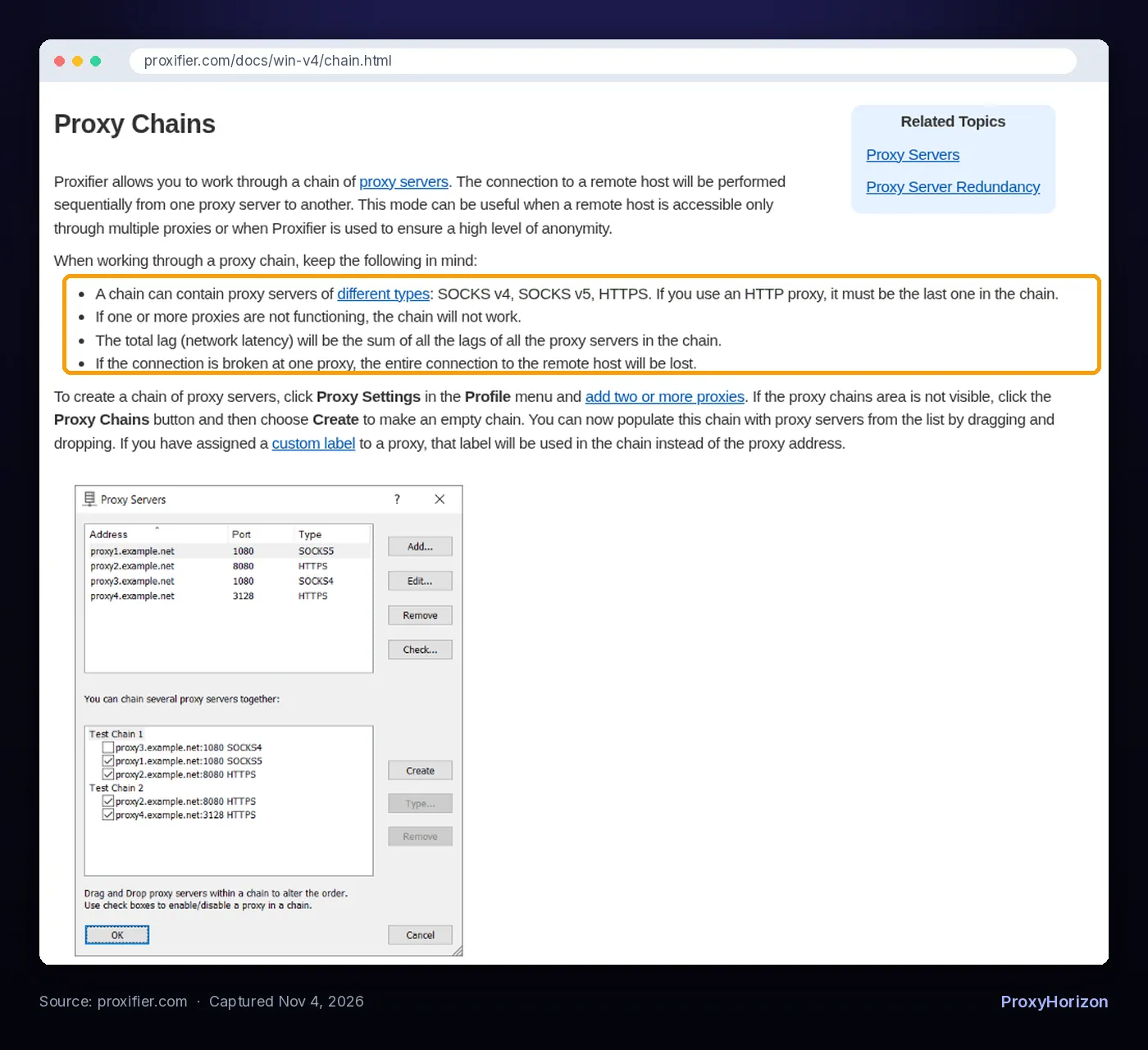
You can mix protocols in one chain. The proxychains-ng README gives the example of a SOCKS5 proxy, then an HTTP proxy, then a SOCKS4 proxy. Proxifier allows SOCKS v4, SOCKS v5 and HTTPS proxies, with one rule: if you use a plain HTTP proxy, it must be the last one in the chain.
Both tools document the same trade-offs. Proxifier says the chain stops working if any proxy fails, the total latency is the sum of every proxy’s lag, and if the connection breaks at one proxy, the entire connection to the remote host is lost.
What Each Hop Can See (and Why Chains Aren’t Tor)
A chain hides your IP from the website, but it doesn’t stop the first proxy from learning where you’re going. This is the part most guides skip.
SOCKS and HTTP proxy handshakes aren’t encrypted. When you ask proxy 2 to connect to a website, that request travels through proxy 1’s tunnel as readable data. So proxy 1 sees your real IP, and it can also read the setup message that names your destination.
| Hop | Sees your real IP? | Can learn the destination? |
|---|---|---|
| Proxy 1 (entry) | Yes | Often, by reading the unencrypted handshake to proxy 2 |
| Proxy 2 (exit) | No, it sees proxy 1 | Yes, it opens the connection |
| Website | No, it sees proxy 2 | It is the destination |
Tor is built differently. The Tor Project says it passes your traffic through at least three relays with a separate layer of encryption for each one, so a bad first relay only sees that “this IP address is using Tor.” A plain proxy chain has no such layering.
Two things narrow the gap. If the link to the next proxy is itself encrypted (an HTTPS proxy that you reach over TLS), the earlier hop can’t read the handshake. And if the site uses HTTPS, no proxy in the chain can read the page content itself, only which host you connected to.
Proxifier says chains can help “ensure a high level of anonymity.” That holds against the website. Against the proxies themselves, it depends on who runs them. A chain of free proxies you found online is a privacy risk, not a privacy tool. Our guide to proxy anonymity levels explains what else a proxy can leak in headers.
Proxy Chain vs VPN + Proxy vs Tor
All three add hops, but they differ in encryption, who runs the servers and how much speed you lose.
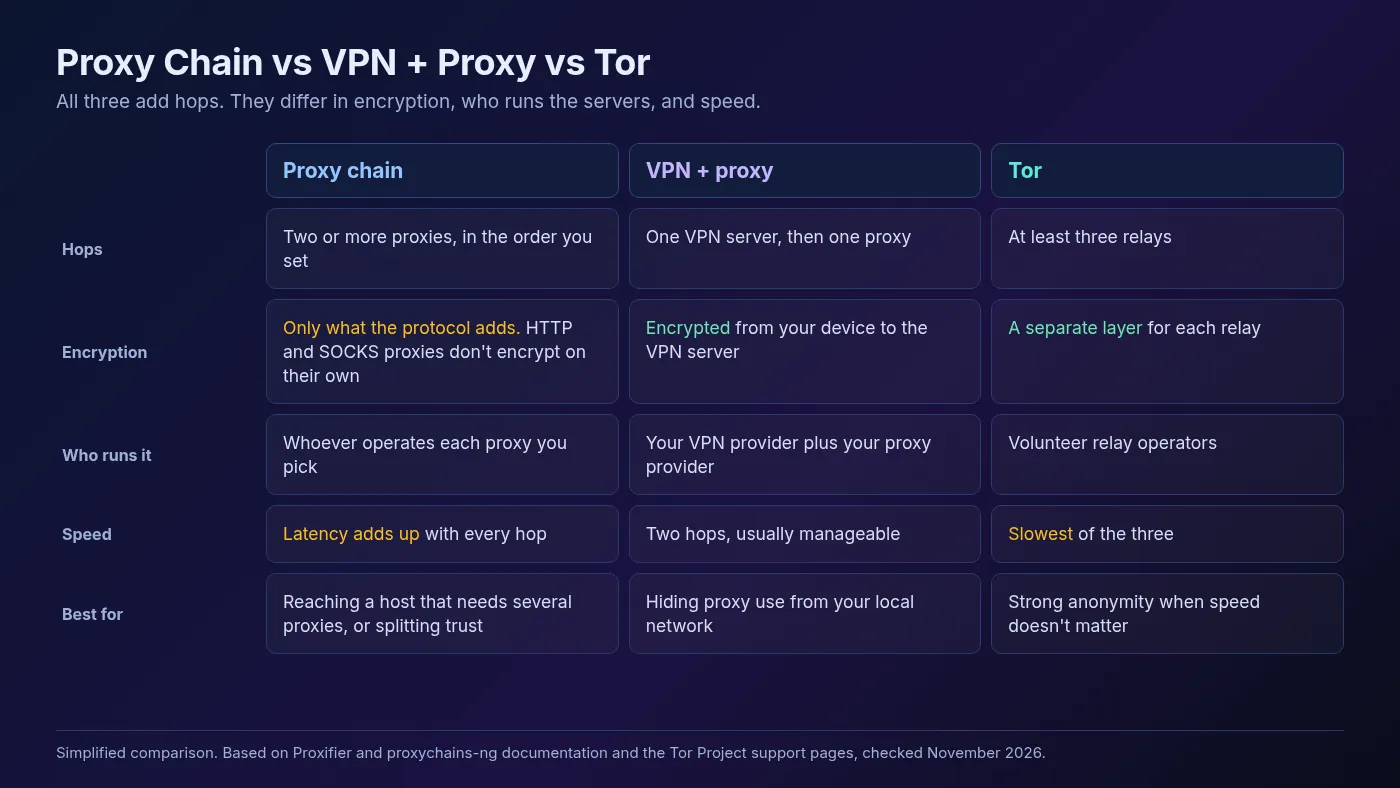
1Proxy Chain
You choose every hop and the order. It’s flexible and works with any proxies you already pay for, but nothing is encrypted by the chain itself, and each provider you add is one more party you have to trust.
2VPN + Proxy
You connect to a VPN first, then send traffic to a proxy through it. Your ISP and local network only see encrypted VPN traffic, and the website sees the proxy.
It’s two hops from two companies, which is usually easier to live with than a long chain. If you only want two hops from one provider, a double VPN does that with encryption at each step.
3Tor
Tor gives the strongest anonymity of the three because no single relay knows both who you are and where you’re going. It’s also the slowest, and many sites treat Tor exit IPs with suspicion. Our VPN vs Tor comparison covers when each one makes sense.
When a Proxy Chain Is Worth the Speed Cost
Chains make sense when the network forces them on you, or when you deliberately want to split trust. For everyday privacy or scraping, one good proxy usually wins.
Good reasons to chain:
- Your network only lets you out through a proxy. The proxychains-ng README lists this first: when the only way outside your LAN is a proxy server. Put the company proxy first and your own proxy last.
- A host is reachable only through several proxies. Proxifier names this as the main use case, such as reaching an internal system through a bastion proxy.
- You want to split what providers know. With different companies at each hop, the exit provider never sees your real IP.
- You’re testing. Chains are handy for checking how an app behaves behind layered proxies or firewalls.
Weak reasons to chain:
- Web scraping at scale. Every hop adds latency and failure points, and if both hops are metered by the GB, the same bytes count against both plans. A rotating residential gateway already gives you a fresh exit IP without a second hop.
- Hiding from your ISP. A chain of plain proxies doesn’t encrypt the first leg. A VPN does.
- Strong anonymity. If that’s the goal, Tor is designed for it and a homemade chain isn’t.
A quick latency example (illustrative numbers): if the first hop adds 40 ms and the second adds 120 ms, every round trip gets at least 160 ms slower. A page that needs dozens of requests feels that quickly. Proxifier’s docs confirm the rule behind the math: total lag is the sum of all hops.
How to Set Up a Proxy Chain in Proxifier
Proxifier (Windows and macOS) lets you build chains with drag and drop and supports three chain types. Following its Proxy Chains documentation:
- Open Profile, then Proxy Settings, and add two or more proxies.
- Click Proxy Chains if the chains area is hidden, then Create to make an empty chain.
- Drag proxies into the chain. Connections run in the order shown, top to bottom.
- Use Type to choose how the chain behaves.
- Point a proxification rule at the chain so the apps you pick use it.
The three chain types work very differently:
| Chain type | What it does | Use it for |
|---|---|---|
| Simple Chain (default) | Sends each connection through every proxy in order | A true multi-hop chain |
| Redundancy | Tries the first proxy, and moves to the next one if it fails | Failover between backup proxies |
| Load Balancing | Sends each connection through a random proxy in the list | Spreading traffic across proxies |
Only Simple Chain is a real chain. Redundancy and Load Balancing use one proxy per connection. Proxifier’s redundancy page also mentions a “Connect directly if all proxies fail” option. Leave it off if you never want your own IP exposed. For the basics of rules and profiles, see our Proxifier beginner’s guide.
How to Chain Proxies With proxychains-ng on Linux and macOS
proxychains-ng forces a program’s TCP connections through the proxies listed in a config file. Its GitHub repository documents four modes:
strict_chain: every proxy, in order, and all must be online.dynamic_chain: in order, but dead proxies are skipped as long as at least one works.round_robin_chain: rotates through the list in chains ofchain_lenproxies.random_chain: picks random proxies from the list for each connection.
A minimal two-hop config looks like this (swap in your own proxy details):
# proxychains.conf
strict_chain
proxy_dns
tcp_read_time_out 15000
tcp_connect_time_out 8000

[ProxyList]
socks5  203.0.113.10  1080  user1  pass1
http    198.51.100.20 8080  user2  pass2
Then run any command through it and confirm which IP the world sees:
proxychains4 -f ./proxychains.conf curl https://ifconfig.meKeep proxy_dns on, since the config notes it’s what stops DNS data leaking outside the chain. Our DNS leak guide explains why that matters.
Know the limits before you rely on it. The README says proxychains-ng supports TCP only (no UDP or ICMP), works by hooking dynamically linked programs, and may not work with scripts or apps that start background processes. It also notes a glibc issue that mainly affects scripting languages like Python and Perl.
A Two-Hop Chain in One cURL Command
cURL can run a two-hop chain natively with --preproxy. The cURL man page says it connects to a SOCKS proxy first, then through it to an HTTP or HTTPS proxy:
curl --preproxy socks5h://user1:pass1@203.0.113.10:1080 \
     -x http://user2:pass2@198.51.100.20:8080 \
     https://ifconfig.me
The first hop must be SOCKS. Use socks5h:// so hostnames resolve at the proxy rather than on your machine. If either password contains special characters like @, URL-encode them, which the man page says cURL decodes. Our cURL proxy command guide covers the rest of the proxy flags.
How to Check Your Chain Is Working
Never assume a chain works. The proxychains-ng README warns you to confirm it isn’t using your real IP before using it for anything serious.
- Check the exit IP. Run the command above or visit an IP checker. You should see the last proxy’s IP, not yours and not the first proxy’s.
- Check DNS. Run a DNS leak test through the chain and make sure your ISP’s resolvers don’t appear.
- Check the browser. If a browser sits in front of the chain, make sure WebRTC isn’t exposing your local IP.
- Time it. Compare response times with and without the chain so you know the real cost.
If speed falls apart, drop to one hop and choose the proxy more carefully. Our roundup of the best proxies for privacy and the proxy directory are good places to compare providers.
Frequently Asked Questions
Should You Use a Proxy Chain?
Use one when the network demands it, when a host is only reachable through several proxies, or when you want different companies to hold different pieces of your connection.
Don’t use one as a shortcut to anonymity. Plain proxies don’t encrypt the links between them, so the first hop can often learn more than you’d expect, and every hop makes your connection slower and more fragile.
Our take: start with one trustworthy proxy. Add a VPN in front if you need to hide traffic from your local network, switch to Tor if anonymity really matters, and save proxy chains for the specific network problems they solve.
Keep Reading
More articles you might enjoy