Rate Limiting in Web Scraping: How to Crawl Politely (2026)
How to handle a web scraping rate limit: read 429s and Retry-After, back off with jitter, cap concurrency per host, and tune Scrapy AutoThrottle to crawl politely.

You fire up the scraper, and the first 300 pages come back clean. Then every response turns into a 429. You add retries, the retries hit the wall too, and an hour later the IP is blocked outright.
The site told you exactly what it wanted. It sent a status code, and often a header saying how long to wait. Most scrapers just don’t listen.
This guide shows you how to handle a web scraping rate limit properly: read 429s and Retry-After, back off with jitter, cap concurrency per host, and set up Scrapy to throttle itself. There’s also one reason rotating IPs rarely fixes a 429, and it’s in the spec.
- A 429 means slow down, not go away. Treat it as a warning.
- Retry-After comes as seconds or an HTTP date. Parse both and honor it first.
- No header? Use capped exponential backoff with random jitter.
- Budget concurrency per host, and pause the whole host on a 429.
- New IPs don’t reset limits keyed to cookies or logins.
What Is a Rate Limit in Web Scraping?
A rate limit is a cap on how many requests a server accepts from one client in a given time. Go over it and the server refuses more work, usually with 429 Too Many Requests.
That status code comes from RFC 6585, which defines it as a user sending “too many requests in a given amount of time”. The response may include a Retry-After header saying how long to wait.
Here’s the part that matters for scrapers. The RFC deliberately doesn’t say how a server identifies you or counts requests. It can count per page, across the whole site, or across a group of servers. It can key on your IP, your login, or a cookie.
MDN’s 429 reference adds that limits are typically based on the client’s IP, but can follow a user or app when requests carry credentials or cookies. Keep that in mind. We’ll come back to it.
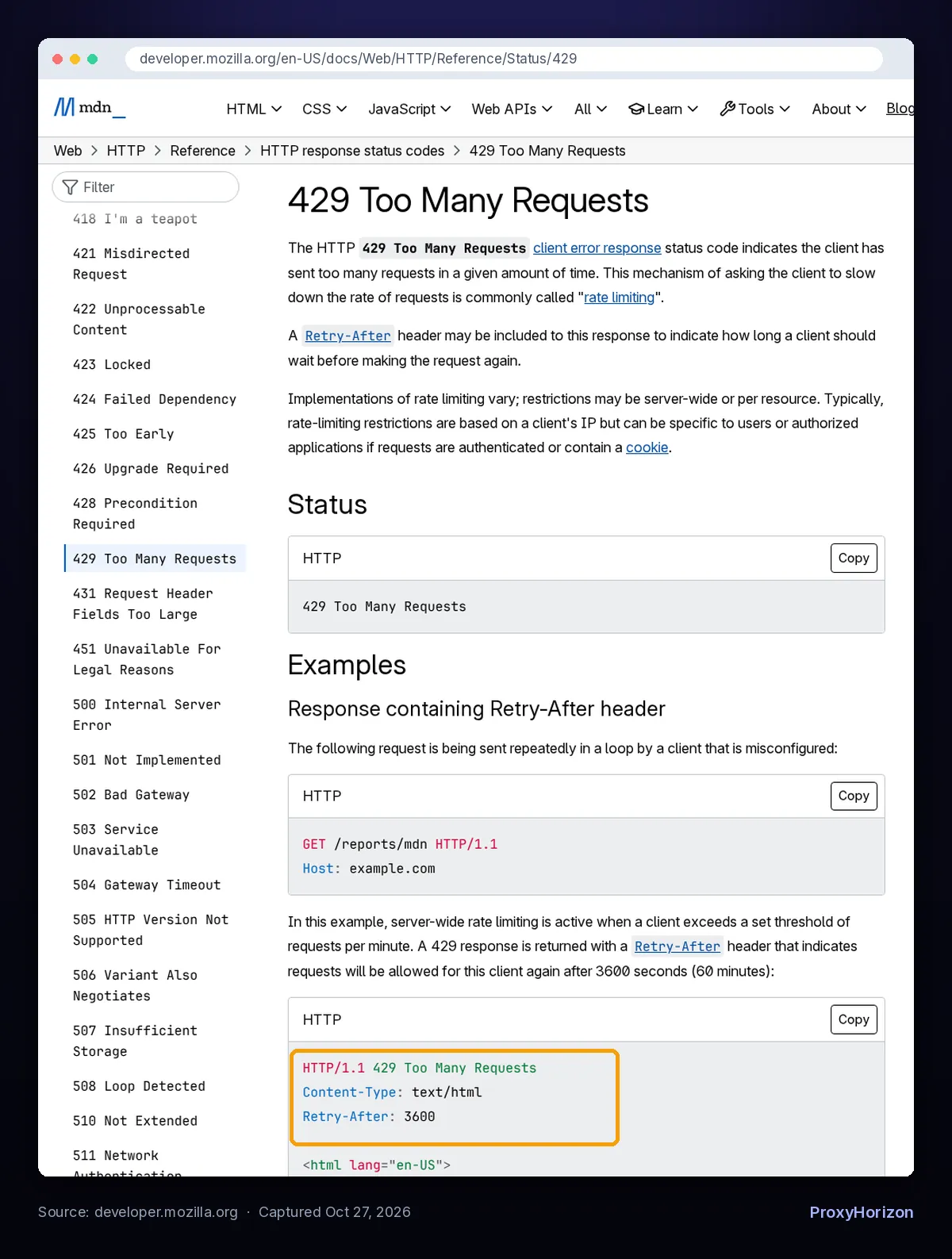
Retry-After: 3600 example. Captured October 27, 2026.The Signals Sites Use to Say “Slow Down”
A 429 is the polite version. Sites push back in several ways, and each one needs a different response from your crawler.
| Signal | What it usually means | What your crawler should do |
|---|---|---|
429 + Retry-After | You hit a limit and the server told you when to return | Pause that host for the stated time, then resume slower |
429 without a header | Over the limit, no timing hint | Back off exponentially with jitter |
503 | Server overloaded or down | Honor Retry-After if present, otherwise back off |
403 or a CAPTCHA page | Blocked or challenged, not rate limited | Stop retrying; fix the cause first |
| Rising latency and timeouts | The server is struggling | Lower concurrency before errors start |
Don’t lump these together. Retrying a 403 in a loop is how a soft block becomes a permanent one. Our guide to handling CAPTCHAs when scraping covers the challenge pages, and handling proxy timeouts and errors covers the network side.
How to Read Retry-After the Right Way
If a server sends Retry-After, wait at least that long. It beats any formula you could write.
According to RFC 9110, the value comes in one of two formats:
Retry-After: 120
Retry-After: Wed, 21 Oct 2026 07:28:00 GMT
The first is a whole number of seconds. The second is an HTTP date. Plenty of scraper code handles only the first and crashes on the second, so parse both:
from datetime import datetime, timezone
from email.utils import parsedate_to_datetime

def retry_after_seconds(value, default=None, cap=600):
    """Return seconds to wait, or `default` if the header is missing or invalid."""
    if not value:
        return default
    value = value.strip()
    if value.isdigit():
        return min(int(value), cap)
    try:
        when = parsedate_to_datetime(value)
    except (TypeError, ValueError):
        return default
    if when.tzinfo is None:
        when = when.replace(tzinfo=timezone.utc)
    seconds = (when - datetime.now(timezone.utc)).total_seconds()
    return min(max(seconds, 0), cap)
The cap is your call. A header asking for an hour on a job that runs every ten minutes is a sign to stop for the day, not to sleep in a worker. urllib3, for comparison, caps Retry-After at 21,600 seconds (six hours) by default.
MDN notes that support for this header is “still inconsistent”, so many 429s arrive without it. That’s where backoff comes in.
1RateLimit Headers: The Early Warning
Some servers tell you your remaining budget before you run out. APIs often send headers like X-RateLimit-Remaining. The IETF is standardizing this as RateLimit-Policy and RateLimit fields, still an Internet-Draft as of October 2026:
RateLimit-Policy: "default";q=100;w=10
RateLimit: "default";r=50;t=30
Here q is the quota, w the window in seconds, r the quota left and t the seconds it applies to. If a site sends these, pace yourself from them and you may never see a 429.
Exponential Backoff With Jitter, Explained
When there’s no Retry-After, double the wait after each failure, cap it, and randomize it. Each part solves a different problem.
- Doubling gets you off the server’s back quickly. Fixed one-second retries just keep feeding the limiter.
- The cap stops waits from growing to absurd lengths. Sixty seconds is a sensible ceiling for most crawls.
- Jitter spreads retries out. Without it, every worker that failed together retries together.
That last point is the one people skip. AWS’s Builders’ Library explains that if all failed calls back off to the same time, they cause contention or overload again when retried. Jitter adds randomness so they don’t.

The common “full jitter” version picks a random wait between zero and the current ceiling. Here’s what the schedule looks like with a one-second base and a 60-second cap:
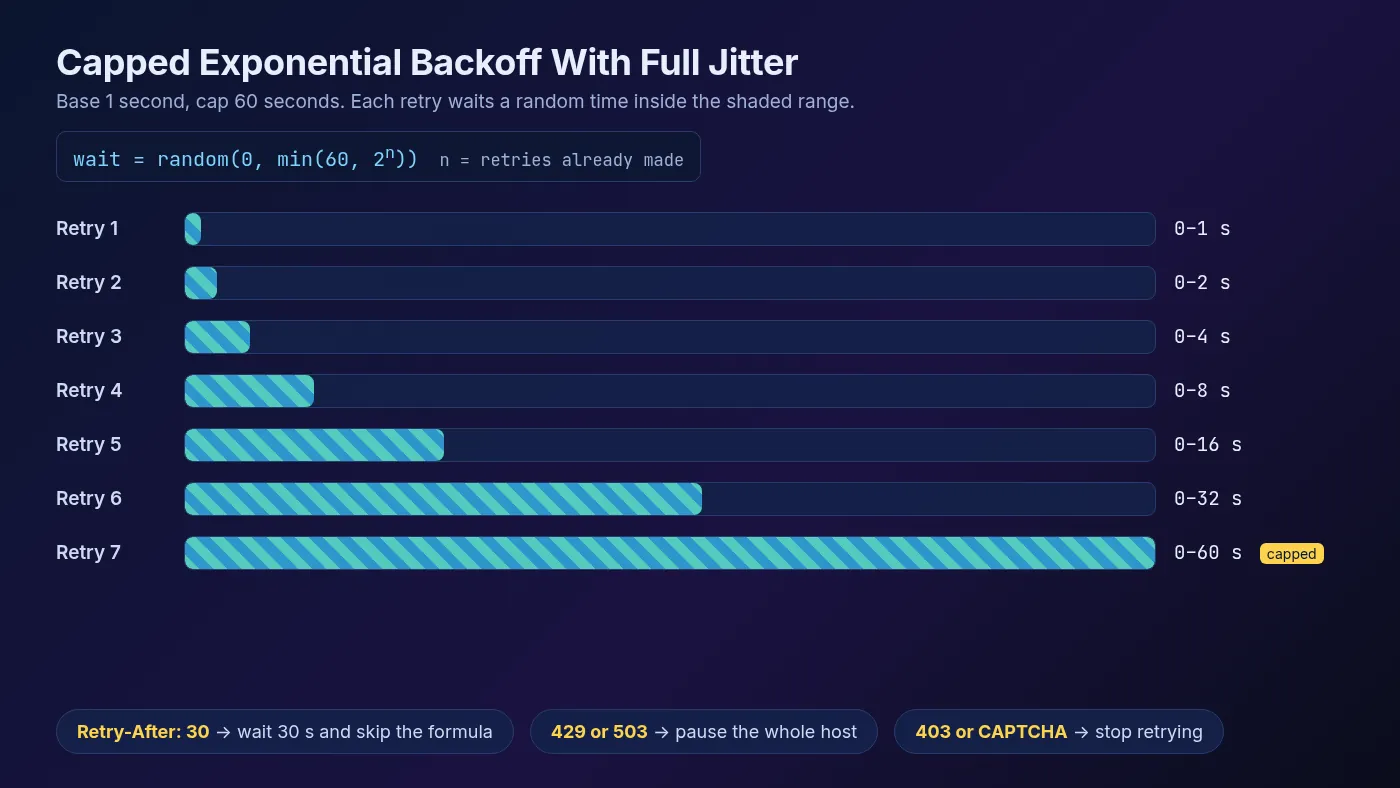
Retry-After header replaces the formula entirely.1Let urllib3 Do It for Python Requests
Requests doesn’t retry failed status codes on its own. Mount urllib3’s Retry on a session and it handles both backoff and Retry-After:
import requests
from requests.adapters import HTTPAdapter
from urllib3.util import Retry

retry = Retry(
    total=5,
    status_forcelist=[429, 500, 502, 503, 504],
    allowed_methods=["GET", "HEAD"],
    backoff_factor=1,     # waits 0s, 2s, 4s, 8s... capped by backoff_max
    backoff_max=60,
    backoff_jitter=1.0,   # adds 0-1s of random delay to each wait
    respect_retry_after_header=True,
)
session = requests.Session()
session.mount("https://", HTTPAdapter(max_retries=retry))
session.mount("http://", HTTPAdapter(max_retries=retry))
Per the urllib3 docs, respect_retry_after_header is on by default and applies to 413, 429 and 503 responses. Backoff itself is off by default, so set backoff_factor. Our Python Requests proxy tutorial shows how to add proxies to the same session.
Per-Host Concurrency: The Setting That Matters Most
Rate limits are per site, so your limits should be per site too. A global “ten requests at once” can still send all ten to one small shop.
Google’s crawler is a good model. Its crawl rate documentation says that when it sees many 500, 503 or 429 responses, it slows down across the whole hostname, including URLs that still return content. It speeds up again once the errors drop.
Copy that. When one URL gets a 429, pause the entire host, not just that URL. Here’s a small async limiter that does it, using the retry_after_seconds helper from earlier:
import asyncio, random, time
from urllib.parse import urlsplit
import httpx

PER_HOST = 2    # requests in flight per host
MIN_GAP = 1.0   # average seconds between request starts per host

class HostLimiter:
    def __init__(self):
        self.sems, self.locks, self.next_at = {}, {}, {}

    async def acquire(self, host):
        sem = self.sems.setdefault(host, asyncio.Semaphore(PER_HOST))
        lock = self.locks.setdefault(host, asyncio.Lock())
        await sem.acquire()
        async with lock:
            now = time.monotonic()
            start = max(now, self.next_at.get(host, 0))
            self.next_at[host] = start + MIN_GAP * random.uniform(0.5, 1.5)
        await asyncio.sleep(start - now)
        return sem

    def pause(self, host, seconds):
        self.next_at[host] = max(self.next_at.get(host, 0), time.monotonic() + seconds)

async def fetch(client, limiter, url, attempts=5):
    host = urlsplit(url).hostname
    for attempt in range(attempts):
        sem = await limiter.acquire(host)
        try:
            r = await client.get(url)
        finally:
            sem.release()
        if r.status_code not in (429, 503):
            return r
        wait = retry_after_seconds(r.headers.get("Retry-After"))
        if wait is None:
            wait = random.uniform(0, min(60, 2 ** attempt))  # full jitter
        limiter.pause(host, wait)  # slows every request to this host
    return r
Different hosts run in parallel, and each one gets its own budget. That’s how you crawl a thousand sites quickly while hitting each one gently. If you run many workers, keep that budget in shared storage, as our guide to how large crawlers manage request queues explains.
Scrapy: AutoThrottle and Download Slots
Scrapy has all of this built in. You only need to switch it on. These settings come from the Scrapy 2.19 docs, checked October 2026:
# settings.py
ROBOTSTXT_OBEY = True
CONCURRENT_REQUESTS_PER_DOMAIN = 2
DOWNLOAD_DELAY = 1              # floor: AutoThrottle never goes below it
AUTOTHROTTLE_ENABLED = True     # off by default
AUTOTHROTTLE_START_DELAY = 5
AUTOTHROTTLE_MAX_DELAY = 60
AUTOTHROTTLE_TARGET_CONCURRENCY = 1.0
RETRY_TIMES = 3
DOWNLOAD_SLOTS = {
    "shop.example.com": {"concurrency": 1, "delay": 3},
}
AutoThrottle measures how long each site takes to respond and sets the delay to latency divided by your target concurrency. Slow site, longer delay. It works per download slot, which means per domain by default.
One rule in its algorithm is worth stealing: latencies of non-200 responses can’t decrease the delay. The docs explain why. Error responses often come back faster than real pages, so a crawler with a fixed delay speeds up exactly when the server starts failing.
A few defaults to know:
- Projects made with
scrapy startprojectsetCONCURRENT_REQUESTS_PER_DOMAIN = 1andDOWNLOAD_DELAY = 1. Without the template, the fallbacks are 8 and 0. DOWNLOAD_DELAY_JITTER, added in 2.19, randomizes delays by ±50% by default.- The retry middleware retries 429 and 503 among others, twice by default, at lower priority. Its docs don’t describe reading
Retry-After, so add a custom middleware if your target sends long waits.
Scrapy’s own advice: lower per-domain concurrency first, and raise DOWNLOAD_DELAY only once concurrency is already 1.
What About robots.txt Crawl-delay?
Crawl-delay isn’t part of the robots.txt standard. RFC 9309 defines user-agent, allow and disallow, and lets crawlers interpret other records if they choose. Google’s robots.txt spec says plainly that it doesn’t support crawl-delay.
That doesn’t make it useless. A site that writes Crawl-delay: 10 is telling you its comfort level for free. Treat it as a floor for that host’s delay.
The same RFC says crawlers shouldn’t use a cached robots.txt for more than 24 hours, so refresh it on long jobs. For the legal side, read our explainer on robots.txt, ToS and scraping legal risk.
Why Polite Crawls Get Blocked Less
A 429 is a warning, not a ban. Sites that bother sending one are giving you a chance to adjust. Ignore it, and the next step is usually a hard block that no header will lift.
Now back to that spec detail. Since a server can count requests by cookie, login or session, a fresh IP doesn’t reset every limit. Rotate through proxies while reusing a logged-in session and you can stay limited while burning through IPs.
Proxies still matter. They spread load across many IPs when a site limits by address, and they keep one blocked IP from stopping the whole job. But pace each identity like a real visitor. Our guide to sticky vs rotating proxy sessions covers when to keep one IP per session.
Your request profile matters too. Consistent headers for web scraping and a steady pace look far less like an attack than bursts of identical requests.
A Polite-Crawl Checklist
- Start slow: one or two concurrent requests per host with about a second between them, then raise only while errors stay near zero.
- Read robots.txt: respect disallow rules, and use any
Crawl-delayas a floor. - Honor
Retry-Afterin both formats, with a sane cap. - Back off with jitter when no header arrives, capped around 60 seconds.
- Pause the whole host on a 429 or 503, not just the URL.
- Stop on 403s and CAPTCHAs. Retrying them makes things worse.
- Cache and deduplicate so you never fetch the same page twice in one run.
- Log status codes per host, so you see the 429 rate climb before the bans start.
Scaling past a few sites? Our guide to web scraping at large scale covers queues, workers and proxy pools around these rules.
Frequently Asked Questions
Slow Is Fast
Rate limiting isn’t the enemy of a fast crawl. It’s the price of a crawl that finishes. The site tells you its limits through 429s, Retry-After and sometimes Crawl-delay, and a crawler that listens keeps its IPs working.
Our take: budget per host, never globally. Honor Retry-After first, fall back to capped backoff with jitter, and let AutoThrottle or a small limiter handle the pacing. Then add proxies to spread the load, not to outrun the limit.
If you need an IP pool, compare networks in our proxy directory and test one on your real target at a gentle pace first.
Keep Reading
More articles you might enjoy