How to Handle Proxy Timeouts, Errors & Connection Failures (2026)
How to handle proxy timeouts, errors, and connection failures: what each error means, retry logic with backoff, when to rotate, and how to cut failures at the source.

Every proxy project works perfectly in testing and then falls apart at scale. Requests hang, connections drop, and your logs fill with 407s, 429s, and timeouts you've never seen before. Here's the uncomfortable truth: proxy errors aren't a sign something is broken. At volume, they're normal. The difference between a hobby script and a production system is entirely in how it handles them.
When automated traffic makes up roughly half of all web activity (Imperva), sites push back hard, and even the best proxies fail a percentage of requests. A pool with 99% success still fails one request in a hundred, which is thousands of failures across a real job. If a single timeout crashes your run or a 429 gets ignored, you don't have a proxy problem. You have an error-handling problem.
This guide covers how to handle proxy timeouts, errors, and connection failures like a production engineer: what the errors actually mean, how to build retry logic that helps instead of hurts, when to rotate versus back off, and how to cut failures at the source. If you're chasing one specific error, our focused guide on proxy connection failed errors pairs well with this broader playbook.
Why Proxy Requests Fail in the First Place
Before you can handle errors, you need to know where they come from, because the fix depends on the cause. Broadly, failures fall into four buckets. The proxy itself can be dead, overloaded, or carrying a flagged IP. The target site can block, rate-limit, or challenge you. The network between you and the proxy can drop packets or lag. And your own config can be wrong: bad credentials, an unreachable port, or timeouts set too tight.
Most people treat every failure the same way, blindly retrying, and that's exactly why their scrapers stall. A dead proxy and a rate limit need opposite responses: one says "switch IPs now," the other says "slow down." Diagnosing the cause is the first real skill here, and everything below builds on it.
The Proxy Errors You'll Actually See
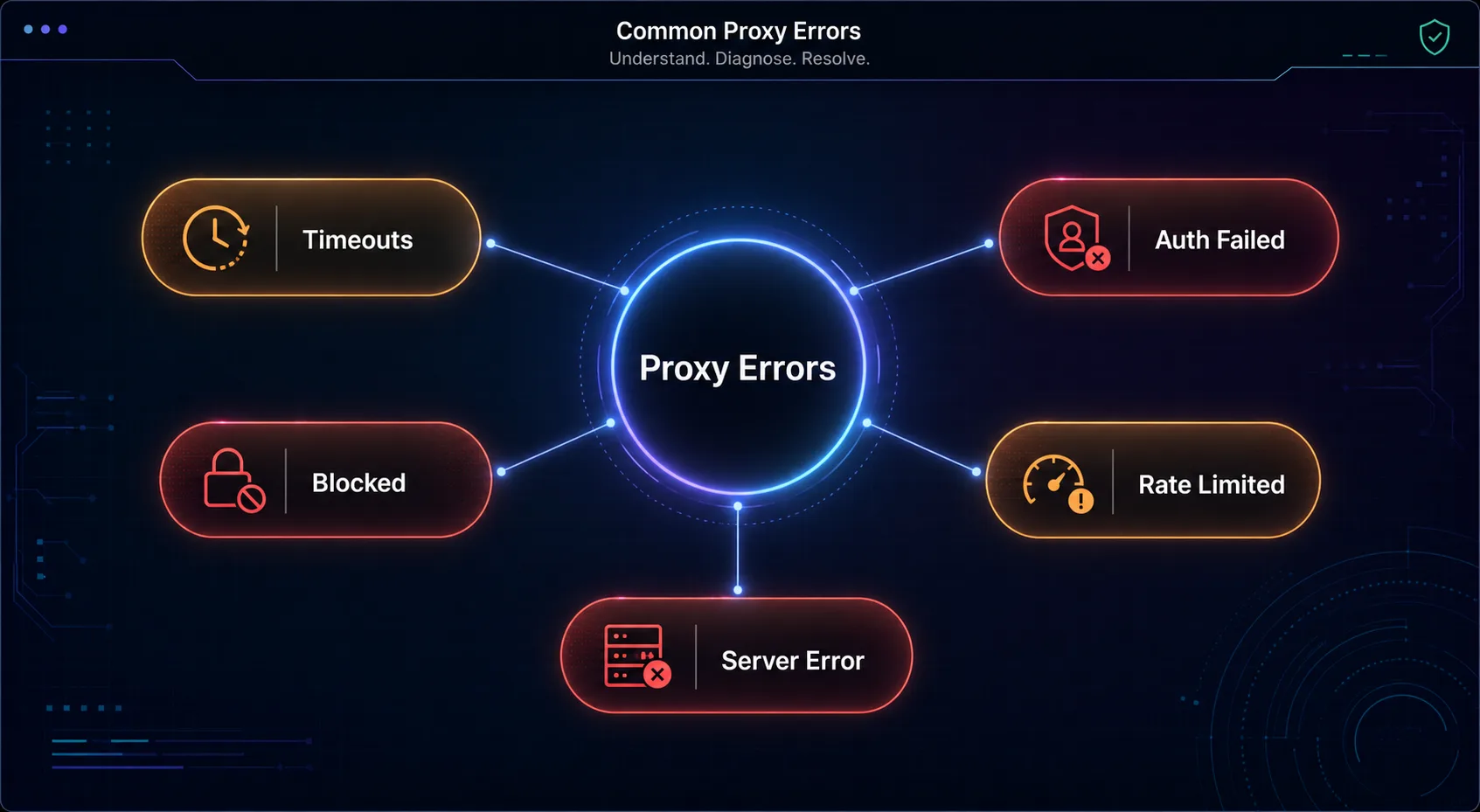
Errors come in two families: HTTP status codes returned by the target or proxy, and lower-level network errors thrown before you get any response at all. Knowing which is which tells you where the failure happened.
| Error | What it means | What to do |
|---|---|---|
| 407 Proxy Authentication Required | The proxy rejected your credentials | Fix username, password, or IP whitelist, don't retry blindly |
| 403 Forbidden | The target blocked the request | Rotate to a cleaner IP; check fingerprint and headers |
| 429 Too Many Requests | You hit the target's rate limit | Back off, slow down, and respect Retry-After |
| 502 / 503 / 504 | Proxy or target server error or overload | Retry after a short delay, often transient |
| ETIMEDOUT / connect timeout | The connection never established in time | Retry on a new proxy; check timeout settings |
| ECONNRESET / ECONNREFUSED | The connection dropped or was refused | Mark the proxy suspect and switch to another |
The key insight: a 429 means the target is fine but you're too fast, while an ECONNRESET usually means the proxy is the problem. Same failure, completely different fix. Tag every error by type so your code can react correctly instead of retrying into a wall.
Timeouts Deserve Special Attention
Timeouts are the silent killer because a hung request doesn't error immediately, it just sits there, holding a slot and stalling your throughput. The fix starts with understanding there are two kinds. A connect timeout caps how long you'll wait to establish the connection to the proxy. A read timeout caps how long you'll wait for the response after connecting. Setting both explicitly is non-negotiable.
The common mistake is setting them too high, or not at all, so one slow proxy freezes a worker for 60 seconds. Set aggressive but realistic values, often a few seconds to connect and 10 to 30 to read, and treat a timeout as a signal to abandon that proxy and move on, not to wait longer. A fast failure you can retry beats a slow success you never get.
The Retry Strategy That Actually Works
Retrying is where most people go wrong. Immediate, unlimited retries on the same proxy just hammer a failing endpoint and can turn a soft block into a hard ban. A good retry strategy has three ingredients: a cap on attempts, an increasing delay, and a fresh proxy each time.
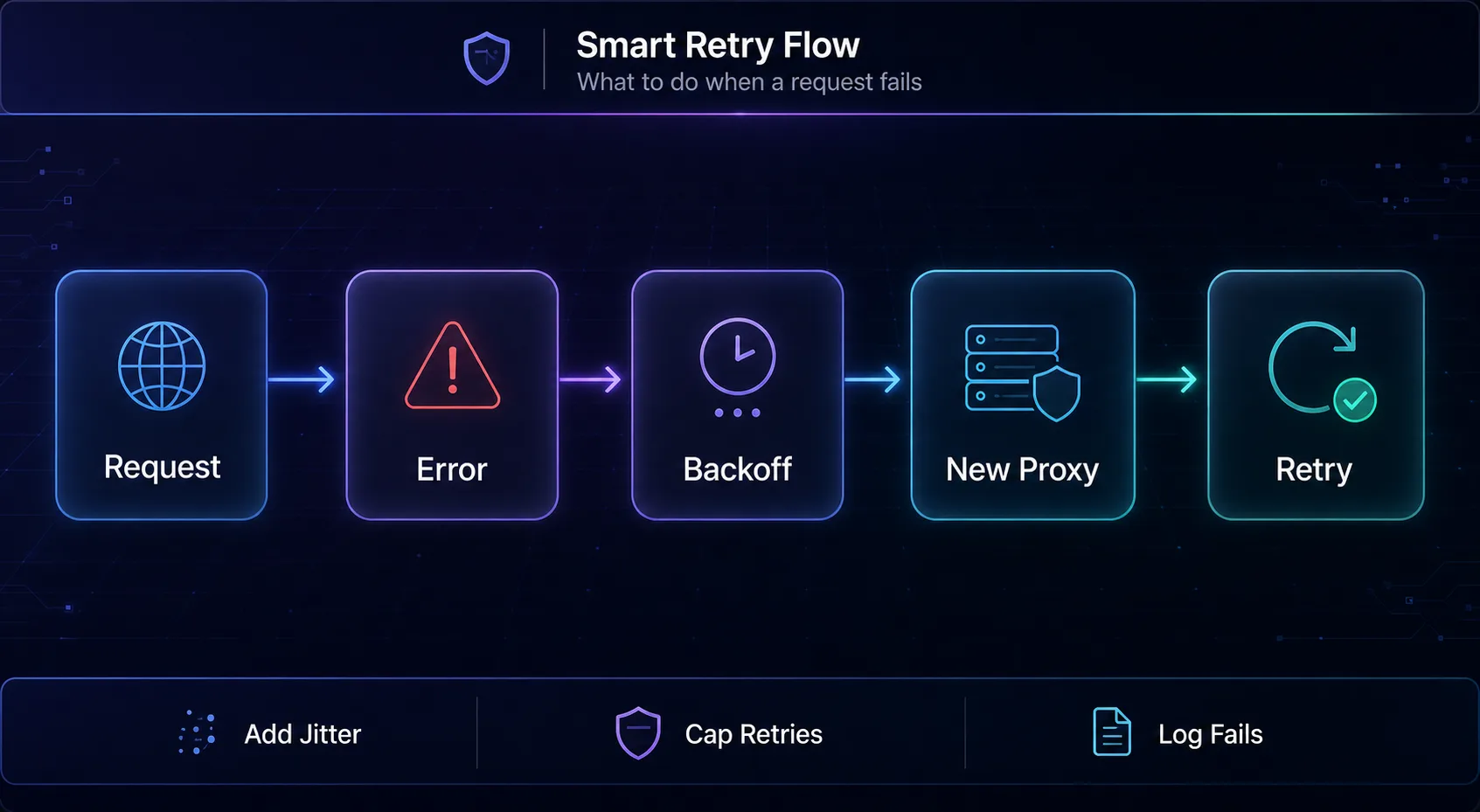
The gold standard is exponential backoff with jitter. Instead of retrying instantly, you wait longer after each failure (1s, then 2s, then 4s) and add a small random offset so a fleet of workers doesn't retry in sync and stampede the target. Cap it at a sensible maximum, usually three to five attempts, then give up and log the failure rather than looping forever. One more rule: only retry idempotent requests automatically. Retrying a GET is safe; blindly retrying a POST that charged a card is not.
| Setting | Sensible default | Why |
|---|---|---|
| Max retries | 3 to 5 | Enough to survive transient failures, not enough to loop forever |
| Backoff | Exponential (1s, 2s, 4s) | Gives a struggling target room to recover |
| Jitter | Random 0 to 1s added | Stops synchronized retry stampedes |
| Connect timeout | A few seconds | Fail fast on dead proxies |
| Read timeout | 10 to 30 seconds | Allow slow pages without hanging forever |
Rotate, Don't Retry the Same IP
This is the rule that separates working setups from broken ones: when a request fails on one proxy, retry on a different one. Retrying a dead or blocked IP just wastes attempts. A healthy setup pulls the next proxy from a pool and gives the request a fresh identity, which is why solid proxy rotation is inseparable from good error handling.
Take it further by tracking each proxy's health. When one racks up timeouts or resets, mark it as suspect and temporarily pull it from the pool so it stops poisoning your success rate. Feed it back in later to test if it recovered. This turns a static list into a self-healing pool that routes around its own bad members, which is exactly how large-scale systems stay reliable when scraping at scale.
Match the Error to the Right Fix
Generic retries waste time. Each error type has a correct response, and reacting specifically is what lifts your success rate.
1Fix Your Authentication
A 407 is almost never worth retrying, because it's a config problem, not a transient one. Your username or password is wrong, or your IP isn't whitelisted. Check your proxy authentication setup, confirm credentials, and verify your IP is authorized before sending another request.
2Rotate and Look More Human
A 403 means the target refused you, usually because the IP or your fingerprint looked suspicious. Retrying the same IP won't help. Rotate to a cleaner one, check the IP's reputation, and make sure your headers and fingerprint are consistent, especially on Cloudflare-protected sites.
3Back Off and Respect Retry-After
A 429 (Too Many Requests) means you're going too fast for that target. Slow down, spread requests across more IPs, and honor the Retry-After header if the site sends one. Hammering through a 429 is the quickest route to a longer, harder block.
45xx: Retry After a Short Delay
Server errors like 502, 503, and 504 are often transient, a proxy hiccup or a momentarily overloaded target. A short backoff and a retry, ideally on a fresh proxy, usually clears them. If a specific proxy throws 5xx repeatedly, though, treat it as unhealthy and rotate it out.
5Timeouts and Resets: Abandon and Switch
ETIMEDOUT, ECONNRESET, and ECONNREFUSED point at the proxy or the network, not your logic. Don't wait longer; abandon that proxy, switch to another, and mark the failing one for a health check. These are the clearest "rotate now" signals you'll get.
Fail Gracefully: Circuit Breakers and Backoff
Sometimes the problem isn't one proxy, it's the whole target. If a site suddenly returns errors on every request, retrying across your entire pool just burns IPs and invites a wider ban. This is where a circuit breaker earns its place: after a threshold of consecutive failures, it trips and pauses requests to that target for a cooling-off period instead of charging ahead.
The mindset shift is treating a flood of errors as information, not just noise to retry through. A spike in failures often means the site changed something or is under load, and the smartest move is to slow down globally, alert yourself, and resume gently. Graceful degradation, doing less rather than failing loudly, keeps your IPs alive for when the target recovers.
Monitor Proxy Health Before It Bites
You can't fix what you don't measure. The teams that rarely get surprised are the ones watching success rate, latency, and error breakdown per proxy in real time. A pool that quietly drifts from 98% to 80% success is telling you something, usually that IPs are getting flagged, long before it derails a job.
Track cost per successful request, not just requests sent, so a degrading pool shows up as rising failures and retries rather than a silent tax. Periodically benchmark your proxies the way our guide on testing proxy speed, latency, and success rate describes, and retire the consistent underperformers. Monitoring turns error handling from reactive firefighting into something you control.
Cut Errors at the Source: Reliable Proxies
All the retry logic in the world can't rescue a bad pool. The single biggest lever on your error rate is starting with clean, high-uptime proxies. How we picked: we favored providers with strong uptime, clean IPs, and consistent success rates that keep failures low before your code ever has to react. A quick disclosure: some links below are affiliate links, and we may earn a commission if you sign up, which never changes our picks.
1Oxylabs

Oxylabs is the reliability benchmark for high-volume work. Near-perfect uptime, a large, well-maintained residential pool, and enterprise support mean fewer failures reach your retry loop in the first place. When a job absolutely has to complete, that consistency is worth paying for.
It's premium infrastructure at a premium price, so it's more than a small project needs. For production systems where every failed request costs money, though, the low error rate justifies it.
2Decodo

Decodo is the best-value pick for keeping errors low without enterprise pricing. A huge IP pool, strong uptime, and a clean dashboard make it easy to run reliable rotation, and success rates on mainstream targets are excellent. For most teams, it's the sweet spot of dependability and cost.
It isn't the rock-bottom cheapest per gigabyte at tiny volumes, but the reliability more than pays back in fewer retries. It's the one we recommend to most people fighting error rates.
3SOAX

SOAX keeps failures down through clean, well-vetted IPs and precise geo-targeting, which avoids the location-mismatch flags that trigger 403s. Its pool hygiene means fewer dead or blocked IPs land in your rotation, translating directly into a smoother success rate.
Costs can climb as you scale and some controls sit on higher tiers, but for clean IPs that fail less, it's a reliable choice. Compare all three in our proxy provider directory.
Common Mistakes When Handling Proxy Errors
Most error-handling pain is self-inflicted. Avoid these and your success rate climbs before you touch anything else.
1Retrying the Same Failed Proxy
Immediately retrying the IP that just failed is the most common error. If it timed out or got blocked, the next attempt will too. Always retry on a fresh proxy from the pool, not the one that just let you down.
2Treating Every Error the Same
Blindly retrying a 407, a 429, and a timeout with identical logic guarantees you handle at least two of them wrong. Tag errors by type and branch your response, because a config error, a rate limit, and a dead proxy need three different fixes.
3No Timeout, or One That's Too Long
Leaving timeouts unset lets a single hung request stall a worker indefinitely. Setting them to a minute has nearly the same effect. Use tight connect and read timeouts so failures surface fast and free up the slot for a good request.
4Ignoring Retry-After and Rate Limits
When a site says slow down, pushing harder gets you banned longer. Respect 429 responses and the Retry-After header. Backing off looks like a bug when you're impatient, but it's what keeps your access alive.
5Not Logging Failures
If you don't record what failed and why, you're flying blind. A pool degrading from 98% to 75% success is invisible without logs. Capture error types, per-proxy stats, and success rate so you can see problems building instead of discovering them mid-job.
Frequently Asked Questions
The Bottom Line
Proxy errors are not a failure of your setup; they're the normal weather of working at scale. What matters is your response. Diagnose the error before you react, retry with exponential backoff on a fresh proxy, respect rate limits, set tight timeouts, and monitor your pool's health so problems surface early. Handle failures well and a 95% pool feels like a 99% one.
And remember the cheapest fix of all: start with reliable IPs so fewer requests fail to begin with. Oxylabs leads on uptime at scale, Decodo is the best value for low error rates, and SOAX keeps flags down with clean, geo-accurate IPs. Build the retry logic, then pair it with a solid pool from our proxy provider directory, and your scrapers will keep running long after the naive ones have crashed.
Keep Reading
More articles you might enjoy