How to Log In to Multiple LinkedIn Accounts Safely (2026)
How to log in to multiple LinkedIn accounts safely in 2026: why the usual tricks fail, the antidetect browser plus proxy method, and the mistakes to avoid.
LinkedIn is built on real identities, and it guards that fiercely. Try to run two accounts from the same browser and it notices fast, because it can see they share the same device, the same fingerprint, and the same IP. One restriction, and both accounts are at risk.
Yet plenty of people have legitimate reasons to run more than one: recruiters managing sourcing profiles, sales teams doing outreach, agencies handling client accounts. The challenge isn't why, it's how to do it without getting flagged.
This guide covers why LinkedIn is so strict, which methods actually keep accounts separate and which quietly fail, the safe setup step by step, and the honest truth about where LinkedIn's rules stand. Let's do this properly.
Why LinkedIn Is Strict About Multiple Accounts
LinkedIn's whole model depends on people being who they say they are. That makes it far less tolerant of multiple accounts than a network like TikTok, and its detection is correspondingly sharp.
It links accounts through several signals at once: your IP address, your browser and device fingerprint, cookies, and behaviour patterns. If two accounts share even a couple of these, LinkedIn connects them. Our guide on how platforms detect multiple accounts breaks the mechanics down, but the takeaway is simple: to run separate accounts, each has to look like a genuinely separate person on a separate device.
What Actually Works, and What Doesn't
Most quick fixes people try only solve part of the problem. Here's how the common methods really stack up.
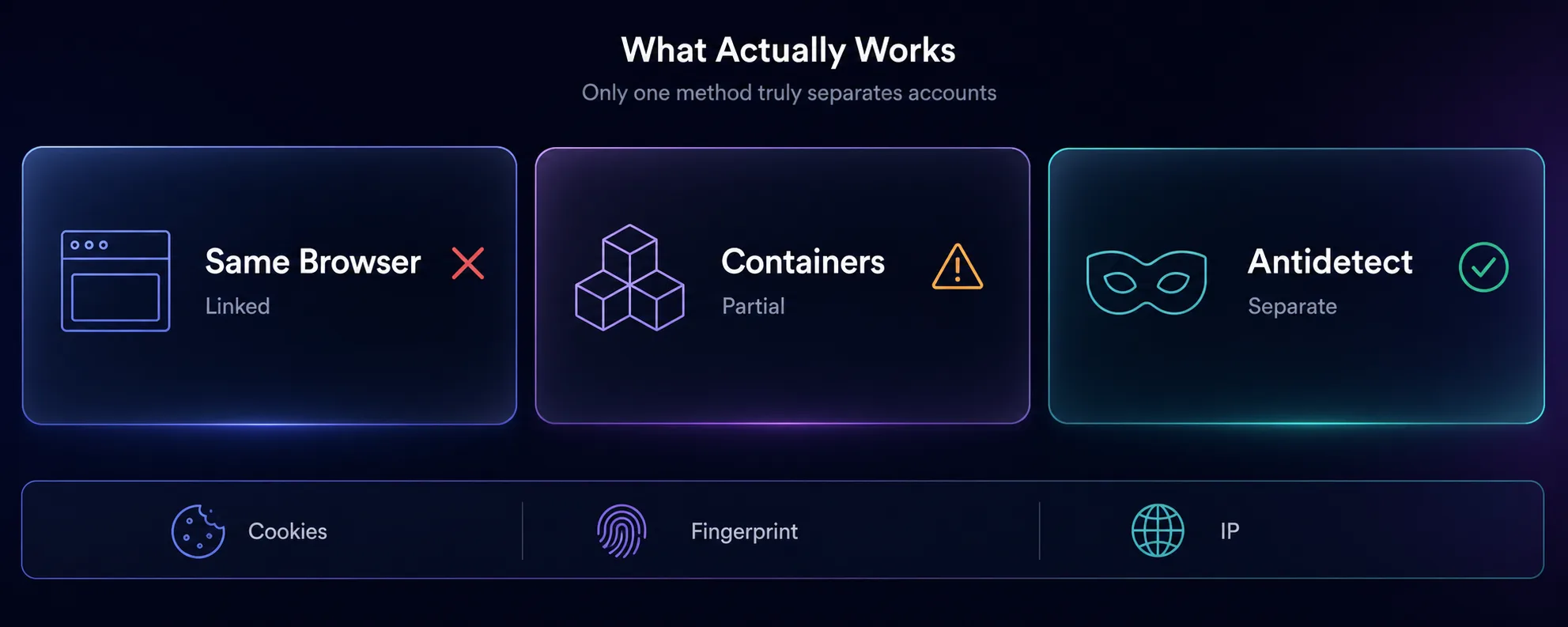
| Method | Separates cookies? | Separates fingerprint? | Separates IP? |
|---|---|---|---|
| Two tabs, same browser | No | No | No |
| Incognito or second browser | Partly | No | No |
| Browser profiles | Yes | No | No |
| Multi-account containers | Yes | No | No |
| Antidetect browser + proxy | Yes | Yes | Yes |
See the pattern? Everything short of an antidetect browser leaves your fingerprint identical across accounts. Different cookies don't help when LinkedIn can see the same canvas, fonts, and hardware behind them. That fingerprint is the signal that ties accounts together, which is why only the last row genuinely works.
The Safe Method: Antidetect Browser Plus Proxy
The reliable way to run multiple LinkedIn accounts is to give each one its own isolated browser profile with a unique fingerprint, and its own dedicated IP. An antidetect browser handles the first part, and a proxy handles the second. Here's the setup.
1Create a Separate Profile Per Account
In your antidetect browser, create one profile for each LinkedIn account. Each gets its own fingerprint: different canvas and WebGL values, user agent, fonts, and screen size. To LinkedIn, each profile looks like a different device.
2Assign a Dedicated Proxy to Each Profile
Give every profile its own proxy so the accounts don't share an IP. For LinkedIn, ISP proxies and residential proxies work best, because they look like real users and stay stable. Keep the IP consistent per account.
3Keep Each Identity Consistent
Same profile, same proxy, same behaviour per account, every time. Don't swap fingerprints or IPs between accounts. Consistency is what builds and keeps trust.
4Warm Accounts Up
Don't blast connection requests or messages from a fresh account. Build activity gradually, the way a real professional would, especially in the first weeks.
Best Antidetect Browsers for LinkedIn
These four handle fingerprinting and proxy management well, which is exactly what LinkedIn account separation needs. Each links to full details.
1Multilogin

The benchmark for fingerprint quality, with mature team features for agencies. Its profiles hold up against strict detection, which is exactly what LinkedIn demands. Premium priced, but reliable where a ban is costly. See our guide to choosing an antidetect browser.
2GoLogin

Reliable fingerprinting at a friendlier price, with a cloud option to access profiles from anywhere. A popular, approachable choice for individuals and small teams running a handful of LinkedIn profiles.
3Octo Browser
Strong reputation for fingerprint quality and frequent updates that keep pace with detection changes. Profiles feel current and stable, which matters when LinkedIn keeps moving the goalposts.
4AdsPower

Solid fingerprinting plus automation and bulk profile management, with a free tier to start. Handy if you manage many accounts or want to automate repetitive outreach tasks. Compare tools in our antidetect browser directory.
Why the Proxy Matters as Much as the Browser
The proxy handles your network identity, but the device layer matters too. Teams managing multiple LinkedIn accounts can pair residential proxies with MoreLogin cloud phone to give each account its own dedicated Android environment, separating the device fingerprint as well as the IP.
Here's the trap beginners fall into: they set up perfect antidetect profiles, then log every account in from the same home IP. LinkedIn sees five accounts on one address and links them anyway. The browser handles the fingerprint, but it does nothing about your IP.
Each profile needs its own proxy. ISP and residential proxies suit LinkedIn because they carry the trust of real connections and stay stable over time, which matters on a network where accounts are long-lived. The rule holds here as everywhere: one account, one proxy, one consistent identity.
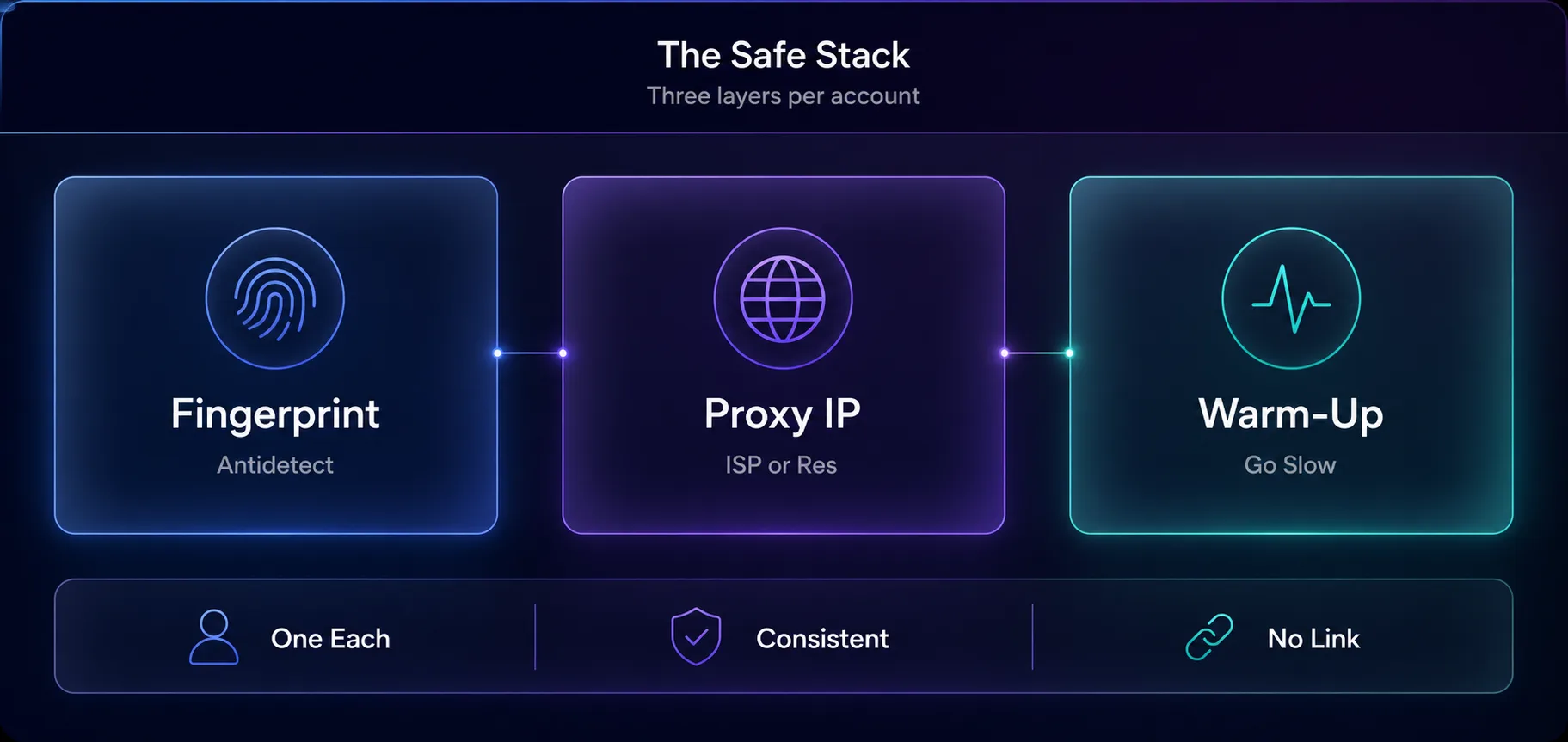
| Layer | What it separates | Tool |
|---|---|---|
| Fingerprint | Device and browser identity | Antidetect browser |
| IP address | Location and network | ISP or residential proxy |
| Behaviour | Human vs automated patterns | Gradual warm-up and pacing |
Is This Against LinkedIn's Rules?
Let's be straight. LinkedIn's User Agreement says you should maintain one account and use your real identity, so running multiple personal profiles goes against its terms, even though it isn't illegal. That's an important distinction to understand before you start.
There are legitimate, sanctioned structures for teams: LinkedIn offers business tools, Recruiter seats, and Sales Navigator for exactly the professional use cases people reach for. Antidetect browsers themselves are legal, general-purpose privacy and testing tools. What matters is how you use them, and we don't encourage anything that breaks a platform's rules.
Our take: the tool is neutral; the responsibility is yours. If your need is genuine multi-account management, understand LinkedIn's terms, use its official team products where they fit, and keep each identity cleanly separated. Read the User Agreement and make an informed choice.
Common Mistakes to Avoid
1Relying on Browser Profiles Alone
Chrome or Firefox profiles separate cookies but share one fingerprint. LinkedIn sees straight through that. You need genuinely different fingerprints, which means an antidetect browser.
2Sharing One IP Across Accounts
The most common and most costly error. A perfect fingerprint on a shared IP still links your accounts. Every profile needs its own proxy.
3Moving Too Fast on New Accounts
Aggressive connection requests or messaging from a fresh account triggers review quickly. LinkedIn watches new-account behaviour closely, so ramp up slowly.
4Using Cheap Datacenter Proxies
Datacenter IPs are easy for LinkedIn to flag. Stick to ISP or residential proxies for accounts you care about, and treat the saving on cheap IPs as a false economy.
5Mixing Identities
Logging one account in through another account's profile or proxy links them instantly. Keep each account's profile, proxy, and behaviour strictly separate.
Frequently Asked Questions
The Bottom Line
Running multiple LinkedIn accounts safely comes down to one principle: make each account look like a separate professional on a separate device. Cookies and browser profiles don't achieve that, because the fingerprint stays the same underneath. Only an antidetect browser gives each account a genuinely different identity.
Pair that with a dedicated ISP or residential proxy per account, keep every identity consistent, and warm accounts up slowly. Get those three layers right, fingerprint, IP, and behaviour, and LinkedIn treats your accounts as the separate people they're meant to represent.
Before you build this, understand where LinkedIn's terms sit and use its official team tools where they fit. Then compare antidetect browsers in our directory, pick a stable pool from the proxy directory, or read our companion guide on antidetect browsers for Facebook to round out your multi-account setup.
Keep Reading
More articles you might enjoy