Best X (Twitter) Proxies to Use in 2026: 7 Picks Compared
The best X (Twitter) proxies for 2026, picked for real account work: which proxy type X trusts, what 10 client accounts cost per month, and the rule most proxy guides skip.
![Best X (Twitter) Proxies to Use in [year]: 7 Picks Compared](/_next/image?url=https%3A%2F%2Fproxyhorizon.com%2Fcdn%2Fblog-images%2Fbest-twitter-proxies-guide.webp&w=3840&q=75)
A lot of X account locks start with the IP, not the posts.
Log in from a datacenter range, jump countries between sessions, or park five accounts on one address, and X notices. Then come the phone checks, the CAPTCHAs and the “your account is locked” screen.
The right proxy fixes the IP side of that. It won’t fix everything, though, and most Twitter proxy lists skip the one rule that matters most. We’ll get to it.
Below are the seven best X (Twitter) proxies for 2026, the proxy type each job actually needs, and what a small agency setup costs per month in real dollars.
- Static ISP proxies are the best default for X accounts you log in to every day.
- Mobile proxies earn the most trust, but per-GB billing makes them the pricey option.
- Rotating residential IPs are the wrong tool for any logged-in X session.
- No proxy makes scraping or scripted bots acceptable under X’s own rules.
- Decodo is our top pick; Bright Data and IPRoyal win on cheap static IPs.
How We Picked These X Proxies
We haven’t run a hands-on X test for this roundup yet. The picks come from each provider’s official pricing and product pages, checked in September 2026, weighed against what X account work depends on.
Here’s what we looked for:
- Static ISP IPs you can keep for weeks, priced per IP.
- A mobile option for the accounts you can’t afford to lose.
- Session control: how long one IP can stay attached to one login.
- Country and city targeting, so the IP matches the account.
- A cheap way to start: a trial, a small plan or pay as you go.
Every provider here also has a listing in our proxy directory. Some links are affiliate links, so we may earn a commission if you buy. Prices change often, so confirm them on the provider’s page before paying.
Which Proxy Type Actually Works on X?
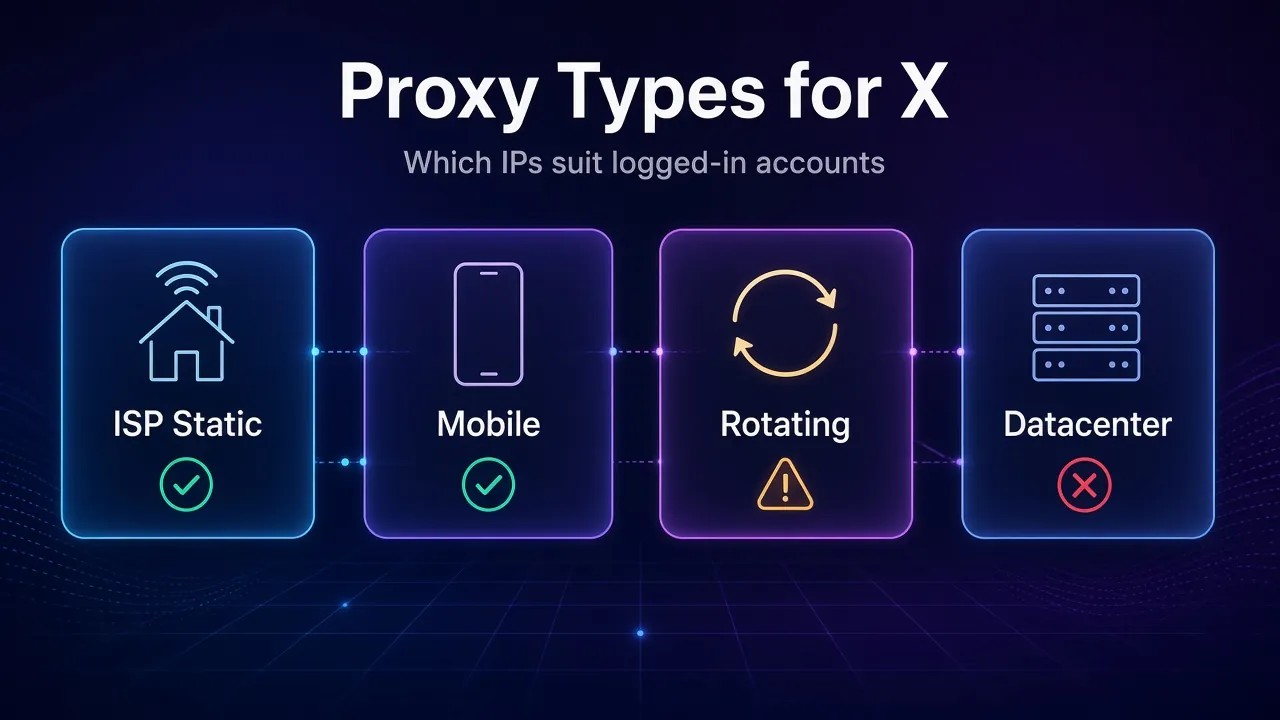
For accounts you log in to every day, a static ISP proxy is the best default. It gives X a home broadband IP that stays the same, which is exactly what a normal user looks like.
The other types each have one job. Here’s how they map to X:
| Proxy type | What X sees | Best for | Avoid for |
|---|---|---|---|
| ISP (static residential) | A home broadband IP that doesn’t change | Daily brand and client accounts | Nothing major; it’s the safe default |
| Mobile (4G/5G) | A carrier IP shared by many phone users | High-value accounts and app logins | Tight budgets, because billing is per GB |
| Rotating residential | A new home IP every request or few minutes | Checking how public pages look in other countries | Any logged-in session |
| Datacenter | A server IP owned by a hosting company | Testing that your proxy setup works | Logging in to any account |
Why does mobile rank so high? Carriers put many subscribers behind shared IPs, so blocking one address would hit real customers. In plain English: a carrier IP is expensive for X to punish, and that makes it forgiving.
Rotating residential proxies are great IPs used the wrong way on X. A login that changes address every few minutes looks like a session being hijacked. Datacenter IPs have the opposite problem: their ranges belong to hosting companies, which hurts their IP reputation on social platforms from the first request.
The Rule Most Twitter Proxy Guides Skip
Several top-ranking Twitter proxy lists recommend rotating residential proxies “for scraping X.” X’s own terms say no.
The X Terms of Service state that crawling or scraping the service in any form, for any purpose, without X’s prior written consent is expressly prohibited. That line is in the current terms and in the version taking effect on October 9, 2026.
The X automation rules (updated April 2026) go further. Their “Don’t!” list includes non-API automation, such as scripting the X website, and warns it may lead to permanent suspension. Automated likes aren’t allowed at all.
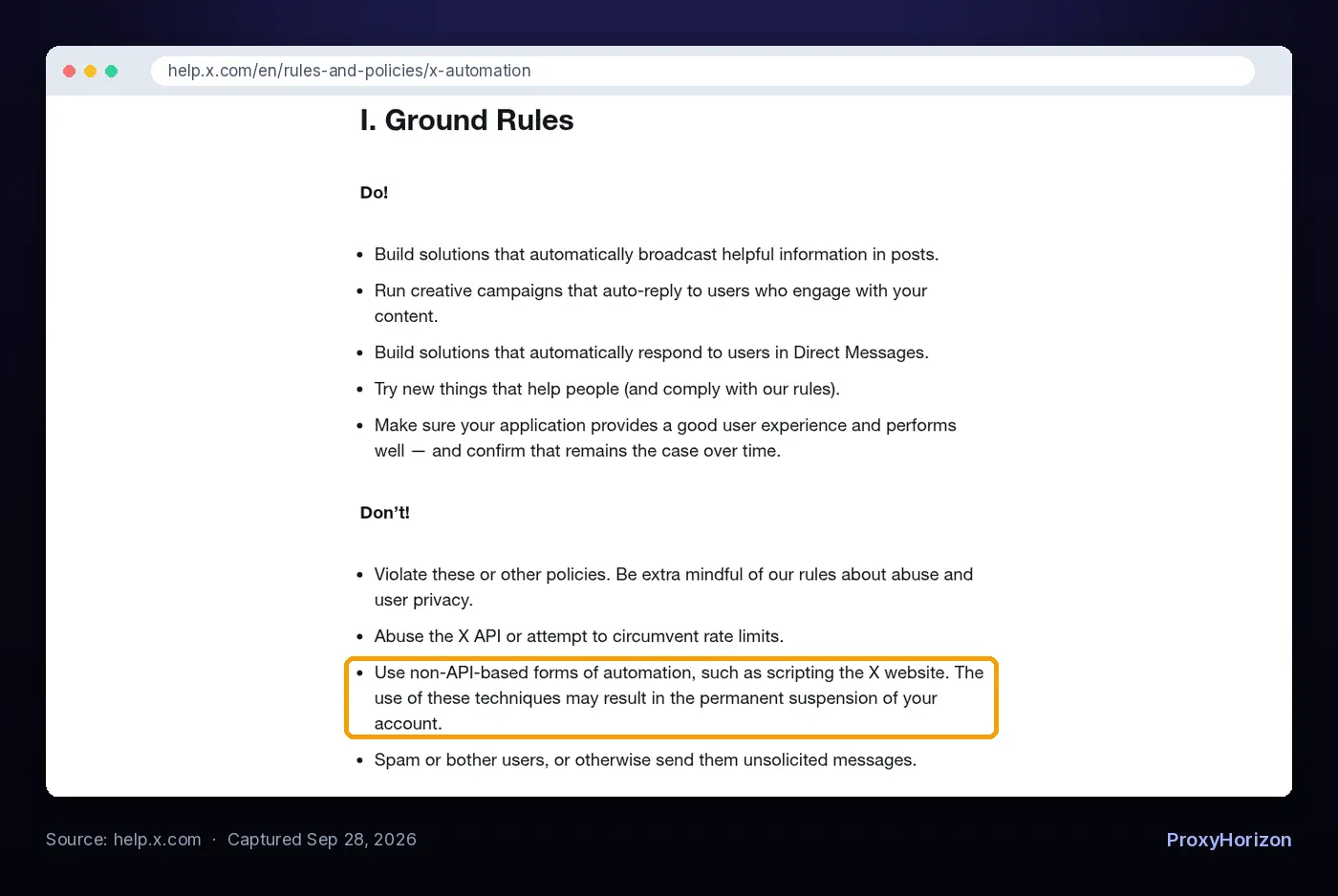
Our take: a proxy changes where your traffic comes from. It doesn’t change what X allows. A browser bot on a perfect mobile IP is still a browser bot.
Need X data? Use the official API. It’s pay-per-use: $0.005 per post read, $0.015 per post created, and $0.20 for a post with a link, capped at 3 million post reads a month on self-serve (X API pricing, checked September 2026).
That makes 100,000 post reads about $500. Not cheap. But no account is at risk, and you aren’t building on something X can switch off.
So where do proxies fit? Running several genuine accounts, keeping a steady location while you travel, checking how X looks from another country, and keeping your home IP private. X allows up to ten accounts per person for different purposes, and its authenticity policy explicitly allows social media managers to run accounts for clients.
The 7 Best X (Twitter) Proxies in 2026
Each pick below has a different strength. The first sentence of each tells you who it suits best.
1Decodo

Decodo is the best all-round pick for X because it sells all three types an X setup needs from one dashboard: dedicated static IPs, mobile IPs and rotating residential. Dedicated ISP IPs cost $3.33 each on a 3-IP plan ($9.99 a month) and $2.90 each at 10 IPs ($29).
The mobile network lists 10M+ IPs across 700+ carriers in 160+ locations, from $3.75/GB on a 2 GB plan. The residential pool is 115M+ IPs, with a 3-day, 100 MB free trial.
Check before you buy: dedicated ISP IPs cover 19 countries, fewer than the residential pool. Make sure your accounts’ countries are on the list. Residential sticky sessions are listed at up to 30 minutes, so keep logins on the ISP product.
2SOAX

SOAX is the best pick when you want mobile IPs without paying a mobile premium. Its pricing charges one rate across residential and mobile traffic, which is unusual in this market.
The free Sandbox tier has no subscription and costs $5/GB for US traffic. The $200 Builder plan drops that to $3/GB and includes 200 credits. Mobile sessions can hold one IP for up to 60 minutes, with country, region, city and ISP targeting.
Here’s the catch: credits expire after 60 days on monthly plans, and there’s no free trial. SOAX also doesn’t serve IPs located in Texas, which matters if your accounts claim to be there.
3NodeMaven

NodeMaven suits people who care most about IP hygiene. Its quality filter screens every residential and mobile IP for fraud score and blacklist status before handing it to you, and it claims a 95% clean-IP rate.
Sticky sessions last up to 24 hours, which is long enough for a full working day on one account. Residential and mobile traffic share one balance from $2.20/GB, a $3.50 trial buys 750 MB, and unused traffic rolls over. ISP proxies start at $2.99 per IP with unlimited traffic.
Not ideal for: big mobile pools. NodeMaven lists 30M+ residential IPs but a mobile pool in the hundreds of thousands, and the clean-rate figure is the vendor’s own.
4Oxylabs

Oxylabs is best for teams that need a large mobile pool with long sessions. It lists 20M+ mobile IPs in 140+ countries, 24-hour sticky sessions, and targeting down to city, coordinates and ASN.
Mobile starts at $7.50/GB on the 4 GB plan ($30) and falls to $3.50/GB at 715 GB. ISP proxies start from $1.2 per IP, and dedicated ISP IPs from $2.5 per IP.
Our take: excellent infrastructure, priced for companies. One or two personal accounts don’t need it. The mobile pool is also shared between customers, though only one user holds an IP at a time.
5Bright Data

Bright Data is the best value for static ISP IPs at agency scale. Ten ISP IPs cost $1.80 each ($18 a month), dropping to $1.45 each at 100, drawn from 1.3M+ ISP IPs.
Residential pay-as-you-go was shown at $4/GB with the RESIGB50 coupon when we checked, and the mobile network lists 7M+ IPs. New accounts get their first deposit matched up to $500.
Worth knowing: the residential and mobile networks require a short KYC check, which can include a video call. That’s good for network quality, but it slows down a quick test.
6Webshare

Webshare is best for testing a setup on a tiny budget. Its smallest static residential plan is 20 IPs for $6 a month ($0.30 each), with AT&T, Sprint and Cox listed as ISPs.
There’s also a permanent free plan with 10 proxies and no card needed. Use those to check that your browser profiles and proxy settings work, then log in to X only on paid static IPs.
Skip it for: accounts outside the US or anything high-value. The pricing page doesn’t say whether static IPs are dedicated, so ask before you trust one with a client account.
7IPRoyal

IPRoyal is best for flexible static IPs and traffic that never expires. ISP proxies cost $2.70 each for 30 days, $2.40 each on 90-day terms, or $1.80 for a 24-hour test, across 31+ countries with state and city targeting.
The residential pool lists 64M+ IPs, sticky sessions of up to 7 days and no monthly minimum. Mobile proxies start at $10.11 a day.
Watch out for: small residential orders are pricey at $7/GB for 1 GB. Buy static IPs for accounts, and keep residential traffic for occasional location checks.
X Proxy Pricing Compared
Here’s how the entry prices line up. Plans and promos shift monthly, so treat this as a snapshot from September 2026.
| Provider | Static ISP IPs | Mobile | Rotating residential | Cheapest way in |
|---|---|---|---|---|
| Decodo | $2.90/IP (10 dedicated) | From $3.75/GB | $3.75/GB (3 GB) | 3-day free trial |
| SOAX | Not on pricing page | $5/GB US (Sandbox) | Same rate as mobile | Sandbox, no subscription |
| NodeMaven | From $2.99/IP | From $2.20/GB | From $2.20/GB | $3.50 trial (750 MB) |
| Oxylabs | From $1.2/IP | $7.50/GB (4 GB) | $6/GB (5 GB) | Trial on request |
| Bright Data | $1.80/IP (10 IPs) | Not on pricing page | $4/GB with coupon | Deposit match up to $500 |
| Webshare | $0.30/IP (20 IPs) | Not on pricing page | $3.50/GB (1 GB) | Free plan, 10 proxies |
| IPRoyal | $2.70/IP (30 days) | From $10.11/day | $7/GB (1 GB) | Pay as you go |
Want two of these side by side? Our comparison tool lines up pools, locations and features in one view.
What 10 Client Accounts Really Cost per Month
Say you run an agency with 10 client accounts on X. The clean setup is one static ISP IP per account, in the client’s country.
| Provider | What you buy | Monthly cost |
|---|---|---|
| Webshare | 20 static residential IPs (smallest plan) | $6 |
| Bright Data | 10 ISP IPs at $1.80 | $18 |
| IPRoyal | 10 ISP IPs at $2.70 (30 days) | $27 |
| Decodo | 10 dedicated ISP IPs | $29 |
| NodeMaven | 10 ISP IPs at the $2.99 starting price | $29.90 |
That’s less than a lunch per client per month. Mobile works differently: you pay per GB, and every video in the timeline eats traffic. On SOAX’s Builder plan, that’s a $200 monthly fee before you scale up.
The bottom line: static IPs for accounts are cheap. What gets expensive is rebuilding a client account after a lock. Save mobile IPs for the one or two accounts where a lock would hurt most.
How to Choose a Proxy for Your X Accounts
Four questions settle it. Answer them in order and the right product usually picks itself.
1Are You Logging In or Just Looking?
Logged-in work needs an IP that stays put, so buy static ISP or mobile. Just checking how a public profile or trend looks from another country? A small rotating residential balance covers that.
2Does the Proxy Country Match the Account?
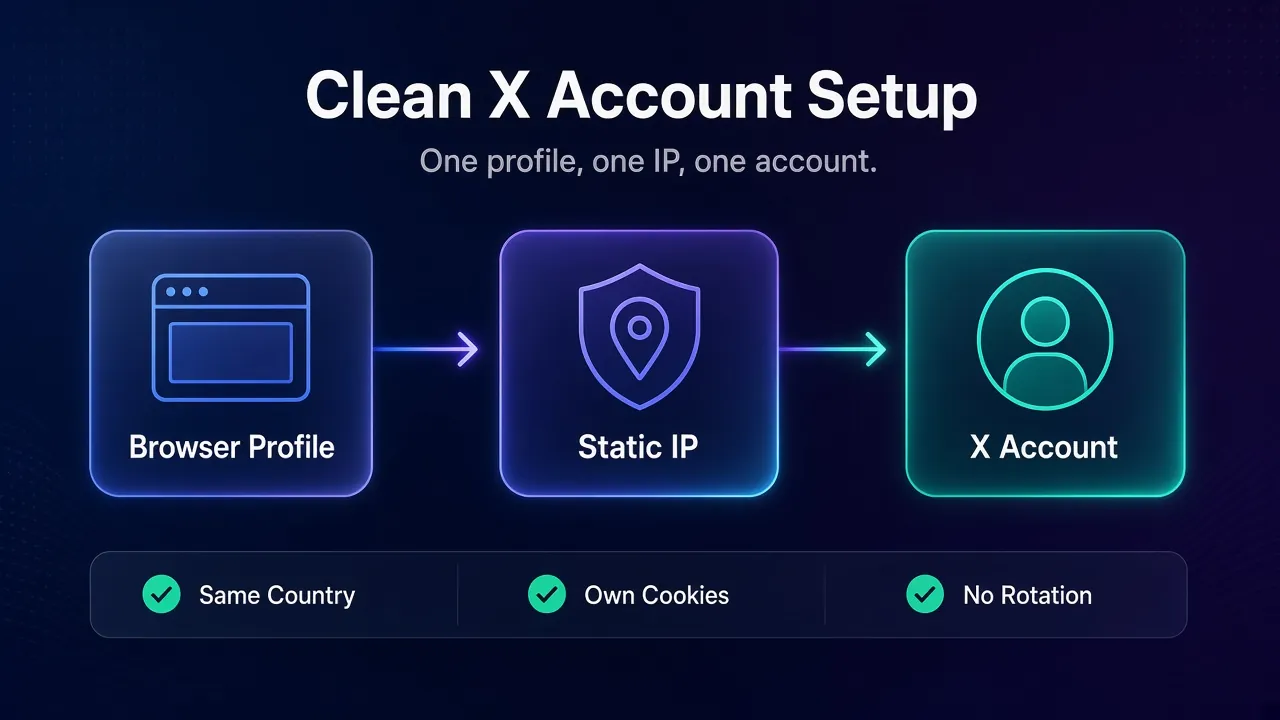
An account that has always posted from London shouldn’t suddenly log in from Texas. Pick the proxy location to match the account’s history and phone number, and keep it there. Country hopping is the fastest way to trigger a verification loop.
3How Long Does One IP Need to Stay Put?
For daily accounts, the answer is “weeks.” That’s why per-IP static plans beat per-GB residential ones here. If you do use a gateway, look for long sticky sessions: NodeMaven and Oxylabs list 24 hours, IPRoyal up to 7 days.
4What Else Links Your Accounts Together?
The IP is only one signal. X can also connect accounts through shared cookies, device details and behavior, as we explain in how social media platforms detect multiple accounts.
So give each account its own browser profile as well as its own IP. Antidetect browsers do this cleanly, with separate cookies and fingerprints per profile.
Mistakes That Get X Accounts Locked
These traps follow straight from X’s rules and from how logins get checked. Each one is avoidable.
- Running a logged-in session on rotating IPs. Every rotation looks like a new device logging in. Use a static IP or a long sticky session.
- Stacking accounts on one address. A shared IP plus accounts that like and repost each other is exactly the coordinated activity X’s policy bans.
- Buying the cheapest datacenter proxies. They’re fine for testing a setup. For logins, they start with a reputation problem.
- Treating a proxy as a way back after a suspension. X calls that ban evasion, and it can suspend other accounts it links to you.
Notice the pattern? Most locks come from behavior plus a weak IP, not the IP alone. Fix both and the verification prompts get much rarer.
If mobile is where you’ll spend most, our roundup of the best mobile proxy providers goes deeper on carriers and pricing models.
Frequently Asked Questions
Our Verdict on X Proxies
For most people running X accounts, Decodo is the pick: dedicated static IPs for daily logins, plus mobile and residential when you need them, all in one dashboard. Agencies watching costs should look at Bright Data or IPRoyal for cheap static IPs, and SOAX when mobile trust matters.
The sharpest point in this whole guide is the boring one. Proxies make legitimate multi-account work safer. They don’t make scraping or scripted bots acceptable to X, and no IP will save an account that breaks those rules.
Start small. Buy one or two static IPs in your accounts’ country, move one account over, and watch it for a week before migrating the rest. Our guide to the best ISP proxy providers helps if you want more static options.
Keep Reading
More articles you might enjoy
![NordVPN Pricing ([year]): Every Plan Compared & Explained](/_next/image?url=https%3A%2F%2Fproxyhorizon.com%2Fcdn%2Fblog-images%2Fnordvpn-pricing-plans-guide.webp&w=3840&q=75)
![Surfshark Pricing ([year]): Plans Breakdown & Comparison](/_next/image?url=https%3A%2F%2Fproxyhorizon.com%2Fcdn%2Fblog-images%2Fsurfshark-pricing-plans-guide.webp&w=3840&q=75)
![Best Cloro.dev Alternatives for Search API and AI Agents ([year])](/_next/image?url=https%3A%2F%2Fproxyhorizon.com%2Fcdn%2Fblog-images%2Fbest-cloro-alternatives-1-muhiipeo.webp&w=3840&q=75)