Dedicated vs Shared Proxies: Which Should You Buy in 2026?
Dedicated or shared proxies? Learn what sharing does to IP reputation and block rates, why “private” means different things at different providers, and when shared IPs are actually fine.

Most people buy dedicated proxies they don’t need. Others buy shared ones and wonder why every login gets flagged.
Both mistakes come from the same gap. Proxy plans talk about “exclusive IPs” and “shared pools,” but rarely explain what sharing actually does to your traffic, your block rate and your bill.
The difference between dedicated vs shared proxies is one question: who else is sending traffic from your IP right now? The answer decides whose reputation you inherit.
This guide covers what each option really means, why the word “private” can trick you, what the price gap looks like on real plans, and a simple decision table for your use case.
- Dedicated means one customer per IP. Shared means several customers use the same address at once.
- Shared IPs pass reputation between customers, so you can inherit blocks you didn’t earn.
- “Private” means dedicated at some providers and semi-dedicated at others.
- The price gap ranges from under 2x to about 40x depending on the plan.
- Pay for dedicated when a block costs an account or an allowlist, not a retry.
What Dedicated and Shared Proxies Actually Mean
A dedicated proxy gives one customer exclusive use of an IP address, while a shared proxy sells the same IP to several customers at once. The proxy server, protocols and speed can be identical. Only the number of people behind the address changes.
Webshare’s help center splits it into three tiers: shared proxies used by multiple users, private proxies shared with one other user, and dedicated proxies assigned to a single user (checked November 2026).
This vocabulary mostly applies to static IPs, meaning datacenter proxies and ISP proxies you keep for weeks or months. Rotating residential pools work differently, and we’ll get to them below.
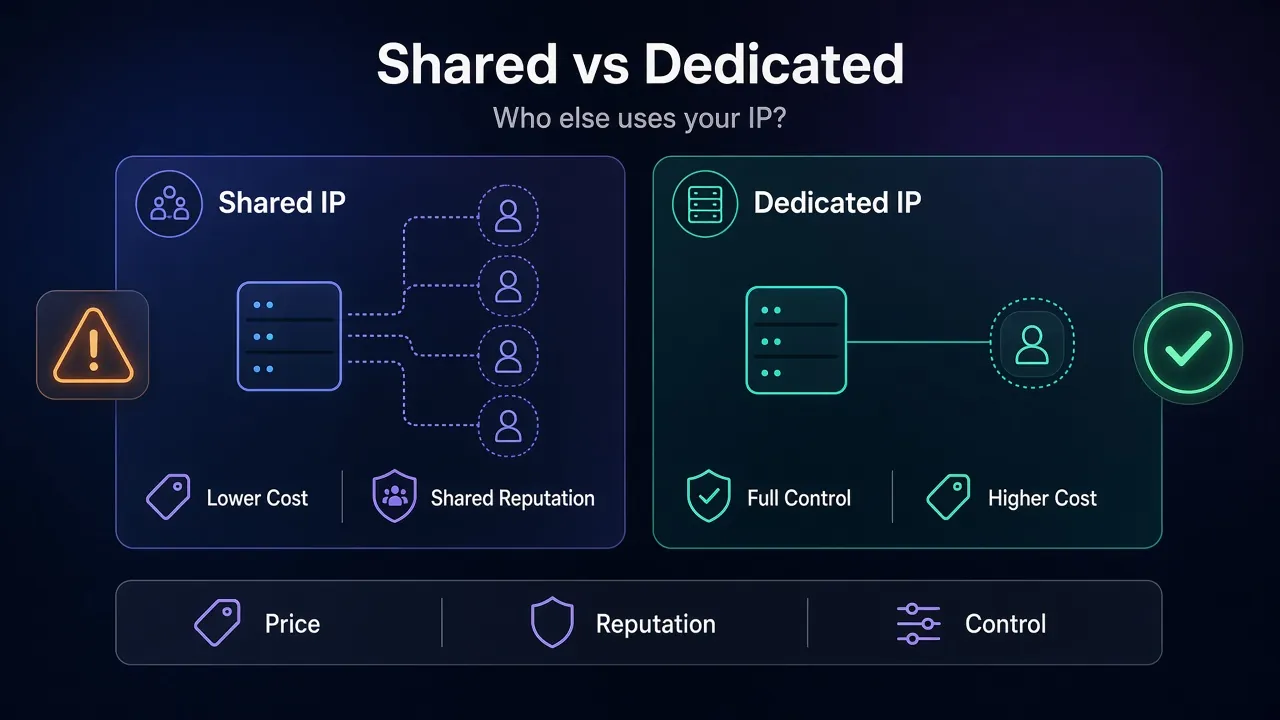
| Tier | Who uses the IP | Typical pricing | Main trade-off |
|---|---|---|---|
| Shared | Many customers at once | Lowest per IP | You inherit everyone’s behavior |
| Semi-dedicated (often called private) | A small, capped group | Middle | Less noise, still not yours alone |
| Dedicated | Only you | Highest per IP | You pay for control and a clean record |
If you’re still picking between proxy families first, our guide to proxy types covers datacenter, residential, ISP and mobile before you get to the sharing question.
The Naming Trap: “Private” Doesn’t Mean the Same Thing Everywhere
Here’s the detail most comparisons skip. Providers don’t agree on what “private” means.
Webshare uses “private” for its semi-dedicated tier. Its pricing page says private proxies are shared with 1-2 users, and only “dedicated” means the IP is yours alone.
IPRoyal uses the words the other way around. Its datacenter proxies page says a dedicated proxy is “also known as private,” and that the only difference from a shared one is how many users can use the same IP at once.
Oxylabs avoids the word entirely. Its datacenter line lists Dedicated (100% exclusive IPs) and Shared, with a cap of three users per shared static IP (checked November 2026).
Check before you buy: ignore the product name and find the sentence that says how many customers can use one IP. If a plan won’t state a number, assume it’s shared.
How Shared IPs Pass Reputation Between Customers
Websites don’t judge you. They judge your IP address, and the history attached to it.
On a shared proxy, that history belongs to everyone using the address. If another customer hammers a sneaker site, sends spam or runs credential stuffing, the IP gets flagged. Your next request arrives with their record attached.
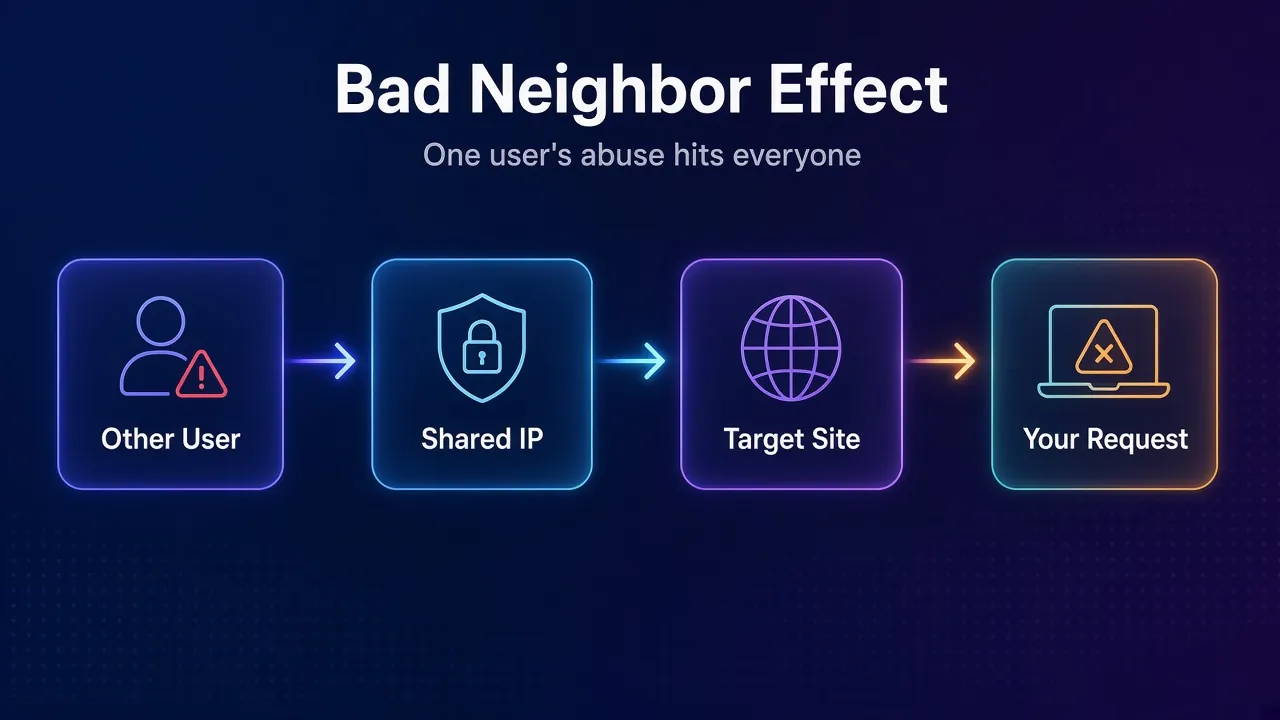
Our guide to how proxy IP reputation works covers blocklists, ASN signals and abuse scores in depth. For this decision, three effects matter.
1Blocks and CAPTCHAs You Didn’t Earn
A target that has seen abuse from an IP tends to challenge or block it for everyone. You can send perfectly polite traffic and still get a CAPTCHA wall.
2Rate Limits Shared With Strangers
Many sites count requests per IP. If three customers share one address, you split that budget three ways without knowing what the others are sending.
That’s why a shared IP can work fine at 9 AM and throw 429 errors at noon. Nothing changed on your side.
3Bans That Follow the Address
Some sites ban an IP after one account on it misbehaves. If you log in to an account through an address someone else used for a banned account, you’ve linked yourself to that history.
Our take: sharing is a cost trade, not a quality problem. Shared IPs aren’t slower or broken. They’re just carrying other people’s baggage.
What the Price Gap Looks Like on Real Plans
Dedicated IPs always cost more. How much more surprises most buyers.
We pulled list prices from official pricing pages on November 23, 2026. Promotions change often, so treat these as a snapshot and recheck before you pay.
| Provider and plan | Shared | Semi-dedicated | Dedicated |
|---|---|---|---|
| Webshare datacenter, 100 IPs per month | $2.99 ($0.0299 per IP) | $66.30 ($0.663 per IP, discounted) | $119.00 ($1.19 per IP, discounted) |
| Oxylabs datacenter, starting price | From $0.70 per IP (max 3 users) | Not offered separately | From $1.20 per IP |
| Decodo datacenter, starting price | From $0.10 per IP, or $0.60 per GB at 10 GB | Not offered separately | From $2.50 per IP |
Sources: Webshare dedicated proxy pricing, Webshare’s shared and private plan pages, the Oxylabs datacenter proxies page and Decodo’s datacenter pricing page.
Look at the Webshare row. For 100 IPs, dedicated costs about 40 times the shared plan. At Oxylabs, the gap on starting prices is under two times.
In plain English: the premium for exclusivity isn’t a fixed markup. Budget shared plans are cheap because the same IP is sold many times. Plans that cap sharing at a few users sit much closer to dedicated pricing.
Common mistake: comparing a shared per-GB plan with a dedicated per-IP plan. They bill different things. Work out your real usage first with a quick bandwidth estimate, then compare the monthly total.
When Shared Proxies Are Actually Fine
Shared proxies get a bad name they don’t always deserve. For a lot of jobs, they’re the smart buy.
- Public, low-protection pages. Blogs, news sites, documentation and small stores rarely run strict IP scoring.
- Price checks and rank tracking on lenient targets. Short, stateless requests where a failed one is simply retried.
- Testing and development. You need an IP from another country for an hour, not a clean identity.
- Large downloads on a budget. Oxylabs itself pitches its shared per-IP plan for high-volume transfers at a flat cost.
The pattern is simple. If a blocked request costs you a retry and nothing else, sharing is fine. Webshare even offers a free plan with 10 shared proxies, which is enough to test a target before spending anything.
When You Need Dedicated IPs
Pay for exclusivity when the IP becomes part of your identity, or when someone else’s mistake would cost you real money.
- Logged-in accounts. Social, marketplace and ad accounts tie trust to a stable, clean address. One IP per account, used only by you.
- IP allowlisting. Payment gateways, corporate tools and partner APIs often only accept traffic from approved addresses. You can’t allowlist an IP a stranger also uses.
- Strict targets. Sites that block fast reward a clean history. Shared IPs on those targets burn out quickly.
- Steady, predictable capacity. No neighbor can eat your per-IP rate limit.
Warning: dedicated says who uses the IP now, not who used it before. An address can be exclusively yours today and still carry last month’s abuse. Check new IPs against a blocklist before you put an account on them.
For account work on strict platforms, a datacenter IP may still be the wrong family even if it’s dedicated. ISP proxies give you a static, dedicated address that’s registered to a consumer internet provider, which many platforms trust more.
Where Rotating Residential Pools Fit
Rotating residential and mobile pools are shared by design. Every customer draws from the same pool of devices, and nobody owns an address.
That sounds worse than it is. With rotation, your requests spread across thousands of IPs, so one flagged address hurts a single request, not your whole job. The question becomes how well the provider cleans the pool, not who else uses it.
If you need one IP for a few minutes, such as a login followed by a few pages, a sticky session on a pool often beats buying a dedicated IP. Our guide to sticky vs rotating proxy sessions explains how long those sessions really last.
A Decision Table for Your Use Case
Use the flow below, then check your job against the table. Stop at the first match.
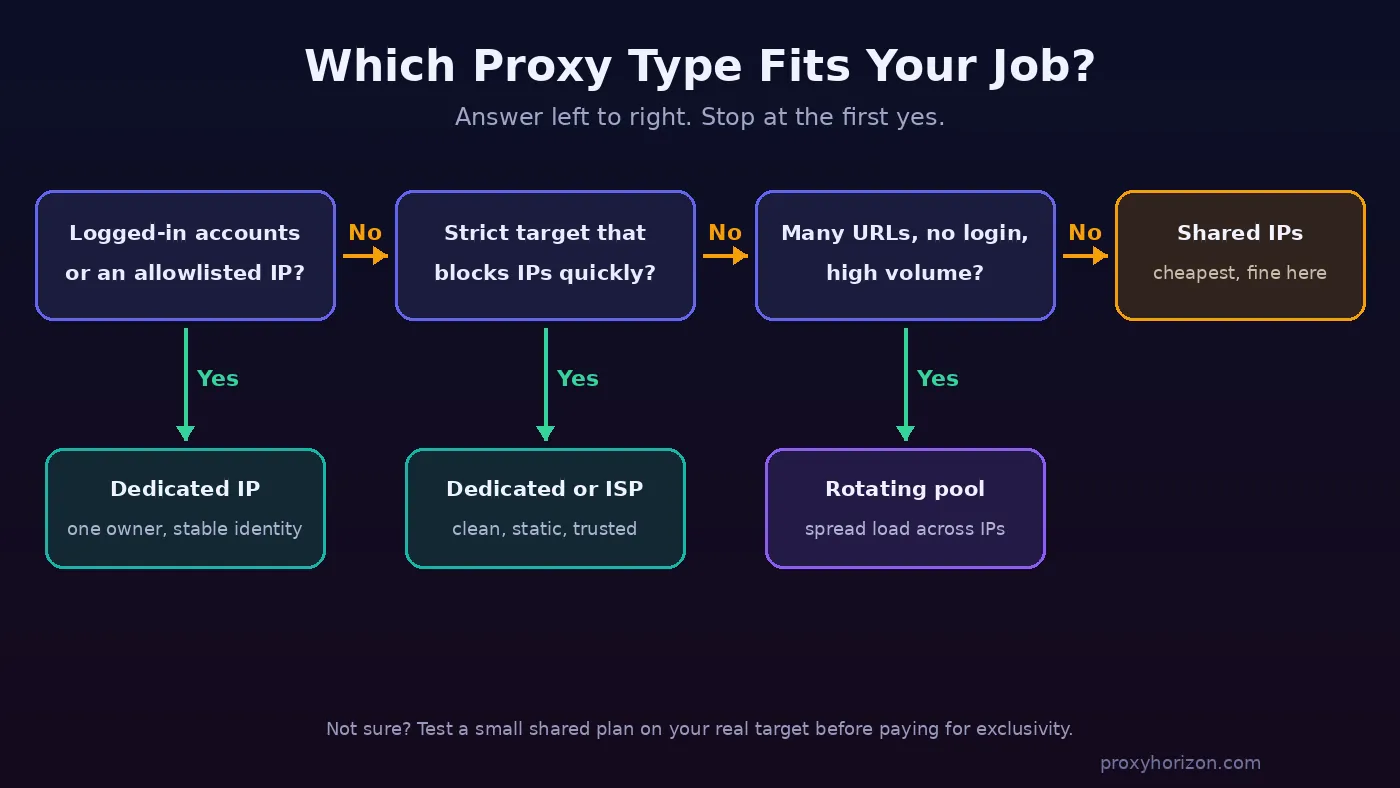
| Your job | Pick | Why |
|---|---|---|
| Managing social or marketplace accounts | Dedicated (ISP preferred) | Stable, clean identity per account |
| Access to an allowlisted API or dashboard | Dedicated | Allowlists need an IP only you control |
| Scraping a strict site with logins | Dedicated or sticky residential | Shared history gets challenged fast |
| Crawling many public URLs | Rotating pool | Spreading load beats owning a few IPs |
| Price checks on lenient sites | Shared | Retries are cheap, exclusivity isn’t |
| Testing geo content or a new script | Shared (free tier if possible) | You need a location, not a reputation |
How to Tell If a Shared IP Is Hurting You
You don’t need to guess whether your neighbors are the problem. Your logs will tell you.
Run the same small batch of requests through two or three of your shared IPs and one fresh test IP from a different plan or provider. Same target, same headers, same pace.
- One IP fails while others pass. That address carries a bad record. Ask the provider to replace it.
- Errors come and go during the day. 429 responses at busy hours with no change on your side point to a shared rate limit.
- CAPTCHAs on the first request. A clean IP usually gets a few pages before a strict site starts asking questions. Instant challenges suggest history.
- Every IP fails the same way. That’s not a neighbor problem. Your scraper, headers or the whole IP range is the issue.
The last case matters most. Upgrading to dedicated won’t fix a fingerprint or header problem, and our guide to proxy error codes can help you tell the two apart before you spend more.
Questions to Ask Before You Buy
A few questions separate a good plan from an expensive surprise. Ask support, or find the answer in the docs, before you pay.
- How many customers can use one IP at the same time? Get a number, not an adjective.
- Were these IPs used by someone else before me? Ask how they check and clean recycled addresses.
- Can I replace a flagged IP, and how fast? Replacements matter more than the initial list.
- Is bandwidth included or billed per GB? Per-IP plans can still cap traffic under a fair-use policy.
- Are the IPs in one subnet? Many addresses in the same range can be blocked together, dedicated or not.
Our checklist for choosing a proxy provider covers the rest, from trials to refund terms. When you’re ready to compare providers side by side, the ProxyHorizon proxy directory lists them with locations and ratings.
Frequently Asked Questions
Share What’s Disposable, Own What’s Persistent
The dedicated vs shared proxies decision isn’t about quality. It’s about whose history you’re willing to carry.
If a block costs you a retry, buy shared and keep the money. If a block costs you an account, an allowlist or a client deadline, pay for an IP that only you use. For big public crawls, skip both and use a rotating pool.
Our take: start with the cheapest option that could work. Run a small shared plan or a free tier against your real target for a day. If the block rate is fine, you’re done. If it isn’t, you’ll know exactly what dedicated IPs are worth to you. Our list of the cheapest private proxies is a good place to start.