Best VPN Locations for Web Data Collection in 2026
The VPN location you pick decides what prices, search results and ads you see. Here are the best ones for data work, which VPNs cover them for real, and when to switch to proxies.

Say your price tracker shows a laptop at $899. A shopper in Dallas sees $949 for the same model.
Nothing is broken. You’re just looking from the wrong place.
Websites change prices, search results, ads and stock by location. So the VPN location you pick for web data collection quietly decides what data you collect. Pick badly and the spreadsheet looks fine while the numbers are wrong.
There’s a second trap most guides skip. The country on your VPN’s button isn’t always the country your traffic leaves from.
Below are the best VPN locations for data work, the VPNs that cover them honestly, and the point where a VPN stops being the right tool.
- The right VPN location is wherever your data is generated, often down to the city.
- Many VPN “countries” are virtual, so the label and the real exit can be far apart.
- NordVPN and Surfshark ban scraping in their terms, so use them for manual checks only.
- A VPN is great for looking at a market and poor at collecting it at scale.
- Proton VPN is our top pick for data work, and Mullvad’s locations held up best in independent tests.
When a VPN Is the Right Tool for Data Collection (and When It Isn’t)
A VPN is a great tool for looking at the web from another country. It’s a poor tool for collecting the web from another country at scale.
Here’s why. A VPN gives you one IP address at a time, and you share it with everyone else on that server. That’s fine when a person checks 30 product pages in Germany. It falls apart when a script wants 30,000.
If you’re fuzzy on the difference, our guide to proxy vs VPN covers the basics. For this post, the short version is in the table below.
| Data task | Does a VPN work? | Better tool |
|---|---|---|
| Spot-checking local prices, search results or ads by hand | Yes | A VPN is ideal |
| Testing how your own site looks in other countries | Yes | A VPN is ideal |
| Capturing screenshots as evidence for a market report | Yes | A VPN is ideal |
| A small scripted sample of a few hundred pages | Sometimes, if the VPN’s terms allow it | Datacenter or residential proxies |
| Daily automated price or rank monitoring | No | Rotating residential proxies |
| Large crawls or AI training data | No | Proxies or a scraping API |
The bottom three rows are where people get burned. Shared VPN IPs carry other users’ history, so CAPTCHAs arrive early. That’s the core reason web scraping needs proxies rather than a tunnel.
AI teams hit the same wall faster, because their volume is so much higher. We covered that case in VPN vs proxy for LLM data collection.
Our take: use a VPN to see a market through a local’s eyes. The moment you want a machine to do the looking, budget for proxies.
Read the Terms First: Two Big VPNs Ban Scraping
Before you pick a location, check whether your VPN lets you collect data at all. Two of the biggest names don’t.
We read the current terms of service for every VPN in this guide on October 2, 2026. Here’s what they say about scraping and automated traffic.
| VPN | What the terms say | Terms dated |
|---|---|---|
| NordVPN | Bans “web crawling, scraping in any form or scale” and harvesting. Says it uses tools to detect scraping and may suspend accounts. | August 10, 2026 |
| Surfshark | Bans web crawling, scraping and harvesting that might affect the service for other users. | July 13, 2026 |
| Proton VPN | Allows automated access only if the traffic stays indistinguishable from normal human use. | June 23, 2026 |
| ExpressVPN | No scraping clause. Bans unlawful use and conduct that restricts other subscribers. | July 27, 2026 |
| Private Internet Access | No scraping clause. Bans degrading service for others and abusing unlimited devices, including non-personal use. | September 24, 2026 |
| Mullvad | No scraping clause in its terms. | January 20, 2026 |
In plain English: NordVPN and Surfshark are fine for a person checking prices by hand. Point a scraper through them and you’re breaking the contract you signed.
The target website’s rules matter too. Its terms of use may limit automated access, and privacy laws such as the GDPR apply to personal data however you reach it. A VPN changes your IP. It doesn’t change your legal position.
One more myth worth killing: robots.txt isn’t a permission slip. The standard that defines it, RFC 9309, says its rules “are not a form of access authorization.” Respect them, but don’t treat them as legal clearance.
Warning: if your plan only works because the VPN hides who you are, stop and get legal advice. That’s a sign the collection itself is the problem.
How We Picked These Locations
We haven’t run hands-on collection tests for this guide. The picks come from each VPN’s official server pages and terms, checked on October 2, 2026, plus IPinfo’s independent measurements of where VPN traffic really exits.
Each location had to clear four bars:
- Data value: prices, search results and ads that differ from neighbouring markets.
- Real coverage: physical servers at several major VPNs, not just one.
- City depth: more than one city where local results vary.
- Low virtual risk: few “locations” that are really hosted next door.
Every VPN mentioned here also has a listing in our VPN directory. Some links are affiliate links, so we may earn a commission if you buy. Server counts change often, so check the provider’s page before you commit.
The Best VPN Locations for Data Collection in 2026
Start with where your customers are, then check the VPN covers that place physically. Here’s the short list before the detail.
| Location | Best for | Watch out for |
|---|---|---|
| United States | E-commerce prices, local search, ad checks | Many US “cities” are virtual |
| United Kingdom | English-language European data in pounds | London-heavy coverage |
| Germany | Euro pricing and German-language search | One country doesn’t represent the EU |
| Japan | Asia-Pacific retail and Japanese search | Fewer cities outside Tokyo and Osaka |
| Brazil | Latin American retail in reais | Neighbours are often virtual |
| Australia | Oceania retail with real city spread | Check more than one city |
| Singapore | Southeast Asian marketplaces and APAC ads | It doesn’t show you Thai or Indonesian results |
| India | Indian prices in rupees | Most big VPNs serve it from abroad |
1United States
The US is the best default VPN location for data collection, because so many prices, ads and search results are tuned to American shoppers. It’s also where city choice matters most. A New York exit won’t show you Dallas delivery prices.
Coverage is deep. NordVPN lists 55 US cities, Proton VPN 22 cities with 6,015 servers, and Mullvad 21 cities. Private Internet Access claims servers in all 50 states, and Surfshark covers 19 states.
Here’s the catch. NordVPN’s own table marks 30 of its 55 US cities as virtual. ExpressVPN lists 62 US entries but advertises 24 US locations, and tags the other 38 as virtual.
Best for: anyone tracking US retail or local search. Pick a physical city near your target customers, then confirm it with an IP check.
2United Kingdom
The UK is the best location for English-language European data, priced in pounds. Think google.co.uk results, UK retailer prices and British ad placements.
Proton VPN lists 6 UK cities and 849 servers. ExpressVPN has seven named UK entries, from Docklands to Manchester and the Midlands. NordVPN covers London, Manchester, Edinburgh and Glasgow, all marked physical in its table.
Common mistake: treating London as the whole country. If a retailer prices by region, a Manchester or Glasgow exit gives you a second view.
3Germany
Germany is the best single exit for euro pricing and German-language search. Big marketplaces run separate German storefronts, so you need a German IP to see them as locals do.
NordVPN covers Berlin, Frankfurt and Hamburg, all physical. ExpressVPN lists Berlin, Nuremberg and two Frankfurt locations. Proton VPN has 706 servers across 2 German cities, and Mullvad adds Düsseldorf.
Surfshark also offers static IP servers in Germany. A static IP stays the same each time you connect, which keeps repeated checks comparable.
Check before you rely on it: Germany doesn’t speak for the EU. France, Italy and Spain each need their own exit if you track them.
4Japan
Japan is the best location for Asia-Pacific retail and Japanese-language search. It’s a market where results look very different from the US, even for global brands.
ExpressVPN lists Tokyo, Osaka, Shibuya and Yokohama. NordVPN covers Tokyo and Osaka, both physical. Proton VPN has 315 servers across 2 cities, and Surfshark has static IP servers in Japan.
Our take: Japan is one of the few Asian markets where the VPNs that label their servers all show physical coverage. Use it.
5Brazil
Brazil is the best anchor for Latin American data, with prices in reais and its own versions of the big marketplaces.
NordVPN covers São Paulo as a physical location. ExpressVPN lists Brazil locations with none marked virtual. Proton VPN has 196 Brazilian servers, and Mullvad covers São Paulo and Fortaleza.
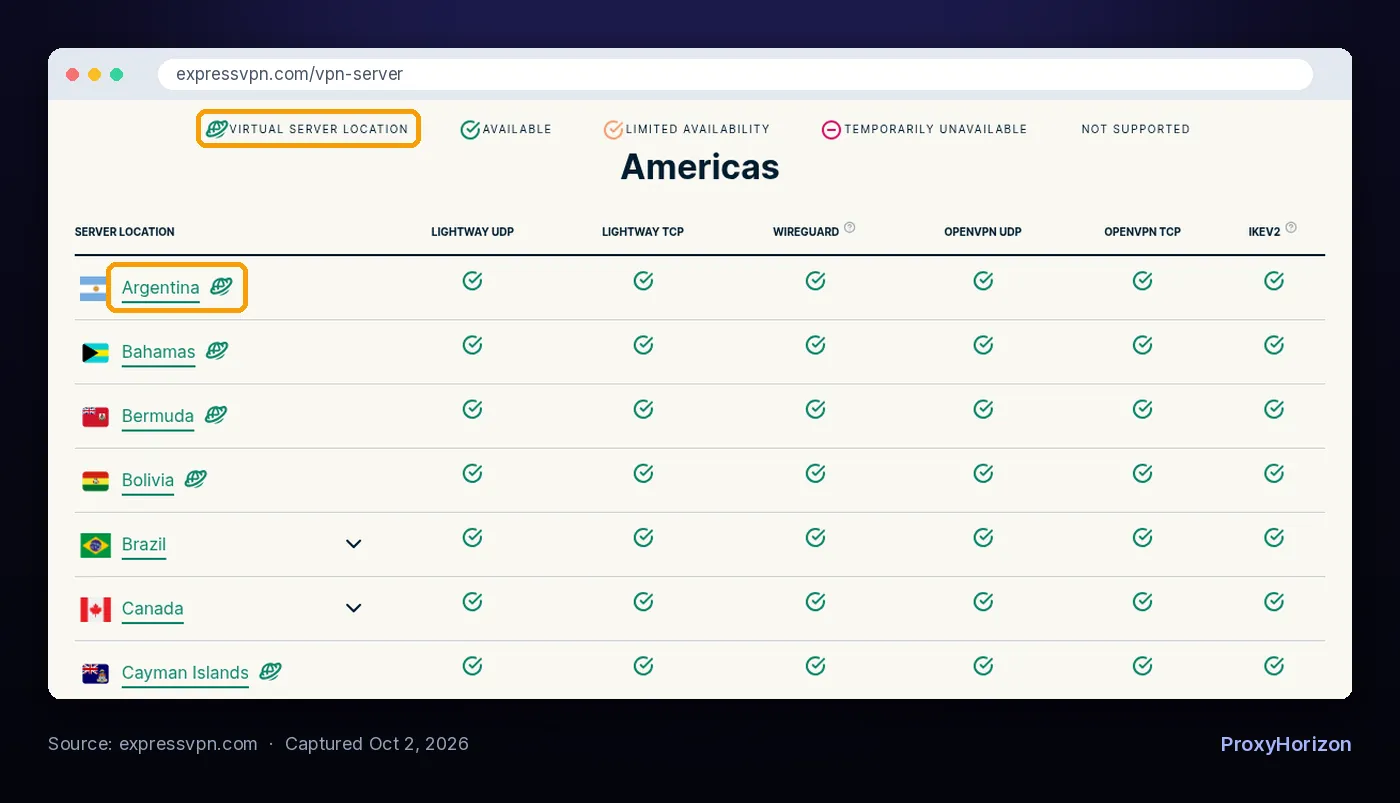
Watch out: Brazil’s neighbours are thinner. ExpressVPN marks Argentina, Colombia and Peru as virtual, so a “Bogotá” exit may be hosted elsewhere.
6Australia
Australia is the best location when you need real city spread outside the US. Prices and delivery terms can vary by city and state, so one Sydney exit may not be enough.
NordVPN covers Adelaide, Brisbane, Melbourne, Perth and Sydney, all physical. Proton VPN lists 5 cities with 281 servers. ExpressVPN and Mullvad cover the same five cities.
Best for: retail and ad checks across states, where you want to compare Perth with Sydney on the same day.
7Singapore
Singapore is the best hub for Southeast Asian marketplaces and Asia-Pacific ad checks. Every VPN in this guide covers it, and both NordVPN and ExpressVPN list it as physical.
ExpressVPN lists three Singapore locations. Proton VPN has 234 servers there. NordVPN, Private Internet Access and Surfshark all sell dedicated IPs in Singapore.
Now for the part most guides skip. Singapore shows you Singapore. ExpressVPN marks Indonesia, Malaysia, the Philippines, Thailand and Vietnam as virtual, and NordVPN marks Bangkok and Manila virtual. Your “Thai” data may come from a server in another country.
8India
India is the best example of why the label on the button matters. Most big VPNs serve “India” from somewhere else.
ExpressVPN says its India servers sit in Singapore and the UK. It points to a 2022 Indian rule requiring VPN providers with servers in India to collect extensive customer data. Private Internet Access describes the same setup, and NordVPN marks Mumbai as virtual.
The IP is still registered to India, so most sites will show Indian content and prices in rupees. City-level data is another story. If Mumbai and Delhi prices differ, a virtual exit can’t show you that.
Better alternative if you need Indian cities: use residential proxies with city targeting, not a VPN.
The VPNs with the Most Useful Location Coverage
Locations only help if your VPN covers them honestly. These six stand out for data work, for different reasons.
| VPN | Countries | Servers | US depth | Virtual locations | Fixed IP option | Scraping in terms |
|---|---|---|---|---|---|---|
| Proton VPN | 149 | 20,799 | 22 cities | Not labelled on its server page | Not covered here | Allowed if human-like |
| ExpressVPN | 113 | Not published | 24 US locations | Labelled | Dedicated IP add-on | No clause |
| NordVPN | 150 | 7,390 | 55 cities, 25 physical | Labelled | Dedicated IP in 13 US cities | Banned |
| Surfshark | 100 | 4,500+ | 19 states | Explained, not flagged | Static IPs in 7 countries, dedicated in 12 | Banned |
| Private Internet Access | 104 | Not published | All 50 states | Explained for India and Indonesia | Dedicated IP in 10 countries | No clause |
| Mullvad | 50 | 545 active | 21 cities | None found by IPinfo | Not listed | No clause |
Sources: each provider’s server page, terms and server API, checked October 2, 2026. Mullvad’s count is live servers at the time we checked.
1Proton VPN

Proton VPN is best overall for data work, thanks to its server depth and its terms. Its server page lists 149 countries, 196 locations and 20,799 servers, including 22 US cities and 6 UK cities.
NordVPN lists one more country, but Proton has far more servers per location. Its terms are also the most explicit about automation. Automated access is allowed if the traffic looks like normal human use. That covers careful, slow checks. It doesn’t cover a crawler.
The trade-off is transparency. Proton’s server page doesn’t flag which locations are virtual, and IPinfo measured some of its labels exiting elsewhere. Verify the exit before you trust a niche country.
2ExpressVPN

ExpressVPN is best if you want to know exactly which locations are real. Its server list covers 113 countries and tags every virtual location, so you can skip them for serious data work.
Physical coverage in the key markets is strong: four Japanese locations, seven UK entries and three in Singapore. It also allows up to 14 devices at once, and its terms have no scraping clause.
The catch is how many entries are virtual. Most of its US city list and much of Southeast Asia carry the tag. Stick to the untagged locations and it’s an excellent geo-checking tool.
3NordVPN

NordVPN is best for manual checks across many US cities. It lists 7,390 servers in 150 countries and 225 locations, including 55 US cities. Its table shows which ones are physical.
It also sells dedicated IPs in 13 US cities, plus London, Frankfurt, Tokyo, Singapore and more. That helps when shared IPs keep triggering CAPTCHAs on sites you check by hand.
Here’s the hard limit. NordVPN’s terms ban scraping in any form or scale, and the company says it monitors for it. Use it as a window, never as a scraper.
4Surfshark

Surfshark is best for repeatable manual checks from a fixed address. Its server list marks static IP servers in seven countries, including the US, UK, Germany, Japan and Singapore.
It covers 100 countries with 4,500+ servers and 19 US states. Dedicated IPs are available in 12 countries for an extra fee.
Like NordVPN, Surfshark’s terms ban crawling and scraping. Its server page also doesn’t flag virtual locations country by country, though its help centre explains how they work.
5Private Internet Access

Private Internet Access is best for US state-level coverage. It claims servers in all 50 states and 104 countries, which suits regional pricing checks outside the big metros.
Dedicated IPs are available in 10 countries, including the US, UK, Germany, Japan and Singapore. Its terms have no scraping clause, but they do ban abusing unlimited devices for non-personal use.
The catch: PIA’s own server table was mid-update when we checked, with a notice that some locations may not appear. Confirm your target state in the app.
6Mullvad VPN

Mullvad is best when location accuracy matters more than reach. In IPinfo’s test of 20 VPNs, Mullvad was one of three with no country mismatches at all.
Its network is smaller: 545 active servers in 50 countries on the day we checked, with 21 US cities and no India. The price is a flat €5 a month on up to 5 devices.
Our take: if a market is on Mullvad’s list, you can trust the exit. If it isn’t, Mullvad won’t pretend.
Virtual Locations: The Hidden Detail That Skews Your Data
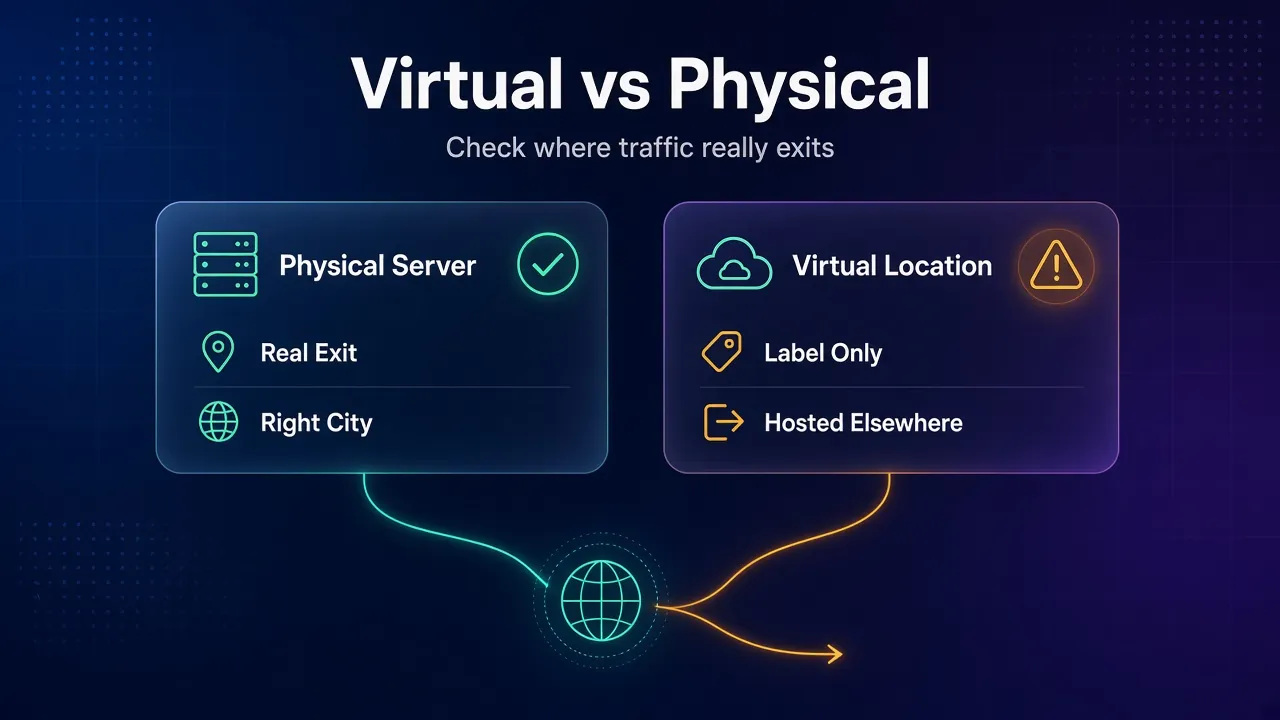
A virtual location gives you an IP registered to one country from a server in another. For streaming that rarely matters. For data collection it can quietly matter a lot.
The scale is bigger than most people expect. NordVPN’s own table marks 123 of its 225 locations as virtual. In IPinfo’s measurement of 20 VPNs, 17 exited traffic in a different country than claimed.
IPinfo tested around 150,000 exit IPs. Every “Bahamas” server it measured, across five providers, actually sat in the United States.
So does it break your data? Usually not at country level. IPinfo found that widely used IP databases tend to follow the registered country, so the site shows that country’s content.
It breaks in three other places. City-level results are wrong, because the server isn’t in that city. Latency is higher, which slows every page. And sites using measurement-based IP data may see the real country and serve you something else.
Rule of thumb: anything you’ll put in a report or a pricing decision should come from a physical location.
How to Run a Clean Geo-Check with a VPN
Your IP is only one of the signals a site uses to place you. Get the others wrong and the VPN location won’t matter.
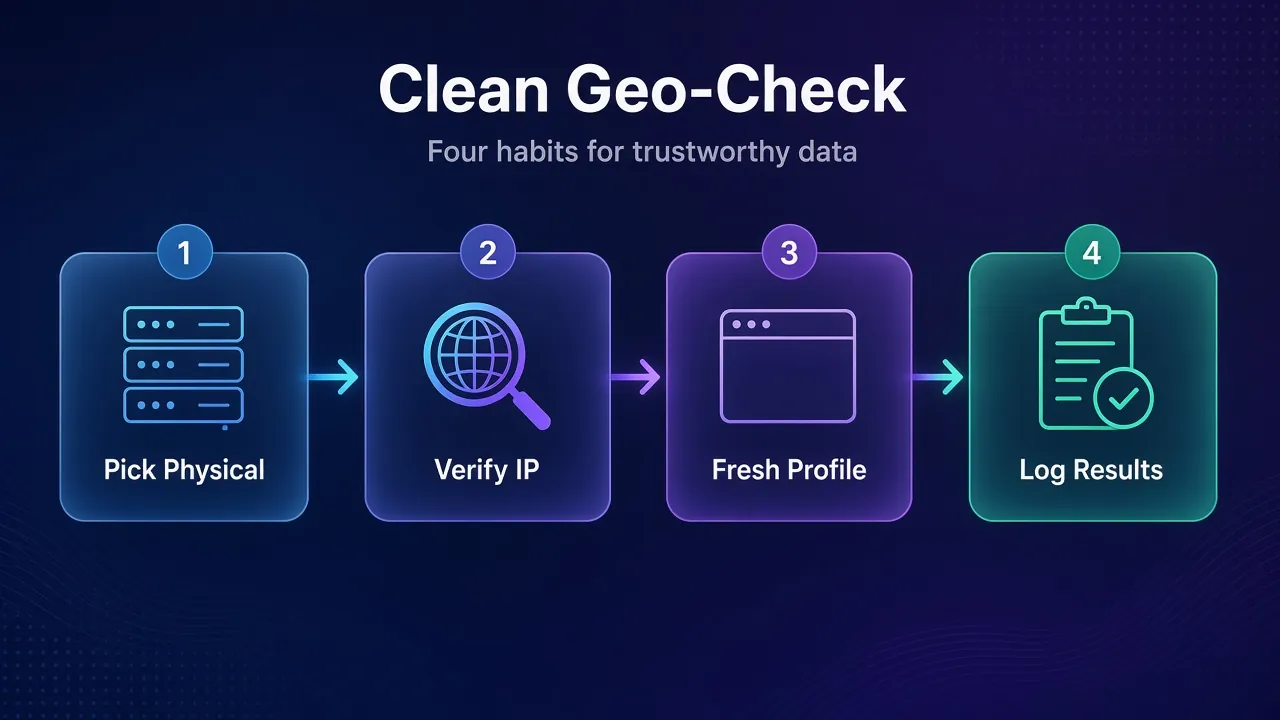
1Pick a Physical Server in the Right City
Choose the city closest to the customers you’re studying, and skip anything marked virtual. If your VPN doesn’t label virtual servers, check the exit in the next step.
2Confirm What the Site Sees
Once connected, check your IP address and the city it maps to. On Google, scroll to the footer of any results page. It shows your estimated location and says “From your internet address” when it’s using your IP.
3Start from a Clean Browser Profile
Use a fresh profile with no cookies, stay logged out, and block location permission. Google says it can reuse your last device location from a cookie for up to 6 hours, so an old session can override the VPN. Set the browser language to match the market too.
4Record the Exit IP with Every Result
Log the date, time, VPN server and exit IP next to every price or ranking you capture. When a number looks odd later, you’ll know whether the market changed or your exit did.
Here’s what that looks like in practice. Say you check 25 products in 4 markets every Monday. That’s 100 page views a week, a comfortable morning’s work with a VPN.
Now say the same 25 products across 12 markets, every day. That’s 300 pages daily, forever. That’s a script, and a script needs proxies.
How to Choose the Right VPN Location for Your Project
Four questions settle almost every case. Answer them in order.
1Where Is the Data Actually Generated?
Pick the country of the customers you’re studying, not your own and not the site’s headquarters. A US company’s German store needs a German exit.
2Do Results Change City by City?
Local search, delivery prices and store stock often do. If they change, you need a physical server in that city. If your VPN doesn’t have one, that’s the moment to look at proxies with city targeting.
3Is the Location Physical or Virtual?
Check the provider’s server list. NordVPN and ExpressVPN label virtual locations clearly. If yours doesn’t, verify the exit with an IP lookup before you trust the data.
4Will a Shared IP Get You Blocked?
If CAPTCHAs appear on the first few pages, the shared IP is the problem. A dedicated or static IP fixes that for manual checks. It won’t fix volume.
Mistakes That Quietly Corrupt Location-Based Data
These don’t throw errors. They just give you wrong numbers that look right.
- Trusting the flag. A virtual “Thailand” can exit from another country. Verify every new location once.
- Staying logged in. Your account’s saved country and history can outrank your IP.
- Letting the browser share location. One “Allow” click and the site knows where you really are.
- Switching servers mid-session. Changing exits halfway through a check mixes two markets in one dataset.
- Comparing different days. Prices move. Check every market in the same window if you want a fair comparison.
The fix for all five is boring. It also works: a clean profile, a verified exit, and a log of both.
When to Switch from a VPN to Proxies
Switch the moment your project needs more than one IP at a time. That’s the line a VPN can’t cross.
Other clear signals: you need ZIP-level targeting, or the job must run daily without you. The same goes if the site blocks your VPN range or your VPN’s terms forbid scraping. Any one of those means the VPN has done its job.
For defended, location-sensitive targets, residential proxies are the usual answer. They come from home internet connections and offer country and city targeting. Our picks for residential proxies for web scraping compare the main options.
If your goal is competitor pricing or market tracking rather than raw scraping, start with our guide to the best proxies for market research.
Our take: many teams use both. A VPN for a human to sanity-check a market, and proxies for the pipeline that collects it.
Frequently Asked Questions
The Bottom Line on VPN Locations for Data Work
The best VPN location for web data collection is the one your customers live in, on a physical server, in the right city. For most teams that means the US first, then the UK, Germany and Japan.
Proton VPN is the best all-rounder, with deep coverage and terms that tolerate careful automation. Mullvad gives you the most confidence that a location is real. ExpressVPN sits between the two, with clear virtual labels.
Just keep the VPN in its lane. It’s a window for checking markets by hand, not a pipe for collecting them.
Your next step: pick your three most important markets, verify each exit with an IP check, and run one clean manual comparison. If you find yourself wanting to automate it, that’s your cue to look at proxies.
Keep Reading
More articles you might enjoy